
S3 存储配置
CloudPaste 支持多种 S3 兼容的对象存储服务,为您的文件提供可靠的存储解决方案。
支持的功能
S3 存储驱动支持以下能力(全部始终启用):
- ✅ READER:读取文件和目录
- ✅ WRITER:上传、创建、重命名、删除文件
- ✅ DIRECT_LINK:直链下载(预签名 URL)
- ✅ MULTIPART:分片上传(大文件,支持断点续传)
- ✅ ATOMIC:原子操作支持(重命名、复制、批量删除)
- ✅ PROXY:代理访问
- ✅ PAGED_LIST:分页目录列表
S3 是功能最完整的存储驱动,支持全部 7 种能力。
支持的存储服务
部分 S3 存储服务对比
价格更新说明
以下价格基于 2024 年 12 月的最新官方信息,实际价格可能因地区、使用量和促销活动而有所不同。建议访问官方网站获取最新价格。
| 服务商 | 免费额度 | 存储费用 | 流量费用 | 1TB 月费用 | 推荐指数 | 适用场景 |
|---|---|---|---|---|---|---|
| Backblaze B2 | 前 10GB 免费 | $6/TB/月 | 3 倍存储量免费 超出 $0.01/GB | $6 | ⭐⭐⭐⭐⭐ | 成本敏感,中等流量 |
| Wasabi | 30 天 1TB 试用 | $6.99/TB/月 | 完全免费 | $6.99 | ⭐⭐⭐⭐ | 大容量存储,低流量 |
| Hetzner | 无 | $5.99/TB/月 | 包含 1TB 免费 | $5.99 | ⭐⭐⭐⭐ | 欧洲用户,性价比优先 |
| Cloudflare R2 | 10GB 存储/月 100 万次操作/月 | $15/TB/月 | 完全免费 | $15 | ⭐⭐⭐⭐⭐ | 高流量应用,全球用户 |
| DigitalOcean | 250GB 存储 1TB 流量 | 基础套餐 $5/月 额外 $20/TB | 包含 1TB | $20.48 | ⭐⭐⭐ | 已使用 DO 生态 |
| Scaleway | 75GB 流量/月 | €12-14.6/TB/月 | 75GB 免费 | €21-24 | ⭐⭐⭐ | 欧洲用户,小规模应用 |
其他兼容服务
- 阿里云 OSS
- 腾讯云 COS
- 七牛云 Kodo
- 华为云 OBS
- Claw Cloud 存储桶
- 缤纷云存储
- TeBi Cloud
- MinIO (自建方案)
Cloudflare R2 配置
1. 开通 R2 服务
- 登录 Cloudflare 控制台
- 进入 "R2 Object Storage"
- 点击 "Create bucket"
- 输入存储桶名称(如
cloudpaste-files-your-name,需全局唯一)
2. 创建 API 令牌
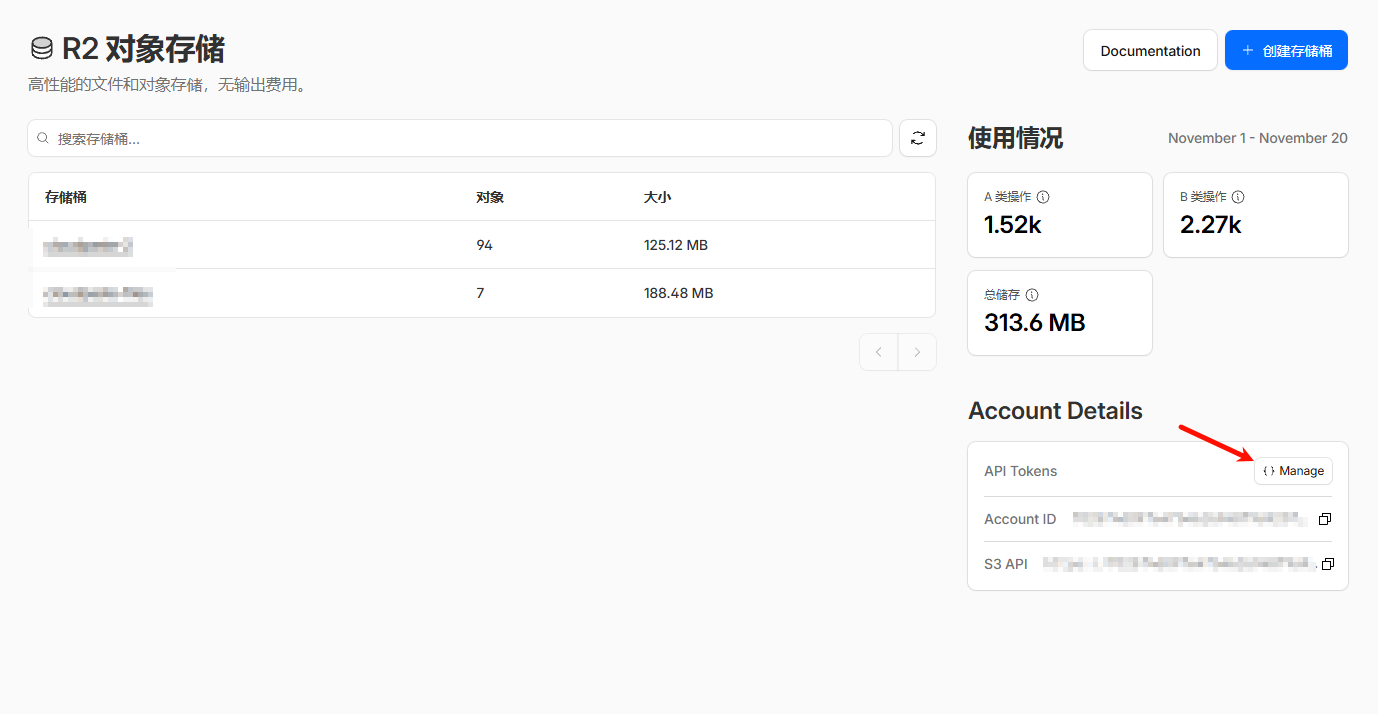
- 进入 "Manage R2 API tokens"
- 点击 "Create API token"
- 管理 API 令牌,创建 帐户 API 令牌(推荐)/用户 API 令牌 都可以任选
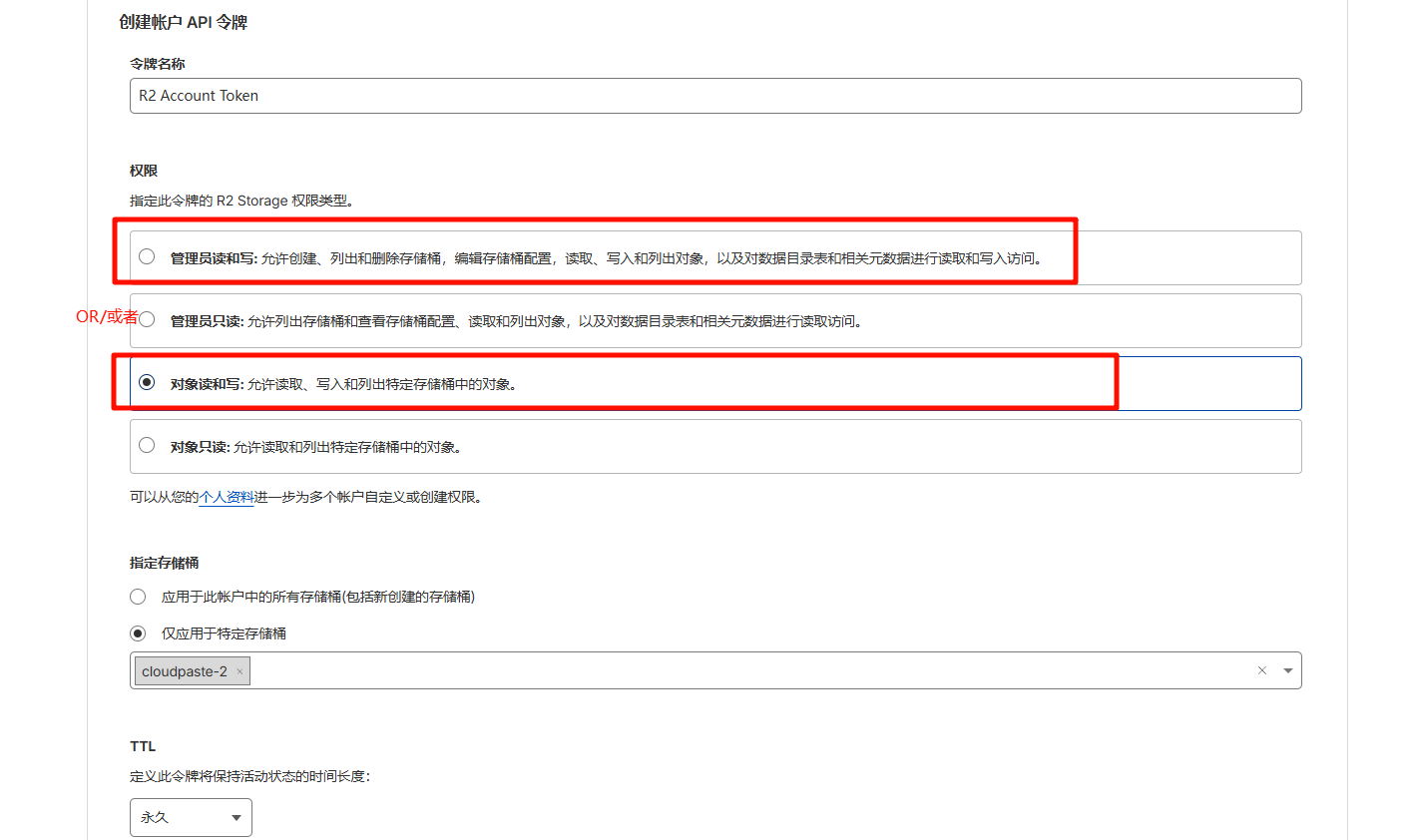
- 记录 Access Key ID 和 Secret Access Key
3. 获取端点信息
端点格式: https://<account-id>.r2.cloudflarestorage.com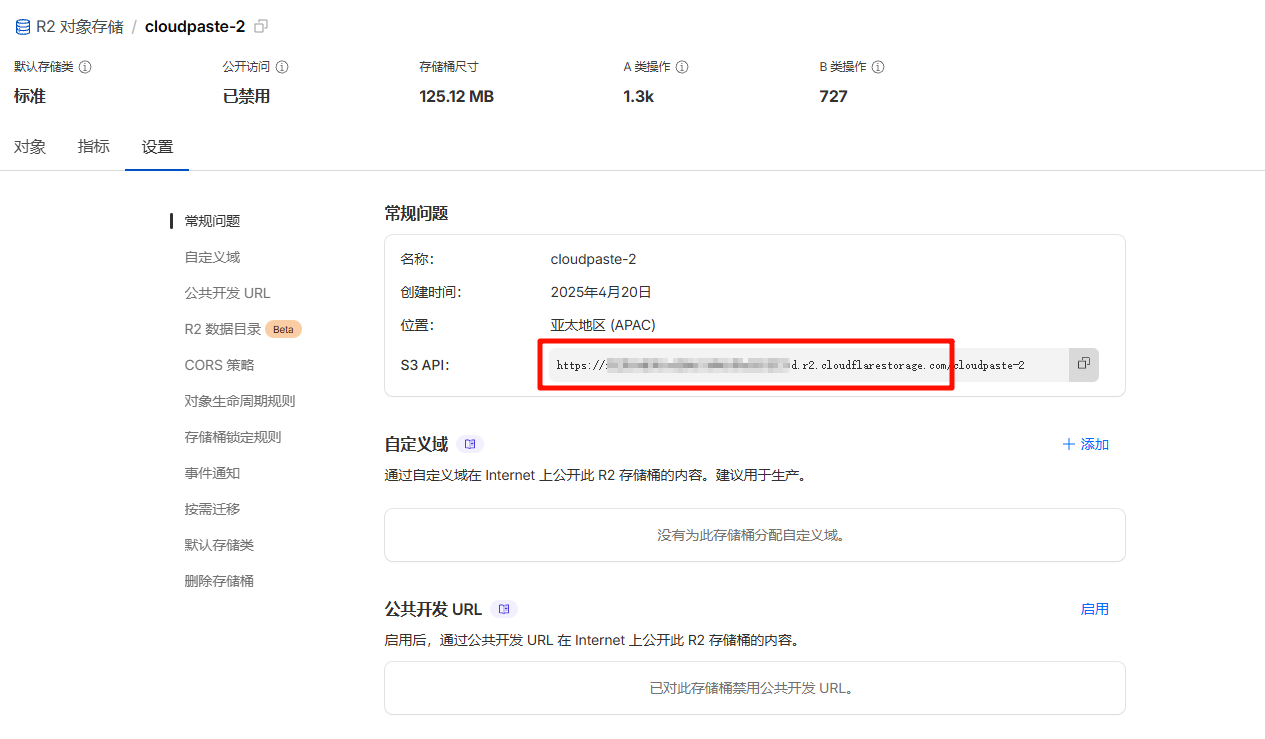
在 R2 控制台的存储桶详情页面可以找到完整的端点 URL。
配置跨域规则,点击对应存储桶,点击设置,编辑 CORS 策略,如下所示:
[
  {
    "AllowedOrigins": ["http://localhost:3000", "https://根据自己的前端域名来替代"],
    "AllowedMethods": ["GET", "PUT", "POST", "DELETE", "HEAD"],
    "AllowedHeaders": ["*"],
    "ExposeHeaders": ["ETag"],
    "MaxAgeSeconds": 3600
  }
]
Backblaze B2 配置
若没有 B2 账号,可以先注册一个,然后创建一个存储桶。
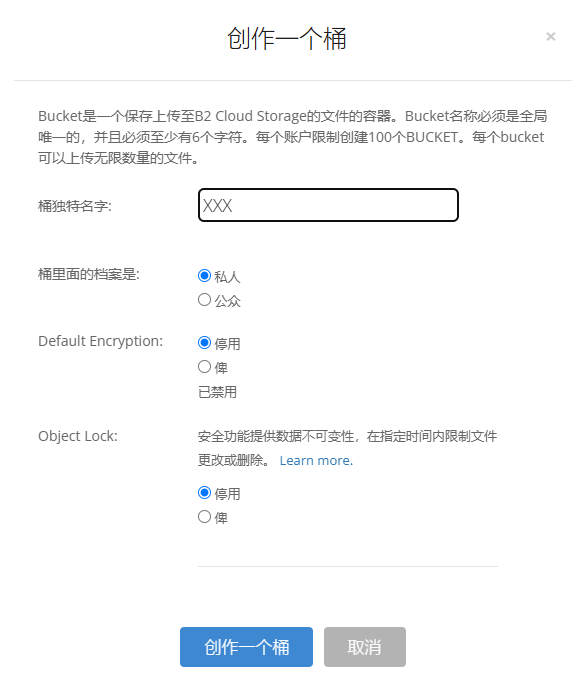
点击侧边栏的 Application Key,点击 Create Key,然后如图所示。

配置 B2 的跨域,B2 跨域配置比较麻烦,需注意, 而端点 URL 在下图的 Endpoint 位置右边
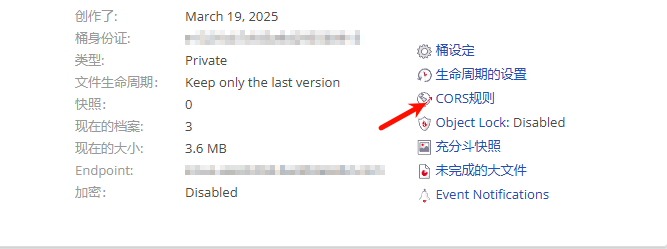
可以先尝试一下 1 或 2,去到上传页面看看是否能上传,F12 打开控制台若显示跨域错误,则使用 3。要一劳永逸就直接使用 3(现在建议直接使用 3)。
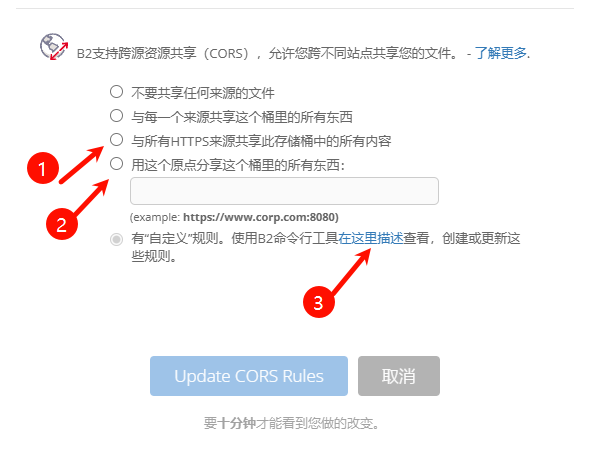
关于 3 的配置由于面板无法配置,只能手动配置,需下载 B2 CLI对应工具。具体可以参考:"https://docs.cloudreve.org/zh/usage/storage/b2 " 。
下载后,在对应下载目录 cmd,在命令行输入以下命令:
b2-windows.exe account authorize   //进行账号登录,根据提示填入之前的 keyID 和 applicationKey
b2-windows.exe bucket get <bucketName> //你可以执行获取bucket信息,<bucketName>换成桶名字
windows 配置,采用“.\b2-windows.exe xxx”, 所以在对应 cli 的 exe 文件夹中 cmd 输入,python 的 cli 也同理:
b2-windows.exe bucket update <bucketName> allPrivate --cors-rules "[{\"corsRuleName\":\"CloudPaste\",\"allowedOrigins\":[\"*\"],\"allowedHeaders\":[\"*\"],\"allowedOperations\":[\"b2_upload_file\",\"b2_download_file_by_name\",\"b2_download_file_by_id\",\"s3_head\",\"s3_get\",\"s3_put\",\"s3_post\",\"s3_delete\"],\"exposeHeaders\":[\"Etag\",\"content-length\",\"content-type\",\"x-bz-content-sha1\"],\"maxAgeSeconds\":3600}]"其中 " <bucketName> " 换成你的存储桶名字,关于允许跨域的域名 allowedOrigins 可以根据个人配置,这里是允许所有。
如需要反代 B2 私有存储桶,可在 worker 中配置
👉 点击展开:B2私有桶反代代码
环境变量:ALLOW_LIST_BUCKET = false
B2_APPLICATION_KEY_ID = 应用 keyID
B2_APPLICATION_KEY = 应用秘钥
B2_ENDPOINT = 端点域名,例如 s3.eu-central-004.backblazeb2.com,不要 https
BUCKET_NAME = 你创建的私密桶名称// Cloudflare Worker 反代Backblaze B2
//
// 环境变量配置(在Cloudflare Worker中设置):
// B2_ENDPOINT=s3.us-west-004.backblazeb2.com // 必需:B2 S3兼容端点
// BUCKET_NAME=my-bucket // 必需:B2存储桶名称
// B2_APPLICATION_KEY_ID=xxx // 必需:B2应用密钥ID
// B2_APPLICATION_KEY=xxx // 必需:B2应用密钥
//
// 缓存控制(可选):
// CACHE_ENABLED=true // 是否启用缓存(默认true)
// CACHE_TTL=86400 // Worker缓存时间(秒,默认24小时)
// CDN_CACHE_TTL=2592000 // CDN边缘缓存时间(秒,默认30天)
//
// 安全控制(可选):
// ALLOWED_REFERERS=https://yourdomain.com // 允许的来源域名(防盗链)
//
// 其他配置(可选):
// ALLOW_LIST_BUCKET=false // 是否允许列出存储桶
// ALLOWED_HEADERS=content-type,range // 自定义允许的请求头
var encoder = new TextEncoder();
var HOST_SERVICES = {
appstream2: "appstream",
cloudhsmv2: "cloudhsm",
email: "ses",
marketplace: "aws-marketplace",
mobile: "AWSMobileHubService",
pinpoint: "mobiletargeting",
queue: "sqs",
"git-codecommit": "codecommit",
"mturk-requester-sandbox": "mturk-requester",
"personalize-runtime": "personalize",
};
var UNSIGNABLE_HEADERS = /* @__PURE__ */ new Set([
"authorization",
"content-type",
"content-length",
"user-agent",
"presigned-expires",
"expect",
"x-amzn-trace-id",
"range",
"connection",
]);
var AwsClient = class {
constructor({ accesskeyID, secretAccessKey, sessionToken, service, region, cache, retries, initRetryMs }) {
if (accesskeyID == null) throw new TypeError("accesskeyID is a required option");
if (secretAccessKey == null) throw new TypeError("secretAccessKey is a required option");
this.accesskeyID = accesskeyID;
this.secretAccessKey = secretAccessKey;
this.sessionToken = sessionToken;
this.service = service;
this.region = region;
this.cache = cache || /* @__PURE__ */ new Map();
this.retries = retries != null ? retries : 10;
this.initRetryMs = initRetryMs || 50;
}
async sign(input, init) {
if (input instanceof Request) {
const { method, url, headers, body } = input;
init = Object.assign({ method, url, headers }, init);
if (init.body == null && headers.has("Content-Type")) {
init.body = body != null && headers.has("X-Amz-Content-Sha256") ? body : await input.clone().arrayBuffer();
}
input = url;
}
const signer = new AwsV4Signer(Object.assign({ url: input }, init, this, init && init.aws));
const signed = Object.assign({}, init, await signer.sign());
delete signed.aws;
try {
return new Request(signed.url.toString(), signed);
} catch (e) {
if (e instanceof TypeError) {
return new Request(signed.url.toString(), Object.assign({ duplex: "half" }, signed));
}
throw e;
}
}
async fetch(input, init) {
for (let i = 0; i <= this.retries; i++) {
const fetched = fetch(await this.sign(input, init));
if (i === this.retries) {
return fetched;
}
const res = await fetched;
if (res.status < 500 && res.status !== 429) {
return res;
}
await new Promise((resolve) => setTimeout(resolve, Math.random() * this.initRetryMs * Math.pow(2, i)));
}
throw new Error("An unknown error occurred, ensure retries is not negative");
}
};
var AwsV4Signer = class {
constructor({
method,
url,
headers,
body,
accesskeyID,
secretAccessKey,
sessionToken,
service,
region,
cache,
datetime,
signQuery,
appendSessionToken,
allHeaders,
singleEncode,
}) {
if (url == null) throw new TypeError("url is a required option");
if (accesskeyID == null) throw new TypeError("accesskeyID is a required option");
if (secretAccessKey == null) throw new TypeError("secretAccessKey is a required option");
this.method = method || (body ? "POST" : "GET");
this.url = new URL(url);
this.headers = new Headers(headers || {});
this.body = body;
this.accesskeyID = accesskeyID;
this.secretAccessKey = secretAccessKey;
this.sessionToken = sessionToken;
let guessedService, guessedRegion;
if (!service || !region) {
[guessedService, guessedRegion] = guessServiceRegion(this.url, this.headers);
}
this.service = service || guessedService || "";
this.region = region || guessedRegion || "us-east-1";
this.cache = cache || /* @__PURE__ */ new Map();
this.datetime = datetime || /* @__PURE__ */ new Date().toISOString().replace(/[:-]|\.\d{3}/g, "");
this.signQuery = signQuery;
this.appendSessionToken = appendSessionToken || this.service === "iotdevicegateway";
this.headers.delete("Host");
if (this.service === "s3" && !this.signQuery && !this.headers.has("X-Amz-Content-Sha256")) {
this.headers.set("X-Amz-Content-Sha256", "UNSIGNED-PAYLOAD");
}
const params = this.signQuery ? this.url.searchParams : this.headers;
params.set("X-Amz-Date", this.datetime);
if (this.sessionToken && !this.appendSessionToken) {
params.set("X-Amz-Security-Token", this.sessionToken);
}
this.signableHeaders = ["host", ...this.headers.keys()].filter((header) => allHeaders || !UNSIGNABLE_HEADERS.has(header)).sort();
this.signedHeaders = this.signableHeaders.join(";");
this.canonicalHeaders = this.signableHeaders
.map((header) => header + ":" + (header === "host" ? this.url.host : (this.headers.get(header) || "").replace(/\s+/g, " ")))
.join("\n");
this.credentialString = [this.datetime.slice(0, 8), this.region, this.service, "aws4_request"].join("/");
if (this.signQuery) {
if (this.service === "s3" && !params.has("X-Amz-Expires")) {
params.set("X-Amz-Expires", "86400");
}
params.set("X-Amz-Algorithm", "AWS4-HMAC-SHA256");
params.set("X-Amz-Credential", this.accesskeyID + "/" + this.credentialString);
params.set("X-Amz-SignedHeaders", this.signedHeaders);
}
if (this.service === "s3") {
try {
this.encodedPath = decodeURIComponent(this.url.pathname.replace(/\+/g, " "));
} catch (e) {
this.encodedPath = this.url.pathname;
}
} else {
this.encodedPath = this.url.pathname.replace(/\/+/g, "/");
}
if (!singleEncode) {
this.encodedPath = encodeURIComponent(this.encodedPath).replace(/%2F/g, "/");
}
this.encodedPath = encodeRfc3986(this.encodedPath);
const seenKeys = /* @__PURE__ */ new Set();
this.encodedSearch = [...this.url.searchParams]
.filter(([k]) => {
if (!k) return false;
if (this.service === "s3") {
if (seenKeys.has(k)) return false;
seenKeys.add(k);
}
return true;
})
.map((pair) => pair.map((p) => encodeRfc3986(encodeURIComponent(p))))
.sort(([k1, v1], [k2, v2]) => (k1 < k2 ? -1 : k1 > k2 ? 1 : v1 < v2 ? -1 : v1 > v2 ? 1 : 0))
.map((pair) => pair.join("="))
.join("&");
}
async sign() {
if (this.signQuery) {
this.url.searchParams.set("X-Amz-Signature", await this.signature());
if (this.sessionToken && this.appendSessionToken) {
this.url.searchParams.set("X-Amz-Security-Token", this.sessionToken);
}
} else {
this.headers.set("Authorization", await this.authHeader());
}
return {
method: this.method,
url: this.url,
headers: this.headers,
body: this.body,
};
}
async authHeader() {
return ["AWS4-HMAC-SHA256 Credential=" + this.accesskeyID + "/" + this.credentialString, "SignedHeaders=" + this.signedHeaders, "Signature=" + (await this.signature())].join(
", "
);
}
async signature() {
const date = this.datetime.slice(0, 8);
const cacheKey = [this.secretAccessKey, date, this.region, this.service].join();
let kCredentials = this.cache.get(cacheKey);
if (!kCredentials) {
const kDate = await hmac("AWS4" + this.secretAccessKey, date);
const kRegion = await hmac(kDate, this.region);
const kService = await hmac(kRegion, this.service);
kCredentials = await hmac(kService, "aws4_request");
this.cache.set(cacheKey, kCredentials);
}
return buf2hex(await hmac(kCredentials, await this.stringToSign()));
}
async stringToSign() {
return ["AWS4-HMAC-SHA256", this.datetime, this.credentialString, buf2hex(await hash(await this.canonicalString()))].join("\n");
}
async canonicalString() {
return [this.method.toUpperCase(), this.encodedPath, this.encodedSearch, this.canonicalHeaders + "\n", this.signedHeaders, await this.hexBodyHash()].join("\n");
}
async hexBodyHash() {
let hashHeader = this.headers.get("X-Amz-Content-Sha256") || (this.service === "s3" && this.signQuery ? "UNSIGNED-PAYLOAD" : null);
if (hashHeader == null) {
if (this.body && typeof this.body !== "string" && !("byteLength" in this.body)) {
throw new Error("body must be a string, ArrayBuffer or ArrayBufferView, unless you include the X-Amz-Content-Sha256 header");
}
hashHeader = buf2hex(await hash(this.body || ""));
}
return hashHeader;
}
};
async function hmac(key, string) {
const cryptoKey = await crypto.subtle.importKey("raw", typeof key === "string" ? encoder.encode(key) : key, { name: "HMAC", hash: { name: "SHA-256" } }, false, ["sign"]);
return crypto.subtle.sign("HMAC", cryptoKey, encoder.encode(string));
}
async function hash(content) {
return crypto.subtle.digest("SHA-256", typeof content === "string" ? encoder.encode(content) : content);
}
function buf2hex(buffer) {
return Array.prototype.map.call(new Uint8Array(buffer), (x) => ("0" + x.toString(16)).slice(-2)).join("");
}
function encodeRfc3986(urlEncodedStr) {
return urlEncodedStr.replace(/[!'()*]/g, (c) => "%" + c.charCodeAt(0).toString(16).toUpperCase());
}
function guessServiceRegion(url, headers) {
const { hostname, pathname } = url;
if (hostname.endsWith(".r2.cloudflarestorage.com")) {
return ["s3", "auto"];
}
if (hostname.endsWith(".backblazeb2.com")) {
const match2 = hostname.match(/^(?:[^.]+\.)?s3\.([^.]+)\.backblazeb2\.com$/);
return match2 != null ? ["s3", match2[1]] : ["", ""];
}
const match = hostname.replace("dualstack.", "").match(/([^.]+)\.(?:([^.]*)\.)?amazonaws\.com(?:\.cn)?$/);
let [service, region] = (match || ["", ""]).slice(1, 3);
if (region === "us-gov") {
region = "us-gov-west-1";
} else if (region === "s3" || region === "s3-accelerate") {
region = "us-east-1";
service = "s3";
} else if (service === "iot") {
if (hostname.startsWith("iot.")) {
service = "execute-api";
} else if (hostname.startsWith("data.jobs.iot.")) {
service = "iot-jobs-data";
} else {
service = pathname === "/mqtt" ? "iotdevicegateway" : "iotdata";
}
} else if (service === "autoscaling") {
const targetPrefix = (headers.get("X-Amz-Target") || "").split(".")[0];
if (targetPrefix === "AnyScaleFrontendService") {
service = "application-autoscaling";
} else if (targetPrefix === "AnyScaleScalingPlannerFrontendService") {
service = "autoscaling-plans";
}
} else if (region == null && service.startsWith("s3-")) {
region = service.slice(3).replace(/^fips-|^external-1/, "");
service = "s3";
} else if (service.endsWith("-fips")) {
service = service.slice(0, -5);
} else if (region && /-\d$/.test(service) && !/-\d$/.test(region)) {
[service, region] = [region, service];
}
return [HOST_SERVICES[service] || service, region];
}
// index.js
var UNSIGNABLE_HEADERS2 = [
// These headers appear in the request, but are not passed upstream
"x-forwarded-proto",
"x-real-ip",
// We can't include accept-encoding in the signature because Cloudflare
// sets the incoming accept-encoding header to "gzip, br", then modifies
// the outgoing request to set accept-encoding to "gzip".
// Not cool, Cloudflare!
"accept-encoding",
];
var HTTPS_PROTOCOL = "https:";
var HTTPS_PORT = "443";
var RANGE_RETRY_ATTEMPTS = 3;
// CORS配置
const CORS_HEADERS = {
"Access-Control-Allow-Origin": "*",
"Access-Control-Allow-Methods": "GET, HEAD, OPTIONS",
"Access-Control-Allow-Headers": "Range, If-Modified-Since, If-None-Match, Content-Type, Authorization",
"Access-Control-Expose-Headers": "Content-Length, Content-Range, Accept-Ranges, Last-Modified, ETag, X-Cache-Status",
"Access-Control-Max-Age": "86400",
};
/**
* 获取缓存设置
* @param {Object} env - 环境变量
* @returns {Object} 缓存设置
*/
function getCacheSettings(env) {
// 从环境变量获取缓存时间,如果没有设置则使用默认值
const cacheTtl = parseInt(env.CACHE_TTL) || 86400; // 默认24小时
const cdnCacheTtl = parseInt(env.CDN_CACHE_TTL) || 2592000; // 默认30天
return {
ttl: cacheTtl,
cdnTtl: cdnCacheTtl,
};
}
/**
* 判断是否应该缓存请求
* @param {string} method - HTTP方法
* @param {URL} url - 请求URL
* @param {Headers} headers - 请求头
* @param {Object} env - 环境变量
* @returns {boolean} 是否应该缓存
*/
function shouldCache(method, url, headers, env) {
// 检查是否启用缓存
if (env.CACHE_ENABLED === "false") {
return false;
}
// 只缓存GET和HEAD请求
if (!["GET", "HEAD"].includes(method)) {
return false;
}
// Range请求缓存策略:
if (headers.has("Range")) {
console.log(`Range请求,允许缓存以优化视频播放体验: ${url.pathname}`);
// 允许缓存Range请求
}
return true;
}
/**
* 生成统一的缓存键(基于文件路径,忽略查询参数)
* @param {URL} url - 请求URL
* @param {string} method - HTTP方法
* @returns {Request} 缓存键
*/
function generateCacheKey(url, method) {
// 使用文件路径作为缓存键,忽略查询参数
const cacheUrl = new URL(url);
cacheUrl.search = ""; // 清除所有查询参数
return new Request(cacheUrl.toString(), {
method: method,
headers: new Headers(), // 空头部,确保缓存键一致
});
}
/**
* 检查是否为下载请求
* @param {URL} url - 请求URL
* @returns {boolean} 是否为下载请求
*/
function isDownloadRequest(url) {
return url.searchParams.has("response-content-disposition") || url.searchParams.get("response-content-disposition")?.includes("attachment");
}
/**
* 处理下载响应头部
* @param {Response} response - 原始响应
* @param {URL} originalUrl - 原始请求URL
* @returns {Response} 处理后的响应
*/
function processDownloadResponse(response, originalUrl) {
// 如果不是下载请求,直接返回
if (!isDownloadRequest(originalUrl)) {
return response;
}
// 检查是否已经有Content-Disposition头部
if (response.headers.has("Content-Disposition")) {
return response;
}
// 从URL参数中获取Content-Disposition
const contentDisposition = originalUrl.searchParams.get("response-content-disposition");
if (contentDisposition) {
const newHeaders = new Headers(response.headers);
newHeaders.set("Content-Disposition", decodeURIComponent(contentDisposition));
// 检查其他response-*参数
const responseContentType = originalUrl.searchParams.get("response-content-type");
if (responseContentType && !response.headers.get("Content-Type")) {
newHeaders.set("Content-Type", decodeURIComponent(responseContentType));
}
return new Response(response.body, {
status: response.status,
statusText: response.statusText,
headers: newHeaders,
});
}
return response;
}
/**
* 添加CORS头部到响应
* @param {Response} response - 原始响应
* @param {string} cacheStatus - 缓存状态
* @returns {Response} 添加了CORS头部的响应
*/
function addCorsHeaders(response, cacheStatus = "MISS") {
const newResponse = new Response(response.body, response);
// 添加CORS头部
Object.entries(CORS_HEADERS).forEach(([key, value]) => {
newResponse.headers.set(key, value);
});
// 添加缓存状态头部
newResponse.headers.set("X-Cache-Status", cacheStatus);
newResponse.headers.set("X-Served-By", "Cloudflare-Worker-B2");
return newResponse;
}
/**
* 处理OPTIONS预检请求
* @returns {Response} CORS预检响应
*/
function handleOptions() {
return new Response(null, {
status: 200,
headers: CORS_HEADERS,
});
}
/**
* 处理缓存请求(优化版)
* @param {Request} request - 请求对象
* @param {URL} originalUrl - 原始URL
* @param {Object} env - 环境变量
* @param {Object} ctx - 执行上下文
* @returns {Response} 响应
*/
async function handleCachedRequest(request, originalUrl, env, ctx) {
const cache = caches.default;
// 生成统一的缓存键(基于文件路径,忽略查询参数)
const cacheKey = generateCacheKey(originalUrl, request.method);
// 尝试从缓存获取
let cachedResponse = await cache.match(cacheKey);
if (cachedResponse) {
console.log(`缓存命中: ${originalUrl.pathname}`);
// 处理下载响应头部(如果是下载请求)
const processedResponse = processDownloadResponse(cachedResponse, originalUrl);
return addCorsHeaders(processedResponse, "HIT");
}
// 缓存未命中,处理请求到B2
console.log(`缓存未命中,处理请求到B2: ${originalUrl.pathname}`);
let response = await handleB2Request(request, originalUrl, env);
// 检查是否应该缓存响应
if (response.ok && shouldCache(request.method, originalUrl, request.headers, env)) {
const cacheSettings = getCacheSettings(env);
const cacheTtl = cacheSettings.ttl;
const cdnCacheTtl = cacheSettings.cdnTtl;
// 克隆响应用于缓存(移除下载相关头部,保存纯净内容)
const headersToCache = new Headers(response.headers);
headersToCache.delete("Content-Disposition"); // 移除下载头部,缓存纯净内容
headersToCache.set("Cache-Control", `public, max-age=${cacheTtl}`);
headersToCache.set("CDN-Cache-Control", `public, max-age=${cdnCacheTtl}`);
headersToCache.set("X-Cache-Time", new Date().toISOString());
const responseToCache = new Response(response.body, {
status: response.status,
statusText: response.statusText,
headers: headersToCache,
});
// 异步存储到缓存
ctx.waitUntil(cache.put(cacheKey, responseToCache.clone()));
// 处理下载响应头部(如果是下载请求)
const processedResponse = processDownloadResponse(responseToCache, originalUrl);
return addCorsHeaders(processedResponse, "MISS");
}
// 处理下载响应头部(如果是下载请求)
const processedResponse = processDownloadResponse(response, originalUrl);
return addCorsHeaders(processedResponse, "BYPASS");
}
/**
* 处理B2请求(原有逻辑封装)
* @param {Request} request - 请求对象
* @param {URL} originalUrl - 原始URL
* @param {Object} env - 环境变量
* @returns {Response} B2响应
*/
async function handleB2Request(request, originalUrl, env) {
const url = new URL(originalUrl);
url.protocol = HTTPS_PROTOCOL;
url.port = HTTPS_PORT;
let path = url.pathname.replace(/^\//, "");
path = path.replace(/\/$/, "");
const pathSegments = path.split("/");
if (env.ALLOW_LIST_BUCKET !== "true") {
if ((env.BUCKET_NAME === "$path" && pathSegments.length < 2) || (env.BUCKET_NAME !== "$path" && path.length === 0)) {
return new Response(null, {
status: 404,
statusText: "Not Found",
});
}
}
switch (env.BUCKET_NAME) {
case "$path":
url.hostname = env.B2_ENDPOINT;
break;
case "$host":
url.hostname = url.hostname.split(".")[0] + "." + env.B2_ENDPOINT;
break;
default:
url.hostname = env.BUCKET_NAME + "." + env.B2_ENDPOINT;
break;
}
const headers = filterHeaders(request.headers, env);
// 区分预览和下载请求
const hasSignature = url.searchParams.has("X-Amz-Signature");
let forwardRequest;
if (hasSignature) {
// 有签名的请求(通常是下载):直接转发预签名URL
console.log(`转发预签名URL到B2: ${url.toString()}`);
forwardRequest = new Request(url.toString(), {
method: request.method,
headers: headers,
body: request.body,
});
} else {
// 无签名的请求(通常是预览):需要生成预签名URL
console.log(`无签名请求,生成预签名URL: ${url.pathname}`);
const endpointRegex = /^s3\.([a-zA-Z0-9-]+)\.backblazeb2\.com$/;
const [, aws_region] = env.B2_ENDPOINT.match(endpointRegex);
const client = new AwsClient({
accesskeyID: env.B2_APPLICATION_KEY_ID,
secretAccessKey: env.B2_APPLICATION_KEY,
service: "s3",
region: aws_region,
});
const signedRequest = await client.sign(url.toString(), {
method: request.method,
headers,
});
forwardRequest = new Request(signedRequest.url, {
method: signedRequest.method,
headers: signedRequest.headers,
body: request.body,
});
}
// 处理Range请求的特殊逻辑
if (forwardRequest.headers.has("range")) {
let attempts = RANGE_RETRY_ATTEMPTS;
let response;
do {
let controller = new AbortController();
response = await fetch(forwardRequest.url, {
method: forwardRequest.method,
headers: forwardRequest.headers,
signal: controller.signal,
});
if (response.headers.has("content-range")) {
if (attempts < RANGE_RETRY_ATTEMPTS) {
console.log(`Retry for ${forwardRequest.url} succeeded - response has content-range header`);
}
break;
} else if (response.ok) {
attempts -= 1;
console.error(`Range header in request for ${forwardRequest.url} but no content-range header in response. Will retry ${attempts} more times`);
if (attempts > 0) {
controller.abort();
}
} else {
break;
}
} while (attempts > 0);
if (attempts <= 0) {
console.error(`Tried range request for ${forwardRequest.url} ${RANGE_RETRY_ATTEMPTS} times, but no content-range in response.`);
}
return processResponse(response, originalUrl);
}
// 普通请求
const response = await fetch(forwardRequest);
return processResponse(response, originalUrl);
}
function filterHeaders(headers, env) {
return new Headers(
Array.from(headers.entries()).filter(
(pair) => !UNSIGNABLE_HEADERS2.includes(pair[0]) && !pair[0].startsWith("cf-") && !("ALLOWED_HEADERS" in env && !env.ALLOWED_HEADERS.includes(pair[0]))
)
);
}
/**
* 处理响应,检查B2是否正确处理了response参数
* @param {Response} response - 原始响应
* @param {URL} originalUrl - 原始请求URL
* @returns {Response} 处理后的响应
*/
function processResponse(response, originalUrl) {
// 如果响应不成功,直接返回
if (!response.ok) {
return response;
}
// 检查B2是否正确处理了response-content-disposition参数
const responseContentDisposition = originalUrl.searchParams.get("response-content-disposition");
if (responseContentDisposition) {
const actualContentDisposition = response.headers.get("Content-Disposition");
if (actualContentDisposition) {
console.log(`B2正确处理了Content-Disposition: ${actualContentDisposition}`);
return response;
} else {
console.log(`B2未设置Content-Disposition,Worker手动设置: ${responseContentDisposition}`);
const responseHeaders = new Headers(response.headers);
responseHeaders.set("Content-Disposition", decodeURIComponent(responseContentDisposition));
// 检查其他response-*参数
const responseContentType = originalUrl.searchParams.get("response-content-type");
if (responseContentType && !response.headers.get("Content-Type")) {
responseHeaders.set("Content-Type", decodeURIComponent(responseContentType));
}
return new Response(response.body, {
status: response.status,
statusText: response.statusText,
headers: responseHeaders,
});
}
}
// 没有response参数,直接返回原始响应
return response;
}
var my_proxy_default = {
async fetch(request, env, ctx) {
// 处理OPTIONS预检请求
if (request.method === "OPTIONS") {
return handleOptions();
}
// 只允许GET和HEAD请求
if (!["GET", "HEAD"].includes(request.method)) {
return new Response(
JSON.stringify({
error: "方法不允许",
message: "只支持GET和HEAD请求",
}),
{
status: 405,
headers: {
"Content-Type": "application/json",
...CORS_HEADERS,
},
}
);
}
try {
const originalUrl = new URL(request.url);
// 检查是否应该使用缓存
if (shouldCache(request.method, originalUrl, request.headers, env)) {
return await handleCachedRequest(request, originalUrl, env, ctx);
} else {
// 不缓存,直接处理
console.log(`直接转发(不缓存): ${originalUrl.pathname}`);
const response = await handleB2Request(request, originalUrl, env);
// 处理下载响应头部(如果是下载请求)
const processedResponse = processDownloadResponse(response, originalUrl);
return addCorsHeaders(processedResponse, "BYPASS");
}
} catch (error) {
console.error("Worker处理错误:", error);
return new Response(
JSON.stringify({
error: "内部服务器错误",
message: error.message,
}),
{
status: 500,
headers: {
"Content-Type": "application/json",
...CORS_HEADERS,
},
}
);
}
},
};
export { my_proxy_default as default };腾讯云 COS 配置
关于腾讯云 COS 的密钥获取方法和跨域配置同理,不过多赘述。
如果想 COS 存储桶配置中添加你的自定义域名,但没有备案可参考下方 Cloudfare worker 反代配置
👉 点击展开:Worker反代腾讯云COS
 COS_BUCKET_NAME=my-bucket-1234567890  // 必需:腾讯云COS存储桶名称
 COS_REGION=ap-beijing  // 必需:腾讯云COS区域
 COS_ACCESS_KEY_ID=AKIDxxxxx  // 必需:腾讯云COS访问密钥ID
 COS_SECRET_ACCESS_KEY=xxxxxxxx  // 必需:腾讯云COS秘密访问密钥

 缓存控制(可选):
 CACHE_ENABLED=true  // 是否启用缓存(默认true)
 CACHE_TTL=86400  // Worker缓存时间(秒,默认24小时)
 CDN_CACHE_TTL=2592000  // CDN边缘缓存时间(秒,默认30天)

 安全控制(可选):
 ALLOWED_REFERERS=https://yourdomain.com  // 允许的来源域名(防盗链)

 其他配置(可选):
ALLOWED_HEADERS=content-type,range // 自定义允许的请求头// Cloudflare Worker 反代腾讯云COS
// 替代自定义域名,提供缓存加速和CORS支持
//Worker透明代理到腾讯云COS,添加缓存和CORS
//
// 环境变量配置(在Cloudflare Worker中设置):
// COS_BUCKET_NAME=my-bucket-1234567890 // 必需:腾讯云COS存储桶名称
// COS_REGION=ap-beijing // 必需:腾讯云COS区域
// COS_ACCESS_KEY_ID=AKIDxxxxx // 必需:腾讯云COS访问密钥ID
// COS_SECRET_ACCESS_KEY=xxxxxxxx // 必需:腾讯云COS秘密访问密钥
//
// 缓存控制(可选):
// CACHE_ENABLED=true // 是否启用缓存(默认true)
// CACHE_TTL=86400 // Worker缓存时间(秒,默认24小时)
// CDN_CACHE_TTL=2592000 // CDN边缘缓存时间(秒,默认30天)
//
// 安全控制(可选):
// ALLOWED_REFERERS=https://yourdomain.com // 允许的来源域名(防盗链)
//
// 其他配置(可选):
// ALLOWED_HEADERS=content-type,range // 自定义允许的请求头
// CORS配置
const CORS_HEADERS = {
"Access-Control-Allow-Origin": "*",
"Access-Control-Allow-Methods": "GET, HEAD, OPTIONS",
"Access-Control-Allow-Headers": "Range, If-Modified-Since, If-None-Match, Content-Type, Authorization",
"Access-Control-Expose-Headers": "Content-Length, Content-Range, Accept-Ranges, Last-Modified, ETag, X-Cache-Status",
"Access-Control-Max-Age": "86400",
};
// AWS4Fetch实现
var encoder = new TextEncoder();
var UNSIGNABLE_HEADERS = new Set(["authorization", "content-type", "content-length", "user-agent", "presigned-expires", "expect", "x-amzn-trace-id", "range", "connection"]);
var AwsClient = class {
constructor({ accessKeyId, secretAccessKey, sessionToken, service, region, cache, retries, initRetryMs }) {
if (accessKeyId == null) throw new TypeError("accessKeyId is a required option");
if (secretAccessKey == null) throw new TypeError("secretAccessKey is a required option");
this.accessKeyId = accessKeyId;
this.secretAccessKey = secretAccessKey;
this.sessionToken = sessionToken;
this.service = service;
this.region = region;
this.cache = cache || new Map();
this.retries = retries != null ? retries : 10;
this.initRetryMs = initRetryMs || 50;
}
async sign(input, init) {
if (input instanceof Request) {
const { method, url, headers, body } = input;
init = Object.assign({ method, url, headers }, init);
if (init.body == null && headers.has("Content-Type")) {
init.body = body != null && headers.has("X-Amz-Content-Sha256") ? body : await input.clone().arrayBuffer();
}
input = url;
}
const signer = new AwsV4Signer(Object.assign({ url: input }, init, this, init && init.aws));
const signed = Object.assign({}, init, await signer.sign());
delete signed.aws;
try {
return new Request(signed.url.toString(), signed);
} catch (e) {
if (e instanceof TypeError) {
return new Request(signed.url.toString(), Object.assign({ duplex: "half" }, signed));
}
throw e;
}
}
async fetch(input, init) {
for (let i = 0; i <= this.retries; i++) {
const fetched = fetch(await this.sign(input, init));
if (i === this.retries) {
return fetched;
}
const res = await fetched;
if (res.status < 500 && res.status !== 429) {
return res;
}
await new Promise((resolve) => setTimeout(resolve, Math.random() * this.initRetryMs * Math.pow(2, i)));
}
throw new Error("An unknown error occurred, ensure retries is not negative");
}
};
var AwsV4Signer = class {
constructor({
method,
url,
headers,
body,
accessKeyId,
secretAccessKey,
sessionToken,
service,
region,
cache,
datetime,
signQuery,
appendSessionToken,
allHeaders,
singleEncode,
}) {
if (url == null) throw new TypeError("url is a required option");
if (accessKeyId == null) throw new TypeError("accessKeyId is a required option");
if (secretAccessKey == null) throw new TypeError("secretAccessKey is a required option");
this.method = method || (body ? "POST" : "GET");
this.url = new URL(url);
this.headers = new Headers(headers || {});
this.body = body;
this.accessKeyId = accessKeyId;
this.secretAccessKey = secretAccessKey;
this.sessionToken = sessionToken;
let guessedService, guessedRegion;
if (!service || !region) {
[guessedService, guessedRegion] = guessServiceRegion(this.url, this.headers);
}
this.service = service || guessedService || "";
this.region = region || guessedRegion || "us-east-1";
this.cache = cache || new Map();
this.datetime = datetime || new Date().toISOString().replace(/[:-]|\.\d{3}/g, "");
this.signQuery = signQuery;
this.appendSessionToken = appendSessionToken || this.service === "iotdevicegateway";
this.headers.delete("Host");
if (this.service === "s3" && !this.signQuery && !this.headers.has("X-Amz-Content-Sha256")) {
this.headers.set("X-Amz-Content-Sha256", "UNSIGNED-PAYLOAD");
}
const params = this.signQuery ? this.url.searchParams : this.headers;
params.set("X-Amz-Date", this.datetime);
if (this.sessionToken && !this.appendSessionToken) {
params.set("X-Amz-Security-Token", this.sessionToken);
}
this.signableHeaders = ["host", ...this.headers.keys()].filter((header) => allHeaders || !UNSIGNABLE_HEADERS.has(header)).sort();
this.signedHeaders = this.signableHeaders.join(";");
this.canonicalHeaders = this.signableHeaders
.map((header) => header + ":" + (header === "host" ? this.url.host : (this.headers.get(header) || "").replace(/\s+/g, " ")))
.join("\n");
this.credentialString = [this.datetime.slice(0, 8), this.region, this.service, "aws4_request"].join("/");
if (this.signQuery) {
if (this.service === "s3" && !params.has("X-Amz-Expires")) {
params.set("X-Amz-Expires", "86400");
}
params.set("X-Amz-Algorithm", "AWS4-HMAC-SHA256");
params.set("X-Amz-Credential", this.accessKeyId + "/" + this.credentialString);
params.set("X-Amz-SignedHeaders", this.signedHeaders);
}
if (this.service === "s3") {
try {
this.encodedPath = decodeURIComponent(this.url.pathname.replace(/\+/g, " "));
} catch (e) {
this.encodedPath = this.url.pathname;
}
} else {
this.encodedPath = this.url.pathname.replace(/\/+/g, "/");
}
if (!singleEncode) {
this.encodedPath = encodeURIComponent(this.encodedPath).replace(/%2F/g, "/");
}
this.encodedPath = encodeRfc3986(this.encodedPath);
const seenKeys = new Set();
this.encodedSearch = [...this.url.searchParams]
.filter(([k]) => {
if (!k) return false;
if (this.service === "s3") {
if (seenKeys.has(k)) return false;
seenKeys.add(k);
}
return true;
})
.map((pair) => pair.map((p) => encodeRfc3986(encodeURIComponent(p))))
.sort(([k1, v1], [k2, v2]) => (k1 < k2 ? -1 : k1 > k2 ? 1 : v1 < v2 ? -1 : v1 > v2 ? 1 : 0))
.map((pair) => pair.join("="))
.join("&");
}
async sign() {
if (this.signQuery) {
this.url.searchParams.set("X-Amz-Signature", await this.signature());
if (this.sessionToken && this.appendSessionToken) {
this.url.searchParams.set("X-Amz-Security-Token", this.sessionToken);
}
} else {
this.headers.set("Authorization", await this.authHeader());
}
return {
method: this.method,
url: this.url,
headers: this.headers,
body: this.body,
};
}
async authHeader() {
return ["AWS4-HMAC-SHA256 Credential=" + this.accessKeyId + "/" + this.credentialString, "SignedHeaders=" + this.signedHeaders, "Signature=" + (await this.signature())].join(
", "
);
}
async signature() {
const date = this.datetime.slice(0, 8);
const cacheKey = [this.secretAccessKey, date, this.region, this.service].join();
let kCredentials = this.cache.get(cacheKey);
if (!kCredentials) {
const kDate = await hmac("AWS4" + this.secretAccessKey, date);
const kRegion = await hmac(kDate, this.region);
const kService = await hmac(kRegion, this.service);
kCredentials = await hmac(kService, "aws4_request");
this.cache.set(cacheKey, kCredentials);
}
return buf2hex(await hmac(kCredentials, await this.stringToSign()));
}
async stringToSign() {
return ["AWS4-HMAC-SHA256", this.datetime, this.credentialString, buf2hex(await hash(await this.canonicalString()))].join("\n");
}
async canonicalString() {
return [this.method.toUpperCase(), this.encodedPath, this.encodedSearch, this.canonicalHeaders + "\n", this.signedHeaders, await this.hexBodyHash()].join("\n");
}
async hexBodyHash() {
let hashHeader = this.headers.get("X-Amz-Content-Sha256") || (this.service === "s3" && this.signQuery ? "UNSIGNED-PAYLOAD" : null);
if (hashHeader == null) {
if (this.body && typeof this.body !== "string" && !("byteLength" in this.body)) {
throw new Error("body must be a string, ArrayBuffer or ArrayBufferView, unless you include the X-Amz-Content-Sha256 header");
}
hashHeader = buf2hex(await hash(this.body || ""));
}
return hashHeader;
}
};
async function hmac(key, string) {
const cryptoKey = await crypto.subtle.importKey("raw", typeof key === "string" ? encoder.encode(key) : key, { name: "HMAC", hash: { name: "SHA-256" } }, false, ["sign"]);
return crypto.subtle.sign("HMAC", cryptoKey, encoder.encode(string));
}
async function hash(content) {
return crypto.subtle.digest("SHA-256", typeof content === "string" ? encoder.encode(content) : content);
}
function buf2hex(buffer) {
return Array.prototype.map.call(new Uint8Array(buffer), (x) => ("0" + x.toString(16)).slice(-2)).join("");
}
function encodeRfc3986(urlEncodedStr) {
return urlEncodedStr.replace(/[!'()*]/g, (c) => "%" + c.charCodeAt(0).toString(16).toUpperCase());
}
function guessServiceRegion(url, headers) {
const { hostname, pathname } = url;
// 腾讯云COS域名识别
if (hostname.endsWith(".myqcloud.com")) {
const match = hostname.match(/^([^.]+)\.cos\.([^.]+)\.myqcloud\.com$/);
return match != null ? ["s3", match[2]] : ["s3", "ap-beijing"];
}
// Cloudflare R2
if (hostname.endsWith(".r2.cloudflarestorage.com")) {
return ["s3", "auto"];
}
// Backblaze B2
if (hostname.endsWith(".backblazeb2.com")) {
const match2 = hostname.match(/^(?:[^.]+\.)?s3\.([^.]+)\.backblazeb2\.com$/);
return match2 != null ? ["s3", match2[1]] : ["", ""];
}
// AWS S3
const match = hostname.replace("dualstack.", "").match(/([^.]+)\.(?:([^.]*)\.)?amazonaws\.com(?:\.cn)?$/);
let [service, region] = (match || ["", ""]).slice(1, 3);
if (region === "us-gov") {
region = "us-gov-west-1";
} else if (region === "s3" || region === "s3-accelerate") {
region = "us-east-1";
service = "s3";
} else if (service === "iot") {
if (hostname.startsWith("iot.")) {
service = "execute-api";
} else if (hostname.startsWith("data.jobs.iot.")) {
service = "iot-jobs-data";
} else {
service = pathname === "/mqtt" ? "iotdevicegateway" : "iotdata";
}
} else if (service === "autoscaling") {
const targetPrefix = (headers.get("X-Amz-Target") || "").split(".")[0];
if (targetPrefix === "AnyScaleFrontendService") {
service = "application-autoscaling";
} else if (targetPrefix === "AnyScaleScalingPlannerFrontendService") {
service = "autoscaling-plans";
}
} else if (region == null && service.startsWith("s3-")) {
region = service.slice(3).replace(/^fips-|^external-1/, "");
service = "s3";
} else if (service.endsWith("-fips")) {
service = service.slice(0, -5);
} else if (region && /-\d$/.test(service) && !/-\d$/.test(region)) {
[service, region] = [region, service];
}
return [service, region];
}
/**
* 获取缓存设置
* @param {Object} env - 环境变量
* @returns {Object} 缓存设置
*/
function getCacheSettings(env) {
// 从环境变量获取缓存时间,如果没有设置则使用默认值
const cacheTtl = parseInt(env.CACHE_TTL) || 86400; // 默认24小时
const cdnCacheTtl = parseInt(env.CDN_CACHE_TTL) || 2592000; // 默认30天
return {
ttl: cacheTtl,
cdnTtl: cdnCacheTtl,
};
}
/**
* 判断是否应该缓存请求
* @param {string} method - HTTP方法
* @param {URL} url - 请求URL
* @param {Headers} headers - 请求头
* @param {Object} env - 环境变量
* @returns {boolean} 是否应该缓存
*/
function shouldCache(method, url, headers, env) {
// 检查是否启用缓存
if (env.CACHE_ENABLED === "false") {
return false;
}
// 只缓存GET和HEAD请求
if (!["GET", "HEAD"].includes(method)) {
return false;
}
// Range请求缓存策略:
if (headers.has("Range")) {
console.log(`Range请求,允许缓存以优化视频播放体验: ${url.pathname}`);
// 允许缓存Range请求
}
return true;
}
/**
* 生成统一的缓存键(基于文件路径,忽略查询参数)
* @param {URL} url - 请求URL
* @param {string} method - HTTP方法
* @returns {Request} 缓存键
*/
function generateCacheKey(url, method) {
// 使用文件路径作为缓存键,忽略查询参数
const cacheUrl = new URL(url);
cacheUrl.search = ""; // 清除所有查询参数
return new Request(cacheUrl.toString(), {
method: method,
headers: new Headers(), // 空头部,确保缓存键一致
});
}
/**
* 检查是否为下载请求
* @param {URL} url - 请求URL
* @returns {boolean} 是否为下载请求
*/
function isDownloadRequest(url) {
return url.searchParams.has("response-content-disposition") || url.searchParams.get("response-content-disposition")?.includes("attachment");
}
/**
* 处理下载响应头部
* @param {Response} response - 原始响应
* @param {URL} originalUrl - 原始请求URL
* @returns {Response} 处理后的响应
*/
function processDownloadResponse(response, originalUrl) {
// 如果不是下载请求,直接返回
if (!isDownloadRequest(originalUrl)) {
return response;
}
// 检查是否已经有Content-Disposition头部
if (response.headers.has("Content-Disposition")) {
return response;
}
// 从URL参数中获取Content-Disposition
const contentDisposition = originalUrl.searchParams.get("response-content-disposition");
if (contentDisposition) {
const newHeaders = new Headers(response.headers);
newHeaders.set("Content-Disposition", decodeURIComponent(contentDisposition));
// 检查其他response-*参数
const responseContentType = originalUrl.searchParams.get("response-content-type");
if (responseContentType && !response.headers.get("Content-Type")) {
newHeaders.set("Content-Type", decodeURIComponent(responseContentType));
}
return new Response(response.body, {
status: response.status,
statusText: response.statusText,
headers: newHeaders,
});
}
return response;
}
/**
* 验证请求来源(防盗链)
* @param {Request} request - 请求对象
* @param {Object} env - 环境变量
* @returns {boolean} 验证是否通过
*/
function validateReferer(request, env) {
// 如果没有配置允许的来源,直接允许
if (!env.ALLOWED_REFERERS) {
return true;
}
const referer = request.headers.get("Referer");
if (!referer) {
// 没有Referer头部,可能是直接访问,根据配置决定是否允许
console.log("请求没有Referer头部");
return true; // 默认允许,避免过于严格
}
const allowedReferers = env.ALLOWED_REFERERS.split(",").map((r) => r.trim());
const refererOrigin = new URL(referer).origin;
const isAllowed = allowedReferers.some((allowed) => refererOrigin === allowed || refererOrigin.endsWith(allowed.replace("https://", "")));
if (!isAllowed) {
console.log(`拒绝访问:不允许的来源 ${refererOrigin}`);
return false;
}
return true;
}
/**
* 添加CORS头部到响应
* @param {Response} response - 原始响应
* @param {string} cacheStatus - 缓存状态
* @returns {Response} 添加了CORS头部的响应
*/
function addCorsHeaders(response, cacheStatus = "MISS") {
const newResponse = new Response(response.body, response);
// 添加CORS头部
Object.entries(CORS_HEADERS).forEach(([key, value]) => {
newResponse.headers.set(key, value);
});
// 添加缓存状态头部
newResponse.headers.set("X-Cache-Status", cacheStatus);
newResponse.headers.set("X-Served-By", "Cloudflare-Worker");
return newResponse;
}
/**
* 处理OPTIONS预检请求
* @returns {Response} CORS预检响应
*/
function handleOptions() {
return new Response(null, {
status: 200,
headers: CORS_HEADERS,
});
}
/**
* 构建腾讯云COS URL(用于内部签名)
* @param {URL} originalUrl - 原始请求URL
* @param {Object} env - 环境变量
* @returns {string} COS URL
*/
function buildCosUrl(originalUrl, env) {
// 构建腾讯云COS的URL
const cosUrl = new URL(originalUrl);
// 使用腾讯云COS的标准域名格式
cosUrl.hostname = `${env.COS_BUCKET_NAME}.cos.${env.COS_REGION}.myqcloud.com`;
// 清除原始URL中的签名参数(如果有的话)
cosUrl.searchParams.delete("X-Amz-Algorithm");
cosUrl.searchParams.delete("X-Amz-Credential");
cosUrl.searchParams.delete("X-Amz-Date");
cosUrl.searchParams.delete("X-Amz-Expires");
cosUrl.searchParams.delete("X-Amz-SignedHeaders");
cosUrl.searchParams.delete("X-Amz-Signature");
return cosUrl.toString();
}
/**
* 检查URL是否包含预签名参数
* @param {URL} url - 要检查的URL
* @returns {boolean} 是否包含预签名参数
*/
function hasPresignedParams(url) {
return url.searchParams.has("X-Amz-Signature") || url.searchParams.has("X-Amz-Algorithm") || url.searchParams.has("X-Amz-Credential");
}
/**
* 处理请求到COS(智能选择签名方式)
* @param {Request} request - 原始请求
* @param {URL} originalUrl - 原始URL
* @param {Object} env - 环境变量
* @returns {Response} COS响应
*/
async function handleCosRequest(request, originalUrl, env) {
const hasSignature = hasPresignedParams(originalUrl);
if (hasSignature) {
// 有预签名参数:直接转发预签名URL(下载请求)
console.log(`检测到预签名URL,直接转发: ${originalUrl.pathname}`);
return await forwardPresignedUrl(request, originalUrl, env);
} else {
// 无预签名参数:Worker内部签名(预览请求)
console.log(`无签名URL,Worker内部签名: ${originalUrl.pathname}`);
return await signAndFetchFromCos(request, originalUrl, env);
}
}
/**
* 直接转发预签名URL到COS
* @param {Request} request - 原始请求
* @param {URL} originalUrl - 原始URL
* @param {Object} env - 环境变量
* @returns {Response} COS响应
*/
async function forwardPresignedUrl(request, originalUrl, env) {
// 构建COS URL,保留所有查询参数
const cosUrl = buildCosUrl(originalUrl, env);
// 过滤请求头部
const filteredHeaders = filterHeaders(request.headers, env);
// 直接转发请求
const response = await fetch(cosUrl, {
method: request.method,
headers: filteredHeaders,
body: request.body,
});
console.log(`📡 COS响应状态: ${response.status} ${response.statusText}`);
if (!response.ok) {
// 克隆响应以避免ReadableStream错误
const errorResponse = response.clone();
const errorText = await errorResponse.text();
console.log(`❌ COS错误响应: ${errorText}`);
}
return response;
}
/**
* 使用AWS4签名发送请求到COS
* @param {Request} request - 原始请求
* @param {URL} originalUrl - 原始URL
* @param {Object} env - 环境变量
* @returns {Response} COS响应
*/
async function signAndFetchFromCos(request, originalUrl, env) {
// 构建COS URL
const cosUrl = buildCosUrl(originalUrl, env);
// 创建AWS客户端 - 使用正确的参数格式
const awsClient = new AwsClient({
accessKeyId: env.COS_ACCESS_KEY_ID,
secretAccessKey: env.COS_SECRET_ACCESS_KEY,
service: "s3",
region: env.COS_REGION,
});
// 过滤请求头部
const filteredHeaders = filterHeaders(request.headers, env);
// 使用AWS4签名
const signedRequest = await awsClient.sign(cosUrl, {
method: request.method,
headers: filteredHeaders,
body: request.body,
});
// 发送已签名的请求
const response = await fetch(signedRequest);
console.log(`📡 COS响应状态: ${response.status} ${response.statusText}`);
if (!response.ok) {
// 克隆响应以避免ReadableStream错误
const errorResponse = response.clone();
const errorText = await errorResponse.text();
console.log(`❌ COS错误响应: ${errorText}`);
}
return response;
}
/**
* 过滤请求头部
* @param {Headers} headers - 原始请求头部
* @param {Object} env - 环境变量
* @returns {Headers} 过滤后的头部
*/
function filterHeaders(headers, env) {
const filteredHeaders = new Headers();
// 基本允许的头部
const allowedHeaders = ["range", "if-modified-since", "if-none-match", "if-match", "content-type", "content-length", "cache-control", "authorization"];
// 添加用户自定义的允许头部
if (env.ALLOWED_HEADERS) {
const customHeaders = env.ALLOWED_HEADERS.split(",").map((h) => h.trim().toLowerCase());
allowedHeaders.push(...customHeaders);
}
// 只保留允许的头部
for (const [key, value] of headers.entries()) {
const lowerKey = key.toLowerCase();
if (allowedHeaders.includes(lowerKey)) {
filteredHeaders.set(key, value);
}
}
return filteredHeaders;
}
/**
* 处理缓存请求
* @param {Request} request - 请求对象
* @param {URL} originalUrl - 原始URL
* @param {Object} env - 环境变量
* @param {Object} ctx - 执行上下文
* @returns {Response} 响应
*/
async function handleCachedRequest(request, originalUrl, env, ctx) {
const cache = caches.default;
// 生成统一的缓存键(基于文件路径,忽略查询参数)
const cacheKey = generateCacheKey(originalUrl, request.method);
// 尝试从缓存获取
let cachedResponse = await cache.match(cacheKey);
if (cachedResponse) {
console.log(`缓存命中: ${originalUrl.pathname}`);
// 处理下载响应头部(如果是下载请求)
const processedResponse = processDownloadResponse(cachedResponse, originalUrl);
return addCorsHeaders(processedResponse, "HIT");
}
// 缓存未命中,智能处理请求到COS
console.log(`缓存未命中,智能处理请求到COS: ${originalUrl.pathname}`);
let response = await handleCosRequest(request, originalUrl, env);
// 检查是否应该缓存响应
if (response.ok && shouldCache(request.method, originalUrl, request.headers, env)) {
const cacheSettings = getCacheSettings(env);
const cacheTtl = cacheSettings.ttl;
const cdnCacheTtl = cacheSettings.cdnTtl;
// 克隆响应用于缓存(移除下载相关头部,保存纯净内容)
const headersToCache = new Headers(response.headers);
headersToCache.delete("Content-Disposition");
headersToCache.set("Cache-Control", `public, max-age=${cacheTtl}`);
headersToCache.set("CDN-Cache-Control", `public, max-age=${cdnCacheTtl}`);
headersToCache.set("X-Cache-Time", new Date().toISOString());
const responseToCache = new Response(response.body, {
status: response.status,
statusText: response.statusText,
headers: headersToCache,
});
// 异步存储到缓存
ctx.waitUntil(cache.put(cacheKey, responseToCache.clone()));
// 处理下载响应头部(如果是下载请求)
const processedResponse = processDownloadResponse(responseToCache, originalUrl);
return addCorsHeaders(processedResponse, "MISS");
}
// 处理下载响应头部(如果是下载请求)
const processedResponse = processDownloadResponse(response, originalUrl);
return addCorsHeaders(processedResponse, "BYPASS");
}
// 主要的Worker处理逻辑
export default {
async fetch(request, env, ctx) {
// 处理OPTIONS预检请求
if (request.method === "OPTIONS") {
return handleOptions();
}
// 只允许GET和HEAD请求
if (!["GET", "HEAD"].includes(request.method)) {
return new Response(
JSON.stringify({
error: "方法不允许",
message: "只支持GET和HEAD请求",
}),
{
status: 405,
headers: {
"Content-Type": "application/json",
...CORS_HEADERS,
},
}
);
}
try {
const originalUrl = new URL(request.url);
// 验证来源(防盗链)
if (!validateReferer(request, env)) {
return new Response(
JSON.stringify({
error: "访问被拒绝",
message: "不允许的来源域名",
}),
{
status: 403,
headers: {
"Content-Type": "application/json",
...CORS_HEADERS,
},
}
);
}
// 检查是否应该使用缓存
if (shouldCache(request.method, originalUrl, request.headers, env)) {
return await handleCachedRequest(request, originalUrl, env, ctx);
} else {
// 不缓存,智能处理直接转发
console.log(`直接转发(不缓存): ${originalUrl.pathname}`);
const response = await handleCosRequest(request, originalUrl, env);
// 处理下载响应头部(如果是下载请求)
const processedResponse = processDownloadResponse(response, originalUrl);
return addCorsHeaders(processedResponse, "BYPASS");
}
} catch (error) {
console.error("代理请求失败:", error);
return new Response(
JSON.stringify({
error: "代理请求失败",
message: error.message,
timestamp: new Date().toISOString(),
}),
{
status: 500,
headers: {
"Content-Type": "application/json",
...CORS_HEADERS,
},
}
);
}
},
};TeBi Cloud 配置
- 若没有 TeBi Cloud 账号,可以先注册一个(注意:需要绑卡验证,但不扣费),然后创建一个存储桶(免费额度 25GB/月,流量 25GB/月)

- 点击侧边栏的 Keys,点击 ADD KEY,如图所示
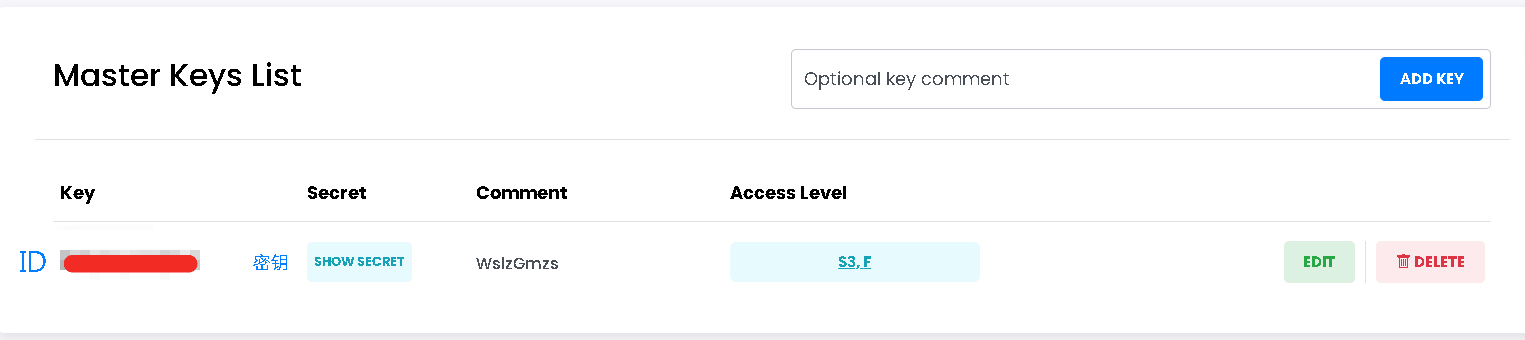
端点 URL:
https://s3.tebi.io配置跨域规则:点击存储桶右边进入 EDIT,找到 CORS,然后 Enable 打上 √,跨域规则配置参考下面代码,最后记得划到下面点击 UPDATE
<?xml version='1.0' encoding='UTF-8'?>
<CORSConfiguration xmlns="http://s3.amazonaws.com/doc/2006-03-01/">
  <CORSRule>
    <AllowedOrigin>*</AllowedOrigin>
    <AllowedMethod>GET</AllowedMethod>
    <AllowedMethod>PUT</AllowedMethod>
    <AllowedMethod>POST</AllowedMethod>
    <AllowedMethod>DELETE</AllowedMethod>
    <AllowedMethod>HEAD</AllowedMethod>
    <AllowedHeader>*</AllowedHeader>
    <ExposeHeader>ETag</ExposeHeader>
    <MaxAgeSeconds>3600</MaxAgeSeconds>
  </CORSRule>
</CORSConfiguration>
七牛云 Kodo 配置
- 若没有七牛云账号,可以先注册一个(注意:需要实名验证,极为严格),然后在七牛云 - 对象存储 - 概览创建一个存储桶,存储区域没有特别要求,可以选择海外搭配海外加速域名
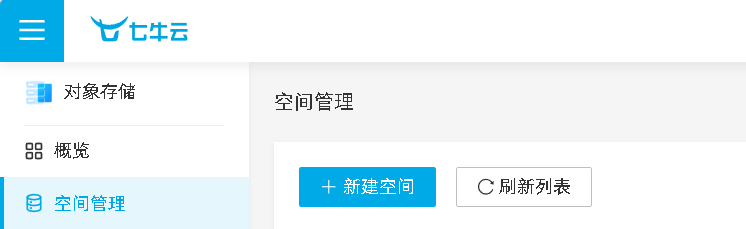
在七牛云 - 密钥管理获取密钥(上面是 ID,下面是密钥)
端点 URL 可在服务域名使用指南实时更新,或参考下表:
| 存储区域 | 区域简称 Region ID | 访问 Endpoint | 协议 |
|---|---|---|---|
| 华东-浙江 | cn-east-1 | s3.cn-east-1.qiniucs.com | HTTP,HTTPS |
| 华东-浙江 2 | cn-east-2 | s3.cn-east-2.qiniucs.com | HTTP,HTTPS |
| 华北-河北 | cn-north-1 | s3.cn-north-1.qiniucs.com | HTTP,HTTPS |
| 华南-广东 | cn-south-1 | s3.cn-south-1.qiniucs.com | HTTP,HTTPS |
| 西北-陕西 1 | cn-northwest-1 | s3.cn-northwest-1.qiniucs.com | HTTP,HTTPS |
| 北美-洛杉矶 | us-north-1 | s3.us-north-1.qiniucs.com | HTTP,HTTPS |
| 亚太-新加坡(原东南亚) | ap-southeast-1 | s3.ap-southeast-1.qiniucs.com | HTTP,HTTPS |
| 亚太-河内 | ap-southeast-2 | s3.ap-southeast-2.qiniucs.com | HTTP,HTTPS |
| 亚太-胡志明 | ap-southeast-3 | s3.ap-southeast-3.qiniucs.com | HTTP,HTTPS |
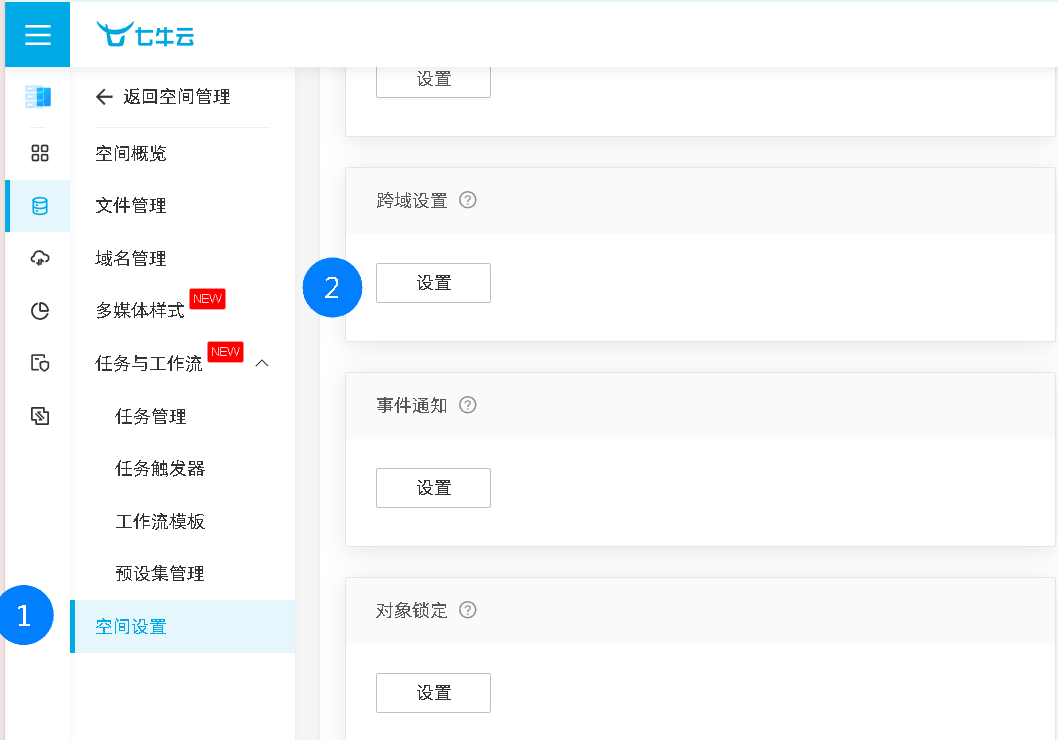
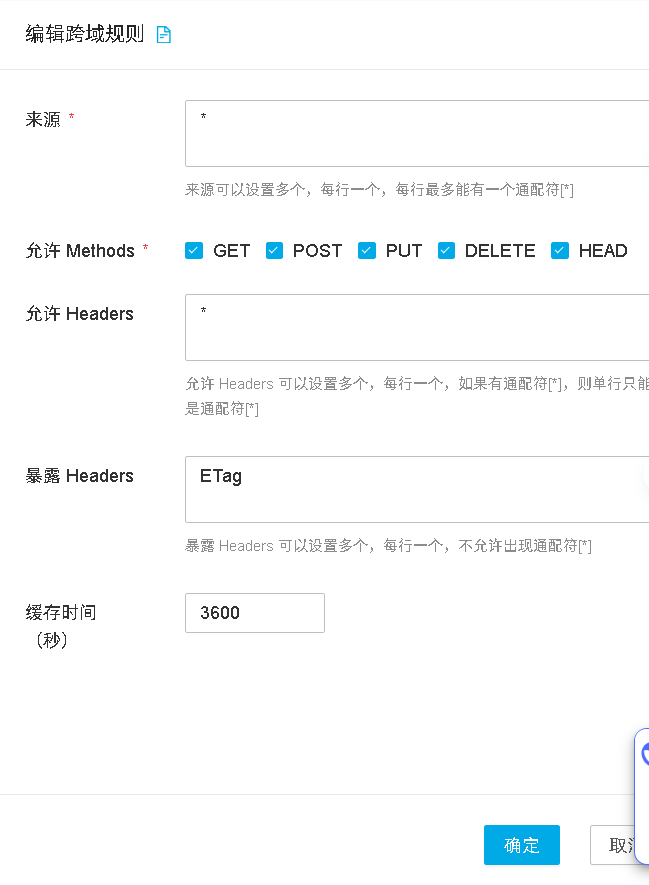
- 配置跨域规则:点击存储桶进入,找到空间设置,往下滑找到跨域设置,点击新增规则
跨域规则配置参考下图,最后点击确定
缤纷云 Bitiful 配置
服务提醒
这家页面确实挺缤纷,但是送 50GB,并且实名验证好像不怎么严格,有可能跑路,建议不要存储珍贵资料。
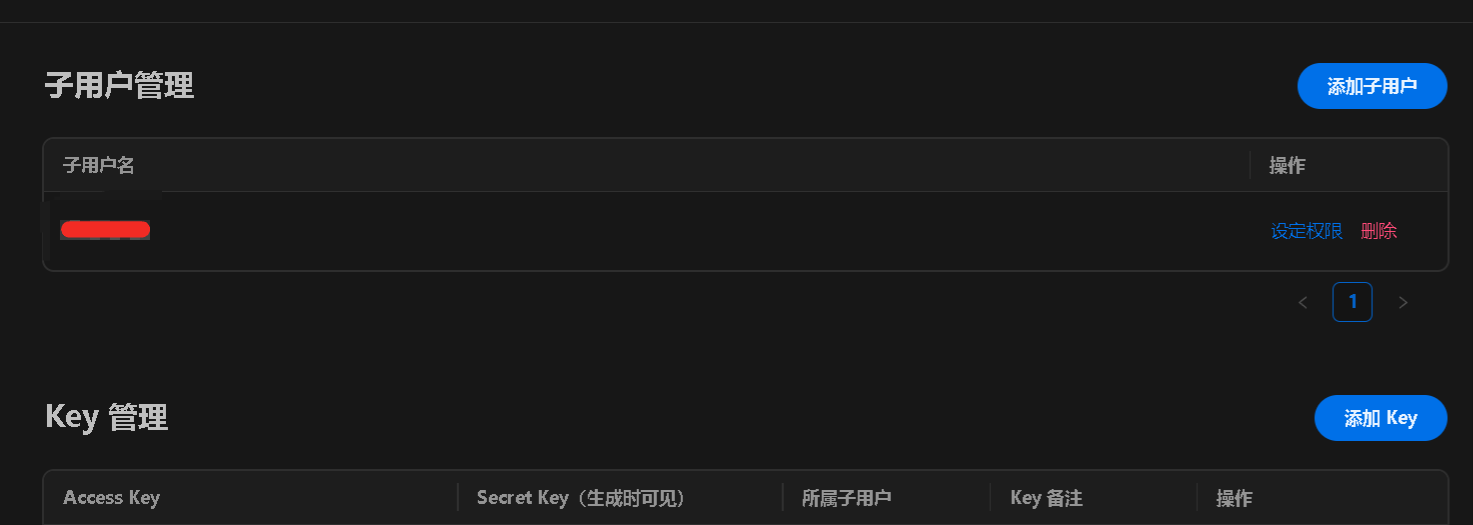
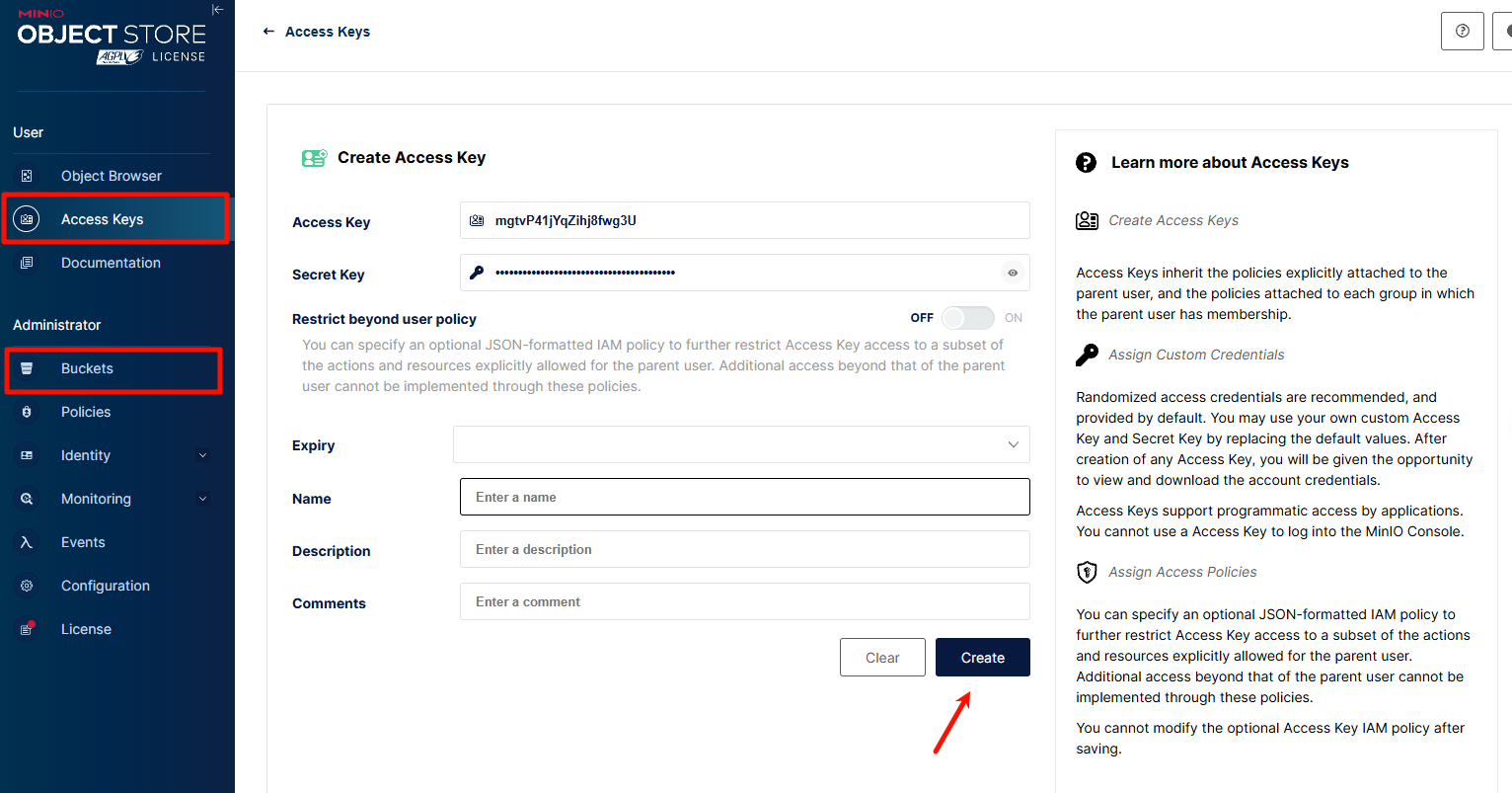
在缤纷云控制台 - 密钥管理获取密钥,先点击上面的添加用户,然后点击下面添加 Key,Access Key 是密钥 ID,Secret Key 是密钥
端点 URL:
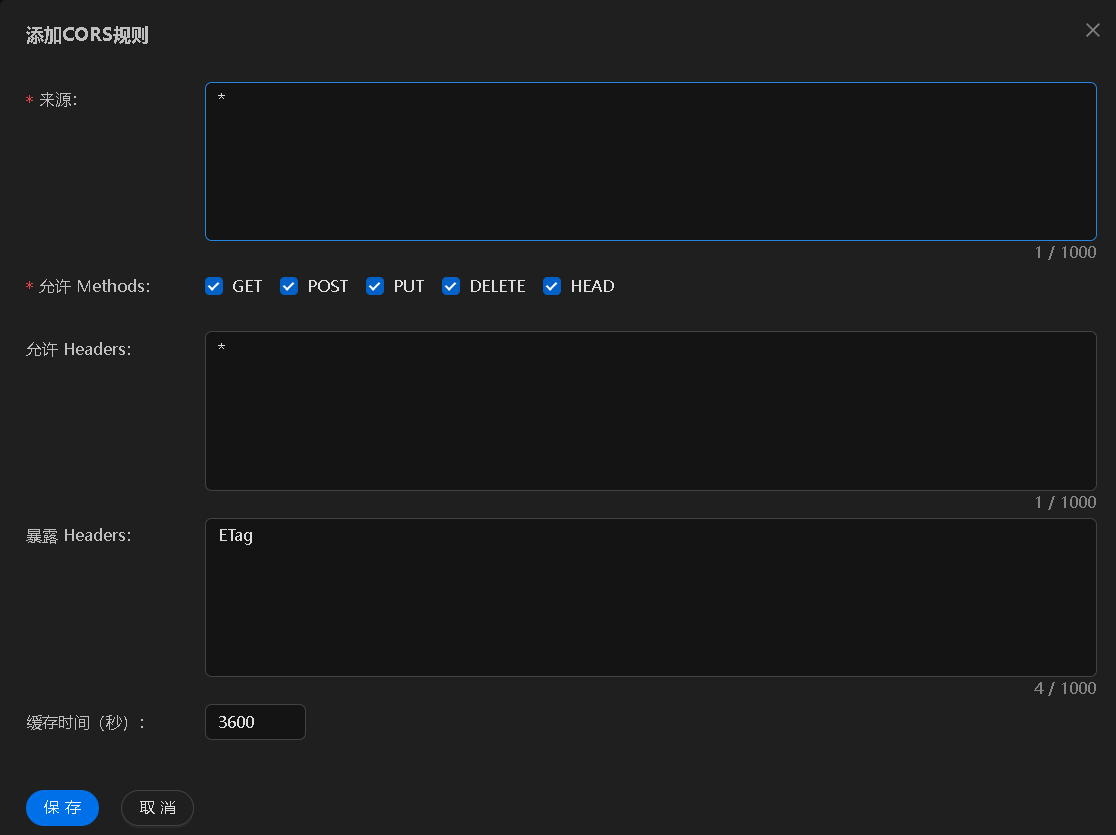
https://s3.bitiful.net,详细信息可在https://console.bitiful.com/buckets/你的存储桶的名称/baseinfo查看配置跨域规则:点击存储桶进入访问管理,找到跨域配置,点击新建规则,访问地址:
https://console.bitiful.com/buckets/你的存储桶的名称/ad,跨域规则配置参考下图,最后点击保存
MinIO 自建配置
1. 部署 MinIO
部署 MinIO 服务器
使用以下 Docker Compose 配置(参考)快速部署 MinIO 服务:
yamlversion: "3" services: minio: image: minio/minio:RELEASE.2025-02-18T16-25-55Z container_name: minio-server command: server /data --console-address :9001 --address :9000 environment: - MINIO_ROOT_USER=minioadmin # 设置管理员用户名 - MINIO_ROOT_PASSWORD=minioadmin # 设置管理员密码 - MINIO_BROWSER=on - MINIO_SERVER_URL=https://minio.example.com # S3 API 访问地址 - MINIO_BROWSER_REDIRECT_URL=https://console.example.com # 控制台访问地址 ports: - "9000:9000" # S3 API 端口 - "9001:9001" # 控制台端口 volumes: - ./data:/data - ./certs:/root/.minio/certs # 如需配置SSL证书 restart: always运行
docker-compose up -d启动服务。配置反向代理(参考)
为确保 MinIO 服务正常工作,特别是文件预览功能,需要正确配置反向代理。以下是 OpenResty/Nginx 的推荐配置:
MinIO S3 API 反向代理 (minio.example.com):
nginxlocation / { proxy_pass http://127.0.0.1:9000; proxy_set_header Host $host; proxy_set_header X-Real-IP $remote_addr; proxy_set_header X-Forwarded-For $proxy_add_x_forwarded_for; proxy_set_header X-Forwarded-Proto $scheme; # HTTP 连接优化 proxy_http_version 1.1; proxy_set_header Connection ""; # 启用HTTP/1.1的keepalive # 关键配置:解决403错误和预览问题 proxy_cache off; proxy_buffering off; proxy_request_buffering off; # 无文件大小限制 client_max_body_size 0; }MinIO 控制台反向代理 (console.example.com):
nginxlocation / { proxy_pass http://127.0.0.1:9001; proxy_set_header Host $host; proxy_set_header X-Real-IP $remote_addr; proxy_set_header X-Forwarded-For $proxy_add_x_forwarded_for; proxy_set_header X-Forwarded-Proto $scheme; # WebSocket 支持 proxy_http_version 1.1; proxy_set_header Upgrade $http_upgrade; proxy_set_header Connection "upgrade"; # 关键配置 proxy_cache off; proxy_buffering off; # 无文件大小限制 client_max_body_size 0; }访问控制台创建存储桶和创建访问密钥
如有详细配置需求,可参考官方文档:https://min.io/docs/minio/container/index.html
CN: https://min-io.cn/docs/minio/container/index.html
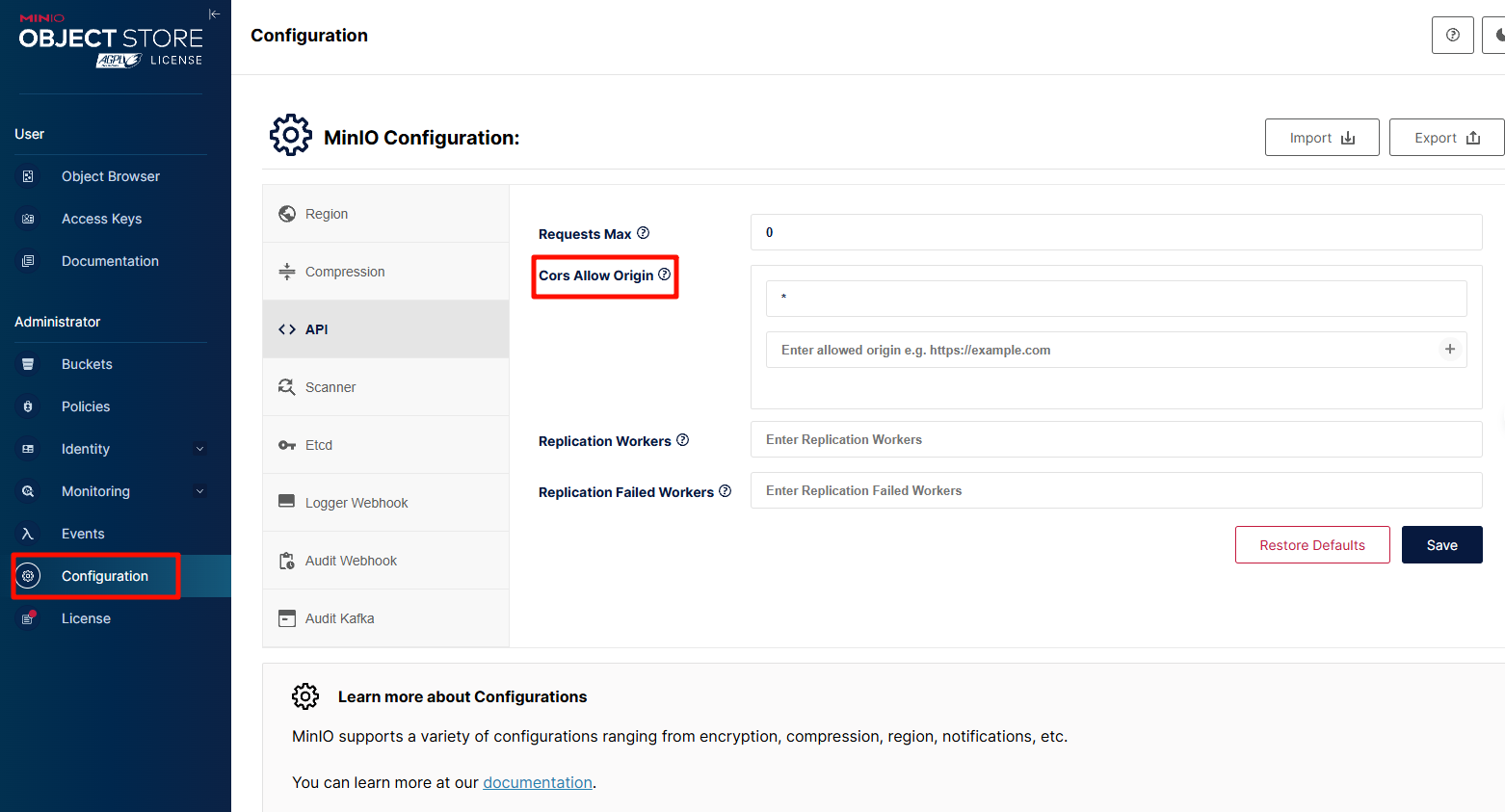
相关配置(可选)
允许的源包含您的前端域名
在 CloudPaste 中配置 MinIO
- 登录 CloudPaste 管理界面
- 进入 "S3 存储配置" → "添加存储配置"
- 选择 "其他兼容 S3 服务" 作为提供商类型
- 填入以下信息:
- 名称:自定义名称
- 端点 URL:您的 MinIO 服务地址(如
https://minio.example.com) - 存储桶名称:之前创建的存储桶名称
- 访问密钥 ID:您的 Access Key
- 访问密钥:您的 Secret Key
- 区域:可留空
- 路径风格访问:必须启用!!!!
- 点击 "测试连接" 确认配置正确
- 保存配置
注意与故障排查
- 注意事项:如使用 Cloudfare 开启 cdn 可能需要加上 proxy_set_header Accept-Encoding "identity",同时存在缓存问题,最好仅用 DNS 解析
- 403 错误:确保反向代理配置中包含
proxy_cache off和proxy_buffering off - 预览问题:确保 MinIO 服务器正确配置了
MINIO_SERVER_URL和MINIO_BROWSER_REDIRECT_URL - 上传失败:检查 CORS 配置是否正确,确保允许的源包含您的前端域名
- 控制台无法访问:检查 WebSocket 配置是否正确,特别是
Connection "upgrade"设置
更多 S3 配置待续....
在 CloudPaste 中配置
1. 登录管理界面
使用管理员账号登录 CloudPaste 管理界面。
2. 添加存储配置
- 进入 "S3 存储配置"
- 点击 "添加存储配置"
- 填写配置信息:
- 配置名称: 给配置起一个易识别的名称
- Access Key ID: 访问密钥 ID
- Secret Access Key: 访问密钥
- 存储桶名称: 存储桶名称
- 端点 URL: S3 端点地址
- 区域: 存储桶所在区域
- 路径样式: 是否强制使用路径样式
3. 测试连接
- 点击 "测试连接" 按钮
- 确认连接成功
- 保存配置
4. 设置默认存储
- 在存储配置列表中
- 选择要设为默认的配置
- 点击 "设为默认"
高级配置
CORS 配置
为了支持直接上传,需要配置 CORS:
[
  {
    "AllowedHeaders": ["*"],
    "AllowedMethods": ["GET", "PUT", "POST", "DELETE"],
    "AllowedOrigins": ["https://your-domain.com"],
    "ExposeHeaders": ["ETag"]
  }
]
CDN 加速(自定义 HOST 域名)
B2 + CloudFlare CDN 实现免流量
代码直达:https://doc.cloudpaste.qzz.io/guide/s3-config#backblaze-b2-配置
参考链接:https://github.com/ling-drag0n/CloudPaste/issues/59
相关解答:https://github.com/ling-drag0n/CloudPaste/issues/67
.....
故障排除
常见问题
连接失败
- 检查端点 URL 是否正确
- 确认访问密钥有效
- 验证网络连接
权限错误
- 检查 IAM 策略配置
- 确认存储桶权限设置
- 验证 CORS 配置,是否配置跨域访问
上传失败
- 检查文件大小限制
- 确认存储空间充足
- 验证文件格式支持