
S3 Storage Configuration
CloudPaste supports multiple S3-compatible storage services, providing reliable storage solutions for your files.
Supported Features
The S3 storage driver supports the following capabilities (all always enabled):
- ✅ READER: Read files and directories
- ✅ WRITER: Upload, create, rename, delete files
- ✅ DIRECT_LINK: Direct link download (presigned URLs)
- ✅ MULTIPART: Chunked upload (large files, supports resumable upload)
- ✅ ATOMIC: Atomic operation support (rename, copy, batch delete)
- ✅ PROXY: Proxy access
- ✅ PAGED_LIST: Paginated directory listing
S3 is the most feature-complete storage driver, supporting all 7 capabilities.
Supported Storage Services
Partial S3 Storage Service Comparison
Price Update Notice
The following prices are based on the latest official information as of December 2024. Actual prices may vary by region, usage, and promotional activities. Please visit official websites for the most current pricing.
| Provider | Free Tier | Storage Cost | Bandwidth Cost | 1TB Monthly Cost | Rating | Use Case |
|---|---|---|---|---|---|---|
| Backblaze B2 | First 10GB free | $6/TB/month | 3x storage amount free Overage $0.01/GB | $6 | ⭐⭐⭐⭐⭐ | Cost-sensitive, medium traffic |
| Wasabi | 30-day 1TB trial | $6.99/TB/month | Completely free | $6.99 | ⭐⭐⭐⭐ | Large storage, low traffic |
| Hetzner | None | $5.99/TB/month | 1TB included | $5.99 | ⭐⭐⭐⭐ | European users, cost-effective |
| Cloudflare R2 | 10GB storage/month 1M operations/month | $15/TB/month | Completely free | $15 | ⭐⭐⭐⭐⭐ | High traffic apps, global users |
| DigitalOcean | 250GB storage 1TB bandwidth | Basic plan $5/month Extra $20/TB | 1TB included | $20.48 | ⭐⭐⭐ | Existing DO ecosystem |
| Scaleway | 75GB bandwidth/month | €12-14.6/TB/month | 75GB free | €21-24 | ⭐⭐⭐ | European users, small scale |
Other Compatible Services
- Alibaba Cloud OSS
- Tencent Cloud COS
- Qiniu Cloud Kodo
- Huawei Cloud OBS
- Claw Cloud Storage
- Binfen Cloud Storage
- TeBi Cloud
- MinIO (Self-hosted solution)
Cloudflare R2 Configuration
1. Enable R2 Service
- Log in to the Cloudflare Dashboard
- Navigate to "R2 Object Storage"
- Click "Create bucket"
- Enter a bucket name (e.g.,
cloudpaste-files-your-name, which must be globally unique)
2. Create an API Token
- Go to "Manage R2 API tokens"
- Click "Create API token"
- Manage API tokens—you can choose either an Account API token (recommended) or a User API token
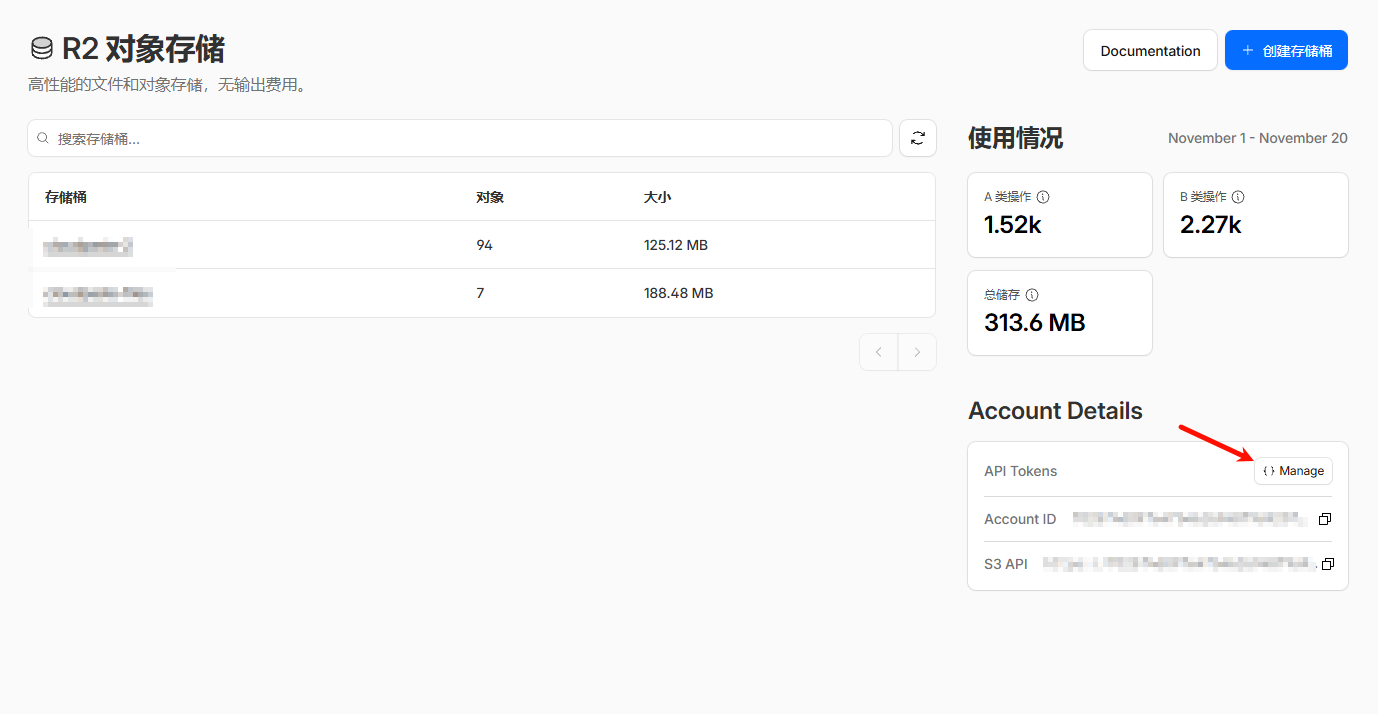
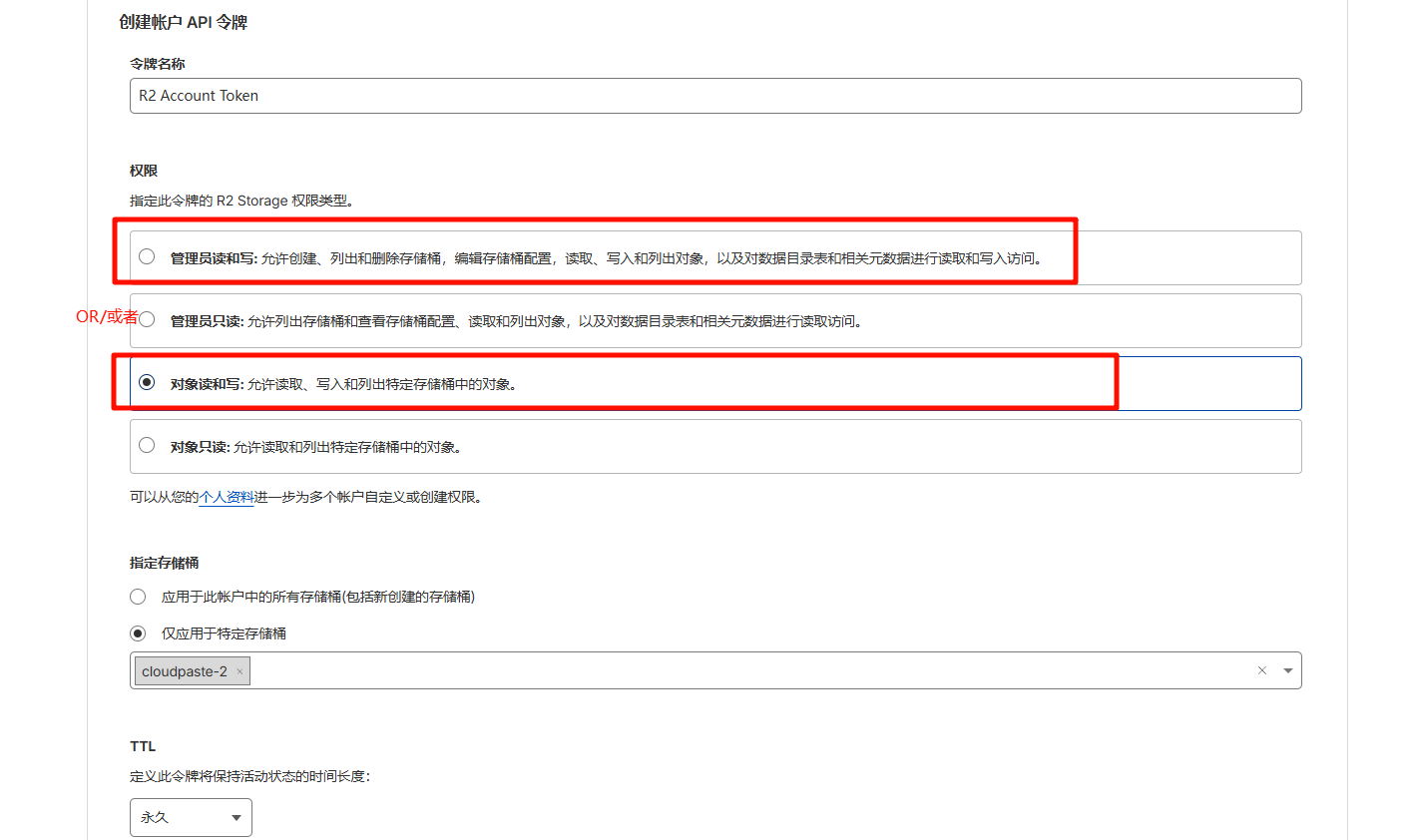
- Record the Access Key ID and Secret Access Key
3. Retrieve Endpoint Information
Endpoint format: https://<account-id>.r2.cloudflarestorage.com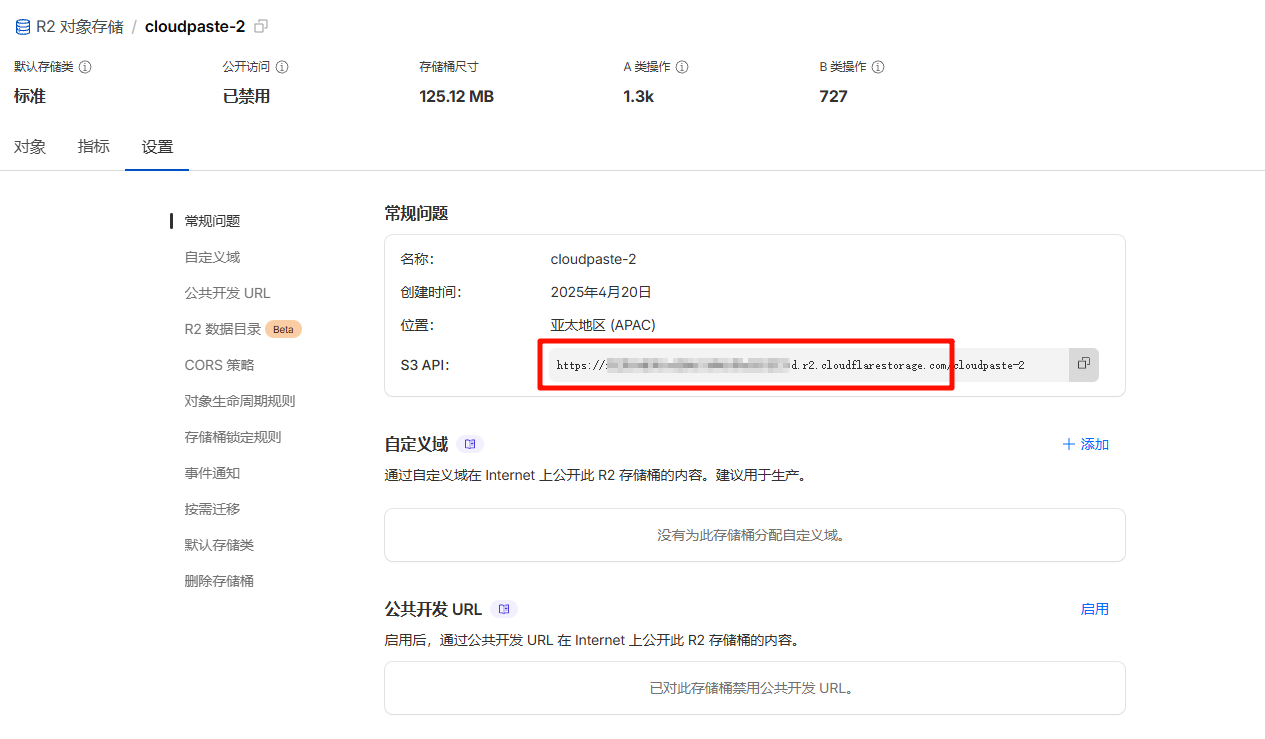
You can find the complete endpoint URL in the bucket details page of the R2 console.
Configure CORS rules, click the corresponding bucket, click settings, edit CORS policy as shown below:
[
  {
    "AllowedOrigins": ["http://localhost:3000", "https://replace-with-your-frontend-domain"],
    "AllowedMethods": ["GET", "PUT", "POST", "DELETE", "HEAD"],
    "AllowedHeaders": ["*"],
    "ExposeHeaders": ["ETag"],
    "MaxAgeSeconds": 3600
  }
]
Backblaze B2 Configuration
If you don't have a B2 account, you can register one first, then create a bucket.
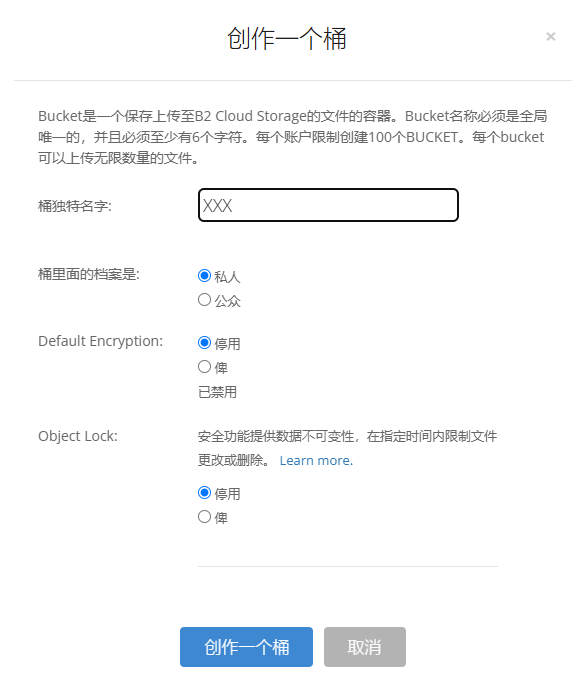
Click Application Key in the sidebar, click Create Key, then as shown in the figure.

Configure B2 CORS, B2 CORS configuration is more complicated, please note
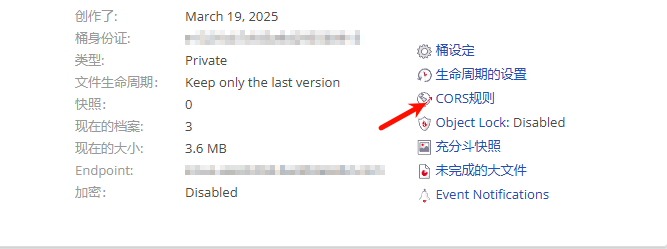
You can try 1 or 2 first, go to the upload page to see if you can upload, open F12 console if it shows CORS error, then use 3. For a one-time solution, use 3 directly (now recommend using 3 directly).
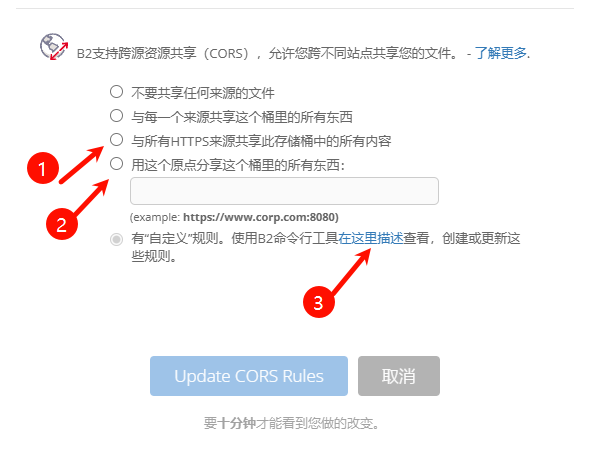
Regarding configuration 3, since the panel cannot configure it, it can only be configured manually. You need to download B2 CLI corresponding tool. You can refer to: "https://docs.cloudreve.org/zh/usage/storage/b2".
After downloading, cmd in the corresponding download directory, enter the following commands in the command line:
b2-windows.exe account authorize   //Account login, fill in the previous keyID and applicationKey according to the prompts
b2-windows.exe bucket get <bucketName> //You can execute to get bucket information, replace <bucketName> with bucket name
Windows configuration, use ".\b2-windows.exe xxx", So cmd input in the corresponding cli exe folder, python cli is the same:
b2-windows.exe bucket update <bucketName> allPrivate --cors-rules "[{\"corsRuleName\":\"CloudPaste\",\"allowedOrigins\":[\"*\"],\"allowedHeaders\":[\"*\"],\"allowedOperations\":[\"b2_upload_file\",\"b2_download_file_by_name\",\"b2_download_file_by_id\",\"s3_head\",\"s3_get\",\"s3_put\",\"s3_post\",\"s3_delete\"],\"exposeHeaders\":[\"Etag\",\"content-length\",\"content-type\",\"x-bz-content-sha1\"],\"maxAgeSeconds\":3600}]"Where " <bucketName> " should be replaced with your bucket name. Regarding allowedOrigins for cross-domain allowed domains, you can configure according to personal needs, here it allows all.
If you need to proxy a B2 private bucket, you can configure it in the worker
👉 Click to expand: B2 private bucket proxy code
Environment variables:ALLOW_LIST_BUCKET = false
B2_APPLICATION_KEY_ID = 应用 keyID
B2_APPLICATION_KEY = 应用秘钥
B2_ENDPOINT = 端点域名,例如 s3.eu-central-004.backblazeb2.com,不要 https
BUCKET_NAME = 你创建的私密桶名称// Cloudflare Worker 反代Backblaze B2
//
// 环境变量配置(在Cloudflare Worker中设置):
// B2_ENDPOINT=s3.us-west-004.backblazeb2.com // 必需:B2 S3兼容端点
// BUCKET_NAME=my-bucket // 必需:B2存储桶名称
// B2_APPLICATION_KEY_ID=xxx // 必需:B2应用密钥ID
// B2_APPLICATION_KEY=xxx // 必需:B2应用密钥
//
// 缓存控制(可选):
// CACHE_ENABLED=true // 是否启用缓存(默认true)
// CACHE_TTL=86400 // Worker缓存时间(秒,默认24小时)
// CDN_CACHE_TTL=2592000 // CDN边缘缓存时间(秒,默认30天)
//
// 安全控制(可选):
// ALLOWED_REFERERS=https://yourdomain.com // 允许的来源域名(防盗链)
//
// 其他配置(可选):
// ALLOW_LIST_BUCKET=false // 是否允许列出存储桶
// ALLOWED_HEADERS=content-type,range // 自定义允许的请求头
var encoder = new TextEncoder();
var HOST_SERVICES = {
appstream2: "appstream",
cloudhsmv2: "cloudhsm",
email: "ses",
marketplace: "aws-marketplace",
mobile: "AWSMobileHubService",
pinpoint: "mobiletargeting",
queue: "sqs",
"git-codecommit": "codecommit",
"mturk-requester-sandbox": "mturk-requester",
"personalize-runtime": "personalize",
};
var UNSIGNABLE_HEADERS = /* @__PURE__ */ new Set([
"authorization",
"content-type",
"content-length",
"user-agent",
"presigned-expires",
"expect",
"x-amzn-trace-id",
"range",
"connection",
]);
var AwsClient = class {
constructor({ accesskeyID, secretAccessKey, sessionToken, service, region, cache, retries, initRetryMs }) {
if (accesskeyID == null) throw new TypeError("accesskeyID is a required option");
if (secretAccessKey == null) throw new TypeError("secretAccessKey is a required option");
this.accesskeyID = accesskeyID;
this.secretAccessKey = secretAccessKey;
this.sessionToken = sessionToken;
this.service = service;
this.region = region;
this.cache = cache || /* @__PURE__ */ new Map();
this.retries = retries != null ? retries : 10;
this.initRetryMs = initRetryMs || 50;
}
async sign(input, init) {
if (input instanceof Request) {
const { method, url, headers, body } = input;
init = Object.assign({ method, url, headers }, init);
if (init.body == null && headers.has("Content-Type")) {
init.body = body != null && headers.has("X-Amz-Content-Sha256") ? body : await input.clone().arrayBuffer();
}
input = url;
}
const signer = new AwsV4Signer(Object.assign({ url: input }, init, this, init && init.aws));
const signed = Object.assign({}, init, await signer.sign());
delete signed.aws;
try {
return new Request(signed.url.toString(), signed);
} catch (e) {
if (e instanceof TypeError) {
return new Request(signed.url.toString(), Object.assign({ duplex: "half" }, signed));
}
throw e;
}
}
async fetch(input, init) {
for (let i = 0; i <= this.retries; i++) {
const fetched = fetch(await this.sign(input, init));
if (i === this.retries) {
return fetched;
}
const res = await fetched;
if (res.status < 500 && res.status !== 429) {
return res;
}
await new Promise((resolve) => setTimeout(resolve, Math.random() * this.initRetryMs * Math.pow(2, i)));
}
throw new Error("An unknown error occurred, ensure retries is not negative");
}
};
var AwsV4Signer = class {
constructor({
method,
url,
headers,
body,
accesskeyID,
secretAccessKey,
sessionToken,
service,
region,
cache,
datetime,
signQuery,
appendSessionToken,
allHeaders,
singleEncode,
}) {
if (url == null) throw new TypeError("url is a required option");
if (accesskeyID == null) throw new TypeError("accesskeyID is a required option");
if (secretAccessKey == null) throw new TypeError("secretAccessKey is a required option");
this.method = method || (body ? "POST" : "GET");
this.url = new URL(url);
this.headers = new Headers(headers || {});
this.body = body;
this.accesskeyID = accesskeyID;
this.secretAccessKey = secretAccessKey;
this.sessionToken = sessionToken;
let guessedService, guessedRegion;
if (!service || !region) {
[guessedService, guessedRegion] = guessServiceRegion(this.url, this.headers);
}
this.service = service || guessedService || "";
this.region = region || guessedRegion || "us-east-1";
this.cache = cache || /* @__PURE__ */ new Map();
this.datetime = datetime || /* @__PURE__ */ new Date().toISOString().replace(/[:-]|\.\d{3}/g, "");
this.signQuery = signQuery;
this.appendSessionToken = appendSessionToken || this.service === "iotdevicegateway";
this.headers.delete("Host");
if (this.service === "s3" && !this.signQuery && !this.headers.has("X-Amz-Content-Sha256")) {
this.headers.set("X-Amz-Content-Sha256", "UNSIGNED-PAYLOAD");
}
const params = this.signQuery ? this.url.searchParams : this.headers;
params.set("X-Amz-Date", this.datetime);
if (this.sessionToken && !this.appendSessionToken) {
params.set("X-Amz-Security-Token", this.sessionToken);
}
this.signableHeaders = ["host", ...this.headers.keys()].filter((header) => allHeaders || !UNSIGNABLE_HEADERS.has(header)).sort();
this.signedHeaders = this.signableHeaders.join(";");
this.canonicalHeaders = this.signableHeaders
.map((header) => header + ":" + (header === "host" ? this.url.host : (this.headers.get(header) || "").replace(/\s+/g, " ")))
.join("\n");
this.credentialString = [this.datetime.slice(0, 8), this.region, this.service, "aws4_request"].join("/");
if (this.signQuery) {
if (this.service === "s3" && !params.has("X-Amz-Expires")) {
params.set("X-Amz-Expires", "86400");
}
params.set("X-Amz-Algorithm", "AWS4-HMAC-SHA256");
params.set("X-Amz-Credential", this.accesskeyID + "/" + this.credentialString);
params.set("X-Amz-SignedHeaders", this.signedHeaders);
}
if (this.service === "s3") {
try {
this.encodedPath = decodeURIComponent(this.url.pathname.replace(/\+/g, " "));
} catch (e) {
this.encodedPath = this.url.pathname;
}
} else {
this.encodedPath = this.url.pathname.replace(/\/+/g, "/");
}
if (!singleEncode) {
this.encodedPath = encodeURIComponent(this.encodedPath).replace(/%2F/g, "/");
}
this.encodedPath = encodeRfc3986(this.encodedPath);
const seenKeys = /* @__PURE__ */ new Set();
this.encodedSearch = [...this.url.searchParams]
.filter(([k]) => {
if (!k) return false;
if (this.service === "s3") {
if (seenKeys.has(k)) return false;
seenKeys.add(k);
}
return true;
})
.map((pair) => pair.map((p) => encodeRfc3986(encodeURIComponent(p))))
.sort(([k1, v1], [k2, v2]) => (k1 < k2 ? -1 : k1 > k2 ? 1 : v1 < v2 ? -1 : v1 > v2 ? 1 : 0))
.map((pair) => pair.join("="))
.join("&");
}
async sign() {
if (this.signQuery) {
this.url.searchParams.set("X-Amz-Signature", await this.signature());
if (this.sessionToken && this.appendSessionToken) {
this.url.searchParams.set("X-Amz-Security-Token", this.sessionToken);
}
} else {
this.headers.set("Authorization", await this.authHeader());
}
return {
method: this.method,
url: this.url,
headers: this.headers,
body: this.body,
};
}
async authHeader() {
return ["AWS4-HMAC-SHA256 Credential=" + this.accesskeyID + "/" + this.credentialString, "SignedHeaders=" + this.signedHeaders, "Signature=" + (await this.signature())].join(
", "
);
}
async signature() {
const date = this.datetime.slice(0, 8);
const cacheKey = [this.secretAccessKey, date, this.region, this.service].join();
let kCredentials = this.cache.get(cacheKey);
if (!kCredentials) {
const kDate = await hmac("AWS4" + this.secretAccessKey, date);
const kRegion = await hmac(kDate, this.region);
const kService = await hmac(kRegion, this.service);
kCredentials = await hmac(kService, "aws4_request");
this.cache.set(cacheKey, kCredentials);
}
return buf2hex(await hmac(kCredentials, await this.stringToSign()));
}
async stringToSign() {
return ["AWS4-HMAC-SHA256", this.datetime, this.credentialString, buf2hex(await hash(await this.canonicalString()))].join("\n");
}
async canonicalString() {
return [this.method.toUpperCase(), this.encodedPath, this.encodedSearch, this.canonicalHeaders + "\n", this.signedHeaders, await this.hexBodyHash()].join("\n");
}
async hexBodyHash() {
let hashHeader = this.headers.get("X-Amz-Content-Sha256") || (this.service === "s3" && this.signQuery ? "UNSIGNED-PAYLOAD" : null);
if (hashHeader == null) {
if (this.body && typeof this.body !== "string" && !("byteLength" in this.body)) {
throw new Error("body must be a string, ArrayBuffer or ArrayBufferView, unless you include the X-Amz-Content-Sha256 header");
}
hashHeader = buf2hex(await hash(this.body || ""));
}
return hashHeader;
}
};
async function hmac(key, string) {
const cryptoKey = await crypto.subtle.importKey("raw", typeof key === "string" ? encoder.encode(key) : key, { name: "HMAC", hash: { name: "SHA-256" } }, false, ["sign"]);
return crypto.subtle.sign("HMAC", cryptoKey, encoder.encode(string));
}
async function hash(content) {
return crypto.subtle.digest("SHA-256", typeof content === "string" ? encoder.encode(content) : content);
}
function buf2hex(buffer) {
return Array.prototype.map.call(new Uint8Array(buffer), (x) => ("0" + x.toString(16)).slice(-2)).join("");
}
function encodeRfc3986(urlEncodedStr) {
return urlEncodedStr.replace(/[!'()*]/g, (c) => "%" + c.charCodeAt(0).toString(16).toUpperCase());
}
function guessServiceRegion(url, headers) {
const { hostname, pathname } = url;
if (hostname.endsWith(".r2.cloudflarestorage.com")) {
return ["s3", "auto"];
}
if (hostname.endsWith(".backblazeb2.com")) {
const match2 = hostname.match(/^(?:[^.]+\.)?s3\.([^.]+)\.backblazeb2\.com$/);
return match2 != null ? ["s3", match2[1]] : ["", ""];
}
const match = hostname.replace("dualstack.", "").match(/([^.]+)\.(?:([^.]*)\.)?amazonaws\.com(?:\.cn)?$/);
let [service, region] = (match || ["", ""]).slice(1, 3);
if (region === "us-gov") {
region = "us-gov-west-1";
} else if (region === "s3" || region === "s3-accelerate") {
region = "us-east-1";
service = "s3";
} else if (service === "iot") {
if (hostname.startsWith("iot.")) {
service = "execute-api";
} else if (hostname.startsWith("data.jobs.iot.")) {
service = "iot-jobs-data";
} else {
service = pathname === "/mqtt" ? "iotdevicegateway" : "iotdata";
}
} else if (service === "autoscaling") {
const targetPrefix = (headers.get("X-Amz-Target") || "").split(".")[0];
if (targetPrefix === "AnyScaleFrontendService") {
service = "application-autoscaling";
} else if (targetPrefix === "AnyScaleScalingPlannerFrontendService") {
service = "autoscaling-plans";
}
} else if (region == null && service.startsWith("s3-")) {
region = service.slice(3).replace(/^fips-|^external-1/, "");
service = "s3";
} else if (service.endsWith("-fips")) {
service = service.slice(0, -5);
} else if (region && /-\d$/.test(service) && !/-\d$/.test(region)) {
[service, region] = [region, service];
}
return [HOST_SERVICES[service] || service, region];
}
// index.js
var UNSIGNABLE_HEADERS2 = [
// These headers appear in the request, but are not passed upstream
"x-forwarded-proto",
"x-real-ip",
// We can't include accept-encoding in the signature because Cloudflare
// sets the incoming accept-encoding header to "gzip, br", then modifies
// the outgoing request to set accept-encoding to "gzip".
// Not cool, Cloudflare!
"accept-encoding",
];
var HTTPS_PROTOCOL = "https:";
var HTTPS_PORT = "443";
var RANGE_RETRY_ATTEMPTS = 3;
// CORS配置
const CORS_HEADERS = {
"Access-Control-Allow-Origin": "*",
"Access-Control-Allow-Methods": "GET, HEAD, OPTIONS",
"Access-Control-Allow-Headers": "Range, If-Modified-Since, If-None-Match, Content-Type, Authorization",
"Access-Control-Expose-Headers": "Content-Length, Content-Range, Accept-Ranges, Last-Modified, ETag, X-Cache-Status",
"Access-Control-Max-Age": "86400",
};
/**
* 获取缓存设置
* @param {Object} env - 环境变量
* @returns {Object} 缓存设置
*/
function getCacheSettings(env) {
// 从环境变量获取缓存时间,如果没有设置则使用默认值
const cacheTtl = parseInt(env.CACHE_TTL) || 86400; // 默认24小时
const cdnCacheTtl = parseInt(env.CDN_CACHE_TTL) || 2592000; // 默认30天
return {
ttl: cacheTtl,
cdnTtl: cdnCacheTtl,
};
}
/**
* 判断是否应该缓存请求
* @param {string} method - HTTP方法
* @param {URL} url - 请求URL
* @param {Headers} headers - 请求头
* @param {Object} env - 环境变量
* @returns {boolean} 是否应该缓存
*/
function shouldCache(method, url, headers, env) {
// 检查是否启用缓存
if (env.CACHE_ENABLED === "false") {
return false;
}
// 只缓存GET和HEAD请求
if (!["GET", "HEAD"].includes(method)) {
return false;
}
// Range请求缓存策略:
if (headers.has("Range")) {
console.log(`Range请求,允许缓存以优化视频播放体验: ${url.pathname}`);
// 允许缓存Range请求
}
return true;
}
/**
* 生成统一的缓存键(基于文件路径,忽略查询参数)
* @param {URL} url - 请求URL
* @param {string} method - HTTP方法
* @returns {Request} 缓存键
*/
function generateCacheKey(url, method) {
// 使用文件路径作为缓存键,忽略查询参数
const cacheUrl = new URL(url);
cacheUrl.search = ""; // 清除所有查询参数
return new Request(cacheUrl.toString(), {
method: method,
headers: new Headers(), // 空头部,确保缓存键一致
});
}
/**
* 检查是否为下载请求
* @param {URL} url - 请求URL
* @returns {boolean} 是否为下载请求
*/
function isDownloadRequest(url) {
return url.searchParams.has("response-content-disposition") || url.searchParams.get("response-content-disposition")?.includes("attachment");
}
/**
* 处理下载响应头部
* @param {Response} response - 原始响应
* @param {URL} originalUrl - 原始请求URL
* @returns {Response} 处理后的响应
*/
function processDownloadResponse(response, originalUrl) {
// 如果不是下载请求,直接返回
if (!isDownloadRequest(originalUrl)) {
return response;
}
// 检查是否已经有Content-Disposition头部
if (response.headers.has("Content-Disposition")) {
return response;
}
// 从URL参数中获取Content-Disposition
const contentDisposition = originalUrl.searchParams.get("response-content-disposition");
if (contentDisposition) {
const newHeaders = new Headers(response.headers);
newHeaders.set("Content-Disposition", decodeURIComponent(contentDisposition));
// 检查其他response-*参数
const responseContentType = originalUrl.searchParams.get("response-content-type");
if (responseContentType && !response.headers.get("Content-Type")) {
newHeaders.set("Content-Type", decodeURIComponent(responseContentType));
}
return new Response(response.body, {
status: response.status,
statusText: response.statusText,
headers: newHeaders,
});
}
return response;
}
/**
* 添加CORS头部到响应
* @param {Response} response - 原始响应
* @param {string} cacheStatus - 缓存状态
* @returns {Response} 添加了CORS头部的响应
*/
function addCorsHeaders(response, cacheStatus = "MISS") {
const newResponse = new Response(response.body, response);
// 添加CORS头部
Object.entries(CORS_HEADERS).forEach(([key, value]) => {
newResponse.headers.set(key, value);
});
// 添加缓存状态头部
newResponse.headers.set("X-Cache-Status", cacheStatus);
newResponse.headers.set("X-Served-By", "Cloudflare-Worker-B2");
return newResponse;
}
/**
* 处理OPTIONS预检请求
* @returns {Response} CORS预检响应
*/
function handleOptions() {
return new Response(null, {
status: 200,
headers: CORS_HEADERS,
});
}
/**
* 处理缓存请求(优化版)
* @param {Request} request - 请求对象
* @param {URL} originalUrl - 原始URL
* @param {Object} env - 环境变量
* @param {Object} ctx - 执行上下文
* @returns {Response} 响应
*/
async function handleCachedRequest(request, originalUrl, env, ctx) {
const cache = caches.default;
// 生成统一的缓存键(基于文件路径,忽略查询参数)
const cacheKey = generateCacheKey(originalUrl, request.method);
// 尝试从缓存获取
let cachedResponse = await cache.match(cacheKey);
if (cachedResponse) {
console.log(`缓存命中: ${originalUrl.pathname}`);
// 处理下载响应头部(如果是下载请求)
const processedResponse = processDownloadResponse(cachedResponse, originalUrl);
return addCorsHeaders(processedResponse, "HIT");
}
// 缓存未命中,处理请求到B2
console.log(`缓存未命中,处理请求到B2: ${originalUrl.pathname}`);
let response = await handleB2Request(request, originalUrl, env);
// 检查是否应该缓存响应
if (response.ok && shouldCache(request.method, originalUrl, request.headers, env)) {
const cacheSettings = getCacheSettings(env);
const cacheTtl = cacheSettings.ttl;
const cdnCacheTtl = cacheSettings.cdnTtl;
// 克隆响应用于缓存(移除下载相关头部,保存纯净内容)
const headersToCache = new Headers(response.headers);
headersToCache.delete("Content-Disposition"); // 移除下载头部,缓存纯净内容
headersToCache.set("Cache-Control", `public, max-age=${cacheTtl}`);
headersToCache.set("CDN-Cache-Control", `public, max-age=${cdnCacheTtl}`);
headersToCache.set("X-Cache-Time", new Date().toISOString());
const responseToCache = new Response(response.body, {
status: response.status,
statusText: response.statusText,
headers: headersToCache,
});
// 异步存储到缓存
ctx.waitUntil(cache.put(cacheKey, responseToCache.clone()));
// 处理下载响应头部(如果是下载请求)
const processedResponse = processDownloadResponse(responseToCache, originalUrl);
return addCorsHeaders(processedResponse, "MISS");
}
// 处理下载响应头部(如果是下载请求)
const processedResponse = processDownloadResponse(response, originalUrl);
return addCorsHeaders(processedResponse, "BYPASS");
}
/**
* 处理B2请求(原有逻辑封装)
* @param {Request} request - 请求对象
* @param {URL} originalUrl - 原始URL
* @param {Object} env - 环境变量
* @returns {Response} B2响应
*/
async function handleB2Request(request, originalUrl, env) {
const url = new URL(originalUrl);
url.protocol = HTTPS_PROTOCOL;
url.port = HTTPS_PORT;
let path = url.pathname.replace(/^\//, "");
path = path.replace(/\/$/, "");
const pathSegments = path.split("/");
if (env.ALLOW_LIST_BUCKET !== "true") {
if ((env.BUCKET_NAME === "$path" && pathSegments.length < 2) || (env.BUCKET_NAME !== "$path" && path.length === 0)) {
return new Response(null, {
status: 404,
statusText: "Not Found",
});
}
}
switch (env.BUCKET_NAME) {
case "$path":
url.hostname = env.B2_ENDPOINT;
break;
case "$host":
url.hostname = url.hostname.split(".")[0] + "." + env.B2_ENDPOINT;
break;
default:
url.hostname = env.BUCKET_NAME + "." + env.B2_ENDPOINT;
break;
}
const headers = filterHeaders(request.headers, env);
// 区分预览和下载请求
const hasSignature = url.searchParams.has("X-Amz-Signature");
let forwardRequest;
if (hasSignature) {
// 有签名的请求(通常是下载):直接转发预签名URL
console.log(`转发预签名URL到B2: ${url.toString()}`);
forwardRequest = new Request(url.toString(), {
method: request.method,
headers: headers,
body: request.body,
});
} else {
// 无签名的请求(通常是预览):需要生成预签名URL
console.log(`无签名请求,生成预签名URL: ${url.pathname}`);
const endpointRegex = /^s3\.([a-zA-Z0-9-]+)\.backblazeb2\.com$/;
const [, aws_region] = env.B2_ENDPOINT.match(endpointRegex);
const client = new AwsClient({
accesskeyID: env.B2_APPLICATION_KEY_ID,
secretAccessKey: env.B2_APPLICATION_KEY,
service: "s3",
region: aws_region,
});
const signedRequest = await client.sign(url.toString(), {
method: request.method,
headers,
});
forwardRequest = new Request(signedRequest.url, {
method: signedRequest.method,
headers: signedRequest.headers,
body: request.body,
});
}
// 处理Range请求的特殊逻辑
if (forwardRequest.headers.has("range")) {
let attempts = RANGE_RETRY_ATTEMPTS;
let response;
do {
let controller = new AbortController();
response = await fetch(forwardRequest.url, {
method: forwardRequest.method,
headers: forwardRequest.headers,
signal: controller.signal,
});
if (response.headers.has("content-range")) {
if (attempts < RANGE_RETRY_ATTEMPTS) {
console.log(`Retry for ${forwardRequest.url} succeeded - response has content-range header`);
}
break;
} else if (response.ok) {
attempts -= 1;
console.error(`Range header in request for ${forwardRequest.url} but no content-range header in response. Will retry ${attempts} more times`);
if (attempts > 0) {
controller.abort();
}
} else {
break;
}
} while (attempts > 0);
if (attempts <= 0) {
console.error(`Tried range request for ${forwardRequest.url} ${RANGE_RETRY_ATTEMPTS} times, but no content-range in response.`);
}
return processResponse(response, originalUrl);
}
// 普通请求
const response = await fetch(forwardRequest);
return processResponse(response, originalUrl);
}
function filterHeaders(headers, env) {
return new Headers(
Array.from(headers.entries()).filter(
(pair) => !UNSIGNABLE_HEADERS2.includes(pair[0]) && !pair[0].startsWith("cf-") && !("ALLOWED_HEADERS" in env && !env.ALLOWED_HEADERS.includes(pair[0]))
)
);
}
/**
* 处理响应,检查B2是否正确处理了response参数
* @param {Response} response - 原始响应
* @param {URL} originalUrl - 原始请求URL
* @returns {Response} 处理后的响应
*/
function processResponse(response, originalUrl) {
// 如果响应不成功,直接返回
if (!response.ok) {
return response;
}
// 检查B2是否正确处理了response-content-disposition参数
const responseContentDisposition = originalUrl.searchParams.get("response-content-disposition");
if (responseContentDisposition) {
const actualContentDisposition = response.headers.get("Content-Disposition");
if (actualContentDisposition) {
console.log(`B2正确处理了Content-Disposition: ${actualContentDisposition}`);
return response;
} else {
console.log(`B2未设置Content-Disposition,Worker手动设置: ${responseContentDisposition}`);
const responseHeaders = new Headers(response.headers);
responseHeaders.set("Content-Disposition", decodeURIComponent(responseContentDisposition));
// 检查其他response-*参数
const responseContentType = originalUrl.searchParams.get("response-content-type");
if (responseContentType && !response.headers.get("Content-Type")) {
responseHeaders.set("Content-Type", decodeURIComponent(responseContentType));
}
return new Response(response.body, {
status: response.status,
statusText: response.statusText,
headers: responseHeaders,
});
}
}
// 没有response参数,直接返回原始响应
return response;
}
var my_proxy_default = {
async fetch(request, env, ctx) {
// 处理OPTIONS预检请求
if (request.method === "OPTIONS") {
return handleOptions();
}
// 只允许GET和HEAD请求
if (!["GET", "HEAD"].includes(request.method)) {
return new Response(
JSON.stringify({
error: "方法不允许",
message: "只支持GET和HEAD请求",
}),
{
status: 405,
headers: {
"Content-Type": "application/json",
...CORS_HEADERS,
},
}
);
}
try {
const originalUrl = new URL(request.url);
// 检查是否应该使用缓存
if (shouldCache(request.method, originalUrl, request.headers, env)) {
return await handleCachedRequest(request, originalUrl, env, ctx);
} else {
// 不缓存,直接处理
console.log(`直接转发(不缓存): ${originalUrl.pathname}`);
const response = await handleB2Request(request, originalUrl, env);
// 处理下载响应头部(如果是下载请求)
const processedResponse = processDownloadResponse(response, originalUrl);
return addCorsHeaders(processedResponse, "BYPASS");
}
} catch (error) {
console.error("Worker处理错误:", error);
return new Response(
JSON.stringify({
error: "内部服务器错误",
message: error.message,
}),
{
status: 500,
headers: {
"Content-Type": "application/json",
...CORS_HEADERS,
},
}
);
}
},
};
export { my_proxy_default as default };Tencent Cloud COS Configuration
The methods for obtaining Tencent Cloud COS keys and cross-origin configuration are the same and will not be elaborated on further.
If you want to add your custom domain to the COS bucket configuration but do not have it registered, refer to the Cloudflare Worker reverse proxy configuration below.
👉 Click to expand: Worker Reverse Proxy for Tencent Cloud COS
 COS_BUCKET_NAME=my-bucket-1234567890  // Required: Tencent Cloud COS bucket name
 COS_REGION=ap-beijing  // Required: Tencent Cloud COS region
 COS_ACCESS_KEY_ID=AKIDxxxxx  // Required: Tencent Cloud COS access key ID
 COS_SECRET_ACCESS_KEY=xxxxxxxx  // Required: Tencent Cloud COS secret access key

 Cache Control (Optional):
 CACHE_ENABLED=true  // Whether to enable caching (default: true)
 CACHE_TTL=86400  // Worker cache duration (seconds, default: 24 hours)
 CDN_CACHE_TTL=2592000  // CDN edge cache duration (seconds, default: 30 days)

 Security Control (Optional):
 ALLOWED_REFERERS=https://yourdomain.com  // Allowed referrer domains (hotlink protection)

 Other Configurations (Optional):
ALLOWED_HEADERS=content-type,range // Custom allowed request headers// Cloudflare Worker Reverse Proxy for Tencent Cloud COS
// Replaces custom domain, provides caching acceleration and CORS support
// Transparent proxy to Tencent Cloud COS with added caching and CORS
//
// Environment variable configuration (set in Cloudflare Worker):
// COS_BUCKET_NAME=my-bucket-1234567890 // Required: Tencent Cloud COS bucket name
// COS_REGION=ap-beijing // Required: Tencent Cloud COS region
// COS_ACCESS_KEY_ID=AKIDxxxxx // Required: Tencent Cloud COS access key ID
// COS_SECRET_ACCESS_KEY=xxxxxxxx // Required: Tencent Cloud COS secret access key
//
// Cache control (optional):
// CACHE_ENABLED=true // Enable caching (default: true)
// CACHE_TTL=86400 // Worker cache duration (seconds, default: 24 hours)
// CDN_CACHE_TTL=2592000 // CDN edge cache duration (seconds, default: 30 days)
//
// Security control (optional):
// ALLOWED_REFERERS=https://yourdomain.com // Allowed origin domains (hotlink protection)
//
// Other configurations (optional):
// ALLOWED_HEADERS=content-type,range // Custom allowed request headers
// CORS配置
const CORS_HEADERS = {
"Access-Control-Allow-Origin": "*",
"Access-Control-Allow-Methods": "GET, HEAD, OPTIONS",
"Access-Control-Allow-Headers": "Range, If-Modified-Since, If-None-Match, Content-Type, Authorization",
"Access-Control-Expose-Headers": "Content-Length, Content-Range, Accept-Ranges, Last-Modified, ETag, X-Cache-Status",
"Access-Control-Max-Age": "86400",
};
// AWS4Fetch实现
var encoder = new TextEncoder();
var UNSIGNABLE_HEADERS = new Set(["authorization", "content-type", "content-length", "user-agent", "presigned-expires", "expect", "x-amzn-trace-id", "range", "connection"]);
var AwsClient = class {
constructor({ accessKeyId, secretAccessKey, sessionToken, service, region, cache, retries, initRetryMs }) {
if (accessKeyId == null) throw new TypeError("accessKeyId is a required option");
if (secretAccessKey == null) throw new TypeError("secretAccessKey is a required option");
this.accessKeyId = accessKeyId;
this.secretAccessKey = secretAccessKey;
this.sessionToken = sessionToken;
this.service = service;
this.region = region;
this.cache = cache || new Map();
this.retries = retries != null ? retries : 10;
this.initRetryMs = initRetryMs || 50;
}
async sign(input, init) {
if (input instanceof Request) {
const { method, url, headers, body } = input;
init = Object.assign({ method, url, headers }, init);
if (init.body == null && headers.has("Content-Type")) {
init.body = body != null && headers.has("X-Amz-Content-Sha256") ? body : await input.clone().arrayBuffer();
}
input = url;
}
const signer = new AwsV4Signer(Object.assign({ url: input }, init, this, init && init.aws));
const signed = Object.assign({}, init, await signer.sign());
delete signed.aws;
try {
return new Request(signed.url.toString(), signed);
} catch (e) {
if (e instanceof TypeError) {
return new Request(signed.url.toString(), Object.assign({ duplex: "half" }, signed));
}
throw e;
}
}
async fetch(input, init) {
for (let i = 0; i <= this.retries; i++) {
const fetched = fetch(await this.sign(input, init));
if (i === this.retries) {
return fetched;
}
const res = await fetched;
if (res.status < 500 && res.status !== 429) {
return res;
}
await new Promise((resolve) => setTimeout(resolve, Math.random() * this.initRetryMs * Math.pow(2, i)));
}
throw new Error("An unknown error occurred, ensure retries is not negative");
}
};
var AwsV4Signer = class {
constructor({
method,
url,
headers,
body,
accessKeyId,
secretAccessKey,
sessionToken,
service,
region,
cache,
datetime,
signQuery,
appendSessionToken,
allHeaders,
singleEncode,
}) {
if (url == null) throw new TypeError("url is a required option");
if (accessKeyId == null) throw new TypeError("accessKeyId is a required option");
if (secretAccessKey == null) throw new TypeError("secretAccessKey is a required option");
this.method = method || (body ? "POST" : "GET");
this.url = new URL(url);
this.headers = new Headers(headers || {});
this.body = body;
this.accessKeyId = accessKeyId;
this.secretAccessKey = secretAccessKey;
this.sessionToken = sessionToken;
let guessedService, guessedRegion;
if (!service || !region) {
[guessedService, guessedRegion] = guessServiceRegion(this.url, this.headers);
}
this.service = service || guessedService || "";
this.region = region || guessedRegion || "us-east-1";
this.cache = cache || new Map();
this.datetime = datetime || new Date().toISOString().replace(/[:-]|\.\d{3}/g, "");
this.signQuery = signQuery;
this.appendSessionToken = appendSessionToken || this.service === "iotdevicegateway";
this.headers.delete("Host");
if (this.service === "s3" && !this.signQuery && !this.headers.has("X-Amz-Content-Sha256")) {
this.headers.set("X-Amz-Content-Sha256", "UNSIGNED-PAYLOAD");
}
const params = this.signQuery ? this.url.searchParams : this.headers;
params.set("X-Amz-Date", this.datetime);
if (this.sessionToken && !this.appendSessionToken) {
params.set("X-Amz-Security-Token", this.sessionToken);
}
this.signableHeaders = ["host", ...this.headers.keys()].filter((header) => allHeaders || !UNSIGNABLE_HEADERS.has(header)).sort();
this.signedHeaders = this.signableHeaders.join(";");
this.canonicalHeaders = this.signableHeaders
.map((header) => header + ":" + (header === "host" ? this.url.host : (this.headers.get(header) || "").replace(/\s+/g, " ")))
.join("\n");
this.credentialString = [this.datetime.slice(0, 8), this.region, this.service, "aws4_request"].join("/");
if (this.signQuery) {
if (this.service === "s3" && !params.has("X-Amz-Expires")) {
params.set("X-Amz-Expires", "86400");
}
params.set("X-Amz-Algorithm", "AWS4-HMAC-SHA256");
params.set("X-Amz-Credential", this.accessKeyId + "/" + this.credentialString);
params.set("X-Amz-SignedHeaders", this.signedHeaders);
}
if (this.service === "s3") {
try {
this.encodedPath = decodeURIComponent(this.url.pathname.replace(/\+/g, " "));
} catch (e) {
this.encodedPath = this.url.pathname;
}
} else {
this.encodedPath = this.url.pathname.replace(/\/+/g, "/");
}
if (!singleEncode) {
this.encodedPath = encodeURIComponent(this.encodedPath).replace(/%2F/g, "/");
}
this.encodedPath = encodeRfc3986(this.encodedPath);
const seenKeys = new Set();
this.encodedSearch = [...this.url.searchParams]
.filter(([k]) => {
if (!k) return false;
if (this.service === "s3") {
if (seenKeys.has(k)) return false;
seenKeys.add(k);
}
return true;
})
.map((pair) => pair.map((p) => encodeRfc3986(encodeURIComponent(p))))
.sort(([k1, v1], [k2, v2]) => (k1 < k2 ? -1 : k1 > k2 ? 1 : v1 < v2 ? -1 : v1 > v2 ? 1 : 0))
.map((pair) => pair.join("="))
.join("&");
}
async sign() {
if (this.signQuery) {
this.url.searchParams.set("X-Amz-Signature", await this.signature());
if (this.sessionToken && this.appendSessionToken) {
this.url.searchParams.set("X-Amz-Security-Token", this.sessionToken);
}
} else {
this.headers.set("Authorization", await this.authHeader());
}
return {
method: this.method,
url: this.url,
headers: this.headers,
body: this.body,
};
}
async authHeader() {
return ["AWS4-HMAC-SHA256 Credential=" + this.accessKeyId + "/" + this.credentialString, "SignedHeaders=" + this.signedHeaders, "Signature=" + (await this.signature())].join(
", "
);
}
async signature() {
const date = this.datetime.slice(0, 8);
const cacheKey = [this.secretAccessKey, date, this.region, this.service].join();
let kCredentials = this.cache.get(cacheKey);
if (!kCredentials) {
const kDate = await hmac("AWS4" + this.secretAccessKey, date);
const kRegion = await hmac(kDate, this.region);
const kService = await hmac(kRegion, this.service);
kCredentials = await hmac(kService, "aws4_request");
this.cache.set(cacheKey, kCredentials);
}
return buf2hex(await hmac(kCredentials, await this.stringToSign()));
}
async stringToSign() {
return ["AWS4-HMAC-SHA256", this.datetime, this.credentialString, buf2hex(await hash(await this.canonicalString()))].join("\n");
}
async canonicalString() {
return [this.method.toUpperCase(), this.encodedPath, this.encodedSearch, this.canonicalHeaders + "\n", this.signedHeaders, await this.hexBodyHash()].join("\n");
}
async hexBodyHash() {
let hashHeader = this.headers.get("X-Amz-Content-Sha256") || (this.service === "s3" && this.signQuery ? "UNSIGNED-PAYLOAD" : null);
if (hashHeader == null) {
if (this.body && typeof this.body !== "string" && !("byteLength" in this.body)) {
throw new Error("body must be a string, ArrayBuffer or ArrayBufferView, unless you include the X-Amz-Content-Sha256 header");
}
hashHeader = buf2hex(await hash(this.body || ""));
}
return hashHeader;
}
};
async function hmac(key, string) {
const cryptoKey = await crypto.subtle.importKey("raw", typeof key === "string" ? encoder.encode(key) : key, { name: "HMAC", hash: { name: "SHA-256" } }, false, ["sign"]);
return crypto.subtle.sign("HMAC", cryptoKey, encoder.encode(string));
}
async function hash(content) {
return crypto.subtle.digest("SHA-256", typeof content === "string" ? encoder.encode(content) : content);
}
function buf2hex(buffer) {
return Array.prototype.map.call(new Uint8Array(buffer), (x) => ("0" + x.toString(16)).slice(-2)).join("");
}
function encodeRfc3986(urlEncodedStr) {
return urlEncodedStr.replace(/[!'()*]/g, (c) => "%" + c.charCodeAt(0).toString(16).toUpperCase());
}
function guessServiceRegion(url, headers) {
const { hostname, pathname } = url;
// 腾讯云COS域名识别
if (hostname.endsWith(".myqcloud.com")) {
const match = hostname.match(/^([^.]+)\.cos\.([^.]+)\.myqcloud\.com$/);
return match != null ? ["s3", match[2]] : ["s3", "ap-beijing"];
}
// Cloudflare R2
if (hostname.endsWith(".r2.cloudflarestorage.com")) {
return ["s3", "auto"];
}
// Backblaze B2
if (hostname.endsWith(".backblazeb2.com")) {
const match2 = hostname.match(/^(?:[^.]+\.)?s3\.([^.]+)\.backblazeb2\.com$/);
return match2 != null ? ["s3", match2[1]] : ["", ""];
}
// AWS S3
const match = hostname.replace("dualstack.", "").match(/([^.]+)\.(?:([^.]*)\.)?amazonaws\.com(?:\.cn)?$/);
let [service, region] = (match || ["", ""]).slice(1, 3);
if (region === "us-gov") {
region = "us-gov-west-1";
} else if (region === "s3" || region === "s3-accelerate") {
region = "us-east-1";
service = "s3";
} else if (service === "iot") {
if (hostname.startsWith("iot.")) {
service = "execute-api";
} else if (hostname.startsWith("data.jobs.iot.")) {
service = "iot-jobs-data";
} else {
service = pathname === "/mqtt" ? "iotdevicegateway" : "iotdata";
}
} else if (service === "autoscaling") {
const targetPrefix = (headers.get("X-Amz-Target") || "").split(".")[0];
if (targetPrefix === "AnyScaleFrontendService") {
service = "application-autoscaling";
} else if (targetPrefix === "AnyScaleScalingPlannerFrontendService") {
service = "autoscaling-plans";
}
} else if (region == null && service.startsWith("s3-")) {
region = service.slice(3).replace(/^fips-|^external-1/, "");
service = "s3";
} else if (service.endsWith("-fips")) {
service = service.slice(0, -5);
} else if (region && /-\d$/.test(service) && !/-\d$/.test(region)) {
[service, region] = [region, service];
}
return [service, region];
}
/**
* 获取缓存设置
* @param {Object} env - 环境变量
* @returns {Object} 缓存设置
*/
function getCacheSettings(env) {
// 从环境变量获取缓存时间,如果没有设置则使用默认值
const cacheTtl = parseInt(env.CACHE_TTL) || 86400; // 默认24小时
const cdnCacheTtl = parseInt(env.CDN_CACHE_TTL) || 2592000; // 默认30天
return {
ttl: cacheTtl,
cdnTtl: cdnCacheTtl,
};
}
/**
* 判断是否应该缓存请求
* @param {string} method - HTTP方法
* @param {URL} url - 请求URL
* @param {Headers} headers - 请求头
* @param {Object} env - 环境变量
* @returns {boolean} 是否应该缓存
*/
function shouldCache(method, url, headers, env) {
// 检查是否启用缓存
if (env.CACHE_ENABLED === "false") {
return false;
}
// 只缓存GET和HEAD请求
if (!["GET", "HEAD"].includes(method)) {
return false;
}
// Range请求缓存策略:
if (headers.has("Range")) {
console.log(`Range请求,允许缓存以优化视频播放体验: ${url.pathname}`);
// 允许缓存Range请求
}
return true;
}
/**
* 生成统一的缓存键(基于文件路径,忽略查询参数)
* @param {URL} url - 请求URL
* @param {string} method - HTTP方法
* @returns {Request} 缓存键
*/
function generateCacheKey(url, method) {
// 使用文件路径作为缓存键,忽略查询参数
const cacheUrl = new URL(url);
cacheUrl.search = ""; // 清除所有查询参数
return new Request(cacheUrl.toString(), {
method: method,
headers: new Headers(), // 空头部,确保缓存键一致
});
}
/**
* 检查是否为下载请求
* @param {URL} url - 请求URL
* @returns {boolean} 是否为下载请求
*/
function isDownloadRequest(url) {
return url.searchParams.has("response-content-disposition") || url.searchParams.get("response-content-disposition")?.includes("attachment");
}
/**
* 处理下载响应头部
* @param {Response} response - 原始响应
* @param {URL} originalUrl - 原始请求URL
* @returns {Response} 处理后的响应
*/
function processDownloadResponse(response, originalUrl) {
// 如果不是下载请求,直接返回
if (!isDownloadRequest(originalUrl)) {
return response;
}
// 检查是否已经有Content-Disposition头部
if (response.headers.has("Content-Disposition")) {
return response;
}
// 从URL参数中获取Content-Disposition
const contentDisposition = originalUrl.searchParams.get("response-content-disposition");
if (contentDisposition) {
const newHeaders = new Headers(response.headers);
newHeaders.set("Content-Disposition", decodeURIComponent(contentDisposition));
// 检查其他response-*参数
const responseContentType = originalUrl.searchParams.get("response-content-type");
if (responseContentType && !response.headers.get("Content-Type")) {
newHeaders.set("Content-Type", decodeURIComponent(responseContentType));
}
return new Response(response.body, {
status: response.status,
statusText: response.statusText,
headers: newHeaders,
});
}
return response;
}
/**
* 验证请求来源(防盗链)
* @param {Request} request - 请求对象
* @param {Object} env - 环境变量
* @returns {boolean} 验证是否通过
*/
function validateReferer(request, env) {
// 如果没有配置允许的来源,直接允许
if (!env.ALLOWED_REFERERS) {
return true;
}
const referer = request.headers.get("Referer");
if (!referer) {
// 没有Referer头部,可能是直接访问,根据配置决定是否允许
console.log("请求没有Referer头部");
return true; // 默认允许,避免过于严格
}
const allowedReferers = env.ALLOWED_REFERERS.split(",").map((r) => r.trim());
const refererOrigin = new URL(referer).origin;
const isAllowed = allowedReferers.some((allowed) => refererOrigin === allowed || refererOrigin.endsWith(allowed.replace("https://", "")));
if (!isAllowed) {
console.log(`拒绝访问:不允许的来源 ${refererOrigin}`);
return false;
}
return true;
}
/**
* 添加CORS头部到响应
* @param {Response} response - 原始响应
* @param {string} cacheStatus - 缓存状态
* @returns {Response} 添加了CORS头部的响应
*/
function addCorsHeaders(response, cacheStatus = "MISS") {
const newResponse = new Response(response.body, response);
// 添加CORS头部
Object.entries(CORS_HEADERS).forEach(([key, value]) => {
newResponse.headers.set(key, value);
});
// 添加缓存状态头部
newResponse.headers.set("X-Cache-Status", cacheStatus);
newResponse.headers.set("X-Served-By", "Cloudflare-Worker");
return newResponse;
}
/**
* 处理OPTIONS预检请求
* @returns {Response} CORS预检响应
*/
function handleOptions() {
return new Response(null, {
status: 200,
headers: CORS_HEADERS,
});
}
/**
* 构建腾讯云COS URL(用于内部签名)
* @param {URL} originalUrl - 原始请求URL
* @param {Object} env - 环境变量
* @returns {string} COS URL
*/
function buildCosUrl(originalUrl, env) {
// 构建腾讯云COS的URL
const cosUrl = new URL(originalUrl);
// 使用腾讯云COS的标准域名格式
cosUrl.hostname = `${env.COS_BUCKET_NAME}.cos.${env.COS_REGION}.myqcloud.com`;
// 清除原始URL中的签名参数(如果有的话)
cosUrl.searchParams.delete("X-Amz-Algorithm");
cosUrl.searchParams.delete("X-Amz-Credential");
cosUrl.searchParams.delete("X-Amz-Date");
cosUrl.searchParams.delete("X-Amz-Expires");
cosUrl.searchParams.delete("X-Amz-SignedHeaders");
cosUrl.searchParams.delete("X-Amz-Signature");
return cosUrl.toString();
}
/**
* 检查URL是否包含预签名参数
* @param {URL} url - 要检查的URL
* @returns {boolean} 是否包含预签名参数
*/
function hasPresignedParams(url) {
return url.searchParams.has("X-Amz-Signature") || url.searchParams.has("X-Amz-Algorithm") || url.searchParams.has("X-Amz-Credential");
}
/**
* 处理请求到COS(智能选择签名方式)
* @param {Request} request - 原始请求
* @param {URL} originalUrl - 原始URL
* @param {Object} env - 环境变量
* @returns {Response} COS响应
*/
async function handleCosRequest(request, originalUrl, env) {
const hasSignature = hasPresignedParams(originalUrl);
if (hasSignature) {
// 有预签名参数:直接转发预签名URL(下载请求)
console.log(`检测到预签名URL,直接转发: ${originalUrl.pathname}`);
return await forwardPresignedUrl(request, originalUrl, env);
} else {
// 无预签名参数:Worker内部签名(预览请求)
console.log(`无签名URL,Worker内部签名: ${originalUrl.pathname}`);
return await signAndFetchFromCos(request, originalUrl, env);
}
}
/**
* 直接转发预签名URL到COS
* @param {Request} request - 原始请求
* @param {URL} originalUrl - 原始URL
* @param {Object} env - 环境变量
* @returns {Response} COS响应
*/
async function forwardPresignedUrl(request, originalUrl, env) {
// 构建COS URL,保留所有查询参数
const cosUrl = buildCosUrl(originalUrl, env);
// 过滤请求头部
const filteredHeaders = filterHeaders(request.headers, env);
// 直接转发请求
const response = await fetch(cosUrl, {
method: request.method,
headers: filteredHeaders,
body: request.body,
});
console.log(`📡 COS响应状态: ${response.status} ${response.statusText}`);
if (!response.ok) {
// 克隆响应以避免ReadableStream错误
const errorResponse = response.clone();
const errorText = await errorResponse.text();
console.log(`❌ COS错误响应: ${errorText}`);
}
return response;
}
/**
* 使用AWS4签名发送请求到COS
* @param {Request} request - 原始请求
* @param {URL} originalUrl - 原始URL
* @param {Object} env - 环境变量
* @returns {Response} COS响应
*/
async function signAndFetchFromCos(request, originalUrl, env) {
// 构建COS URL
const cosUrl = buildCosUrl(originalUrl, env);
// 创建AWS客户端 - 使用正确的参数格式
const awsClient = new AwsClient({
accessKeyId: env.COS_ACCESS_KEY_ID,
secretAccessKey: env.COS_SECRET_ACCESS_KEY,
service: "s3",
region: env.COS_REGION,
});
// 过滤请求头部
const filteredHeaders = filterHeaders(request.headers, env);
// 使用AWS4签名
const signedRequest = await awsClient.sign(cosUrl, {
method: request.method,
headers: filteredHeaders,
body: request.body,
});
// 发送已签名的请求
const response = await fetch(signedRequest);
console.log(`📡 COS响应状态: ${response.status} ${response.statusText}`);
if (!response.ok) {
// 克隆响应以避免ReadableStream错误
const errorResponse = response.clone();
const errorText = await errorResponse.text();
console.log(`❌ COS错误响应: ${errorText}`);
}
return response;
}
/**
* 过滤请求头部
* @param {Headers} headers - 原始请求头部
* @param {Object} env - 环境变量
* @returns {Headers} 过滤后的头部
*/
function filterHeaders(headers, env) {
const filteredHeaders = new Headers();
// 基本允许的头部
const allowedHeaders = ["range", "if-modified-since", "if-none-match", "if-match", "content-type", "content-length", "cache-control", "authorization"];
// 添加用户自定义的允许头部
if (env.ALLOWED_HEADERS) {
const customHeaders = env.ALLOWED_HEADERS.split(",").map((h) => h.trim().toLowerCase());
allowedHeaders.push(...customHeaders);
}
// 只保留允许的头部
for (const [key, value] of headers.entries()) {
const lowerKey = key.toLowerCase();
if (allowedHeaders.includes(lowerKey)) {
filteredHeaders.set(key, value);
}
}
return filteredHeaders;
}
/**
* 处理缓存请求
* @param {Request} request - 请求对象
* @param {URL} originalUrl - 原始URL
* @param {Object} env - 环境变量
* @param {Object} ctx - 执行上下文
* @returns {Response} 响应
*/
async function handleCachedRequest(request, originalUrl, env, ctx) {
const cache = caches.default;
// 生成统一的缓存键(基于文件路径,忽略查询参数)
const cacheKey = generateCacheKey(originalUrl, request.method);
// 尝试从缓存获取
let cachedResponse = await cache.match(cacheKey);
if (cachedResponse) {
console.log(`缓存命中: ${originalUrl.pathname}`);
// 处理下载响应头部(如果是下载请求)
const processedResponse = processDownloadResponse(cachedResponse, originalUrl);
return addCorsHeaders(processedResponse, "HIT");
}
// 缓存未命中,智能处理请求到COS
console.log(`缓存未命中,智能处理请求到COS: ${originalUrl.pathname}`);
let response = await handleCosRequest(request, originalUrl, env);
// 检查是否应该缓存响应
if (response.ok && shouldCache(request.method, originalUrl, request.headers, env)) {
const cacheSettings = getCacheSettings(env);
const cacheTtl = cacheSettings.ttl;
const cdnCacheTtl = cacheSettings.cdnTtl;
// 克隆响应用于缓存(移除下载相关头部,保存纯净内容)
const headersToCache = new Headers(response.headers);
headersToCache.delete("Content-Disposition");
headersToCache.set("Cache-Control", `public, max-age=${cacheTtl}`);
headersToCache.set("CDN-Cache-Control", `public, max-age=${cdnCacheTtl}`);
headersToCache.set("X-Cache-Time", new Date().toISOString());
const responseToCache = new Response(response.body, {
status: response.status,
statusText: response.statusText,
headers: headersToCache,
});
// 异步存储到缓存
ctx.waitUntil(cache.put(cacheKey, responseToCache.clone()));
// 处理下载响应头部(如果是下载请求)
const processedResponse = processDownloadResponse(responseToCache, originalUrl);
return addCorsHeaders(processedResponse, "MISS");
}
// 处理下载响应头部(如果是下载请求)
const processedResponse = processDownloadResponse(response, originalUrl);
return addCorsHeaders(processedResponse, "BYPASS");
}
// 主要的Worker处理逻辑
export default {
async fetch(request, env, ctx) {
// 处理OPTIONS预检请求
if (request.method === "OPTIONS") {
return handleOptions();
}
// 只允许GET和HEAD请求
if (!["GET", "HEAD"].includes(request.method)) {
return new Response(
JSON.stringify({
error: "方法不允许",
message: "只支持GET和HEAD请求",
}),
{
status: 405,
headers: {
"Content-Type": "application/json",
...CORS_HEADERS,
},
}
);
}
try {
const originalUrl = new URL(request.url);
// 验证来源(防盗链)
if (!validateReferer(request, env)) {
return new Response(
JSON.stringify({
error: "访问被拒绝",
message: "不允许的来源域名",
}),
{
status: 403,
headers: {
"Content-Type": "application/json",
...CORS_HEADERS,
},
}
);
}
// 检查是否应该使用缓存
if (shouldCache(request.method, originalUrl, request.headers, env)) {
return await handleCachedRequest(request, originalUrl, env, ctx);
} else {
// 不缓存,智能处理直接转发
console.log(`直接转发(不缓存): ${originalUrl.pathname}`);
const response = await handleCosRequest(request, originalUrl, env);
// 处理下载响应头部(如果是下载请求)
const processedResponse = processDownloadResponse(response, originalUrl);
return addCorsHeaders(processedResponse, "BYPASS");
}
} catch (error) {
console.error("代理请求失败:", error);
return new Response(
JSON.stringify({
error: "代理请求失败",
message: error.message,
timestamp: new Date().toISOString(),
}),
{
status: 500,
headers: {
"Content-Type": "application/json",
...CORS_HEADERS,
},
}
);
}
},
};TeBi Cloud Configuration
- If you don't have a TeBi Cloud account, you can first register one (Note: card verification is required but no fee will be charged), then create a storage bucket (free quota: 25GB/month, traffic: 25GB/month)

- Click on the "Keys" in the sidebar, then click "ADD KEY" as shown in the image
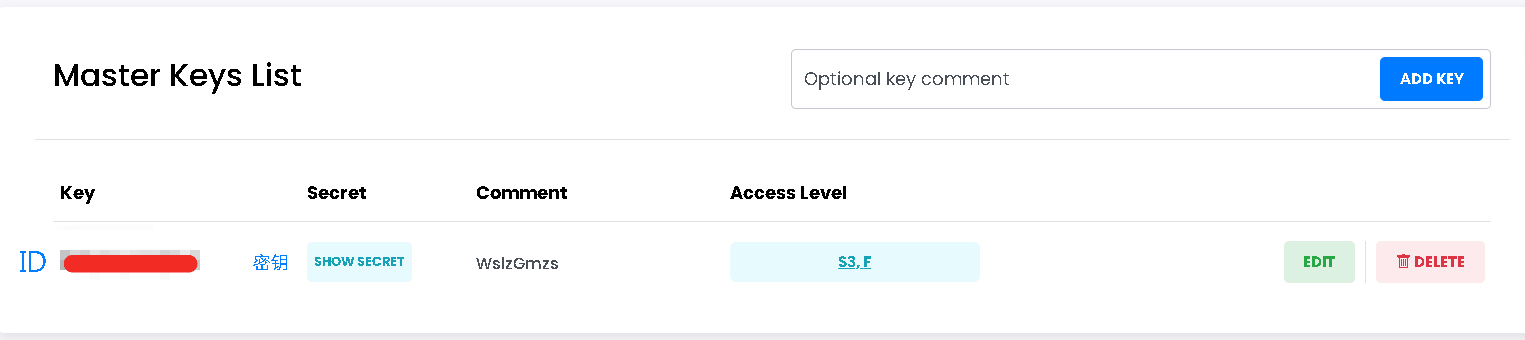
Endpoint URL:
https://s3.tebi.ioConfigure CORS rules: Click on the bucket, go to EDIT, find CORS and check the "Enable" box, refer to the following code for CORS rules, and remember to scroll down and click "UPDATE" at the end
<?xml version='1.0' encoding='UTF-8'?>
<CORSConfiguration xmlns="http://s3.amazonaws.com/doc/2006-03-01/">
  <CORSRule>
    <AllowedOrigin>*</AllowedOrigin>
    <AllowedMethod>GET</AllowedMethod>
    <AllowedMethod>PUT</AllowedMethod>
    <AllowedMethod>POST</AllowedMethod>
    <AllowedMethod>DELETE</AllowedMethod>
    <AllowedMethod>HEAD</AllowedMethod>
    <AllowedHeader>*</AllowedHeader>
    <ExposeHeader>ETag</ExposeHeader>
    <MaxAgeSeconds>3600</MaxAgeSeconds>
  </CORSRule>
</CORSConfiguration>
Qiniu Kodo Configuration
- If you don't have a Qiniu account, you can first register one (Note: real-name verification is required and very strict), then create a storage bucket in Qiniu - Object Storage - Overview. There are no specific requirements for the storage region; you can choose overseas regions paired with overseas accelerated domains
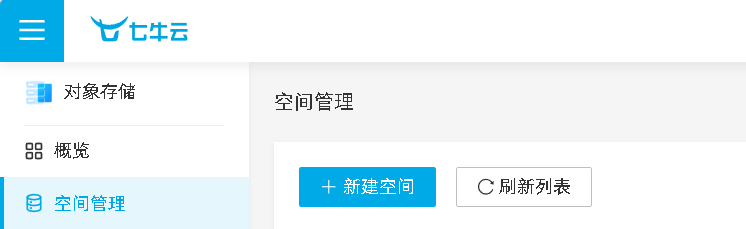
Access keys can be found at Qiniu - Key Management (the top one is the ID, the bottom one is the secret key)
Endpoint URLs are updated in real-time at Service Domains User Guide, or you can refer to the table below:
| Storage Region | Region ID | Endpoint | Protocol |
|---|---|---|---|
| East China - Zhejiang | cn-east-1 | s3.cn-east-1.qiniucs.com | HTTP, HTTPS |
| East China - Zhejiang 2 | cn-east-2 | s3.cn-east-2.qiniucs.com | HTTP, HTTPS |
| North China - Hebei | cn-north-1 | s3.cn-north-1.qiniucs.com | HTTP, HTTPS |
| South China - Guangdong | cn-south-1 | s3.cn-south-1.qiniucs.com | HTTP, HTTPS |
| Northwest China - Shaanxi 1 | cn-northwest-1 | s3.cn-northwest-1.qiniucs.com | HTTP, HTTPS |
| North America - Los Angeles | us-north-1 | s3.us-north-1.qiniucs.com | HTTP, HTTPS |
| Asia Pacific - Singapore | ap-southeast-1 | s3.ap-southeast-1.qiniucs.com | HTTP, HTTPS |
| Asia Pacific - Hanoi | ap-southeast-2 | s3.ap-southeast-2.qiniucs.com | HTTP, HTTPS |
| Asia Pacific - Ho Chi Minh | ap-southeast-3 | s3.ap-southeast-3.qiniucs.com | HTTP, HTTPS |
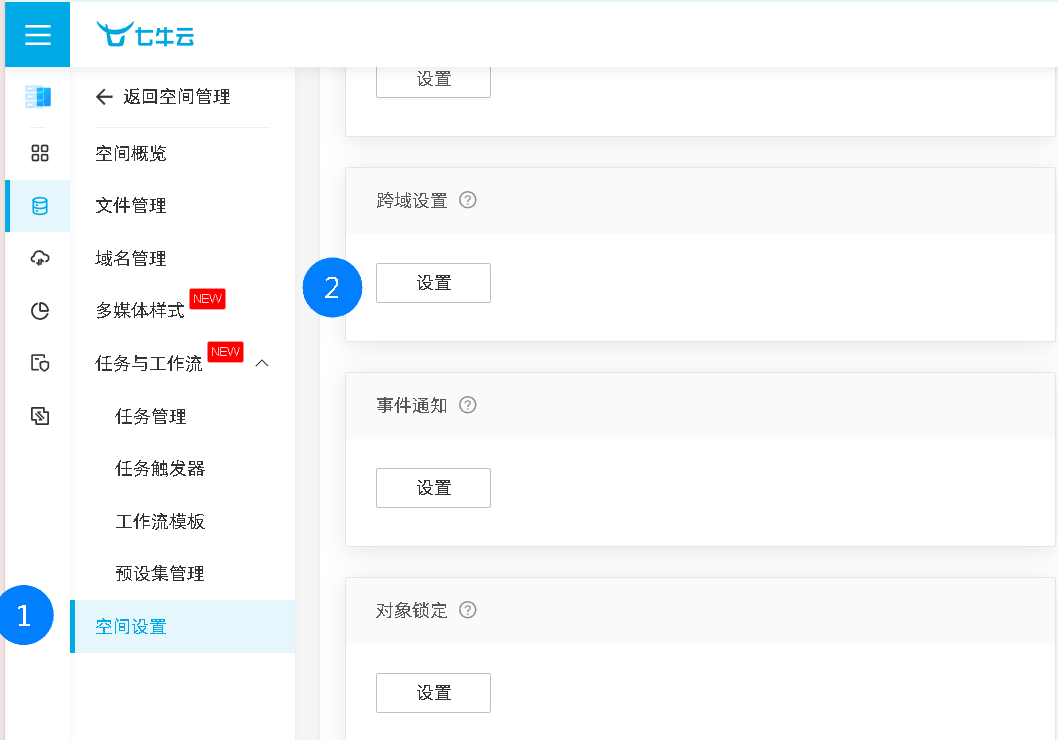
- Configure CORS rules: Click into the bucket, go to "Space Settings", scroll down to find "CORS Settings", click "Add Rule"
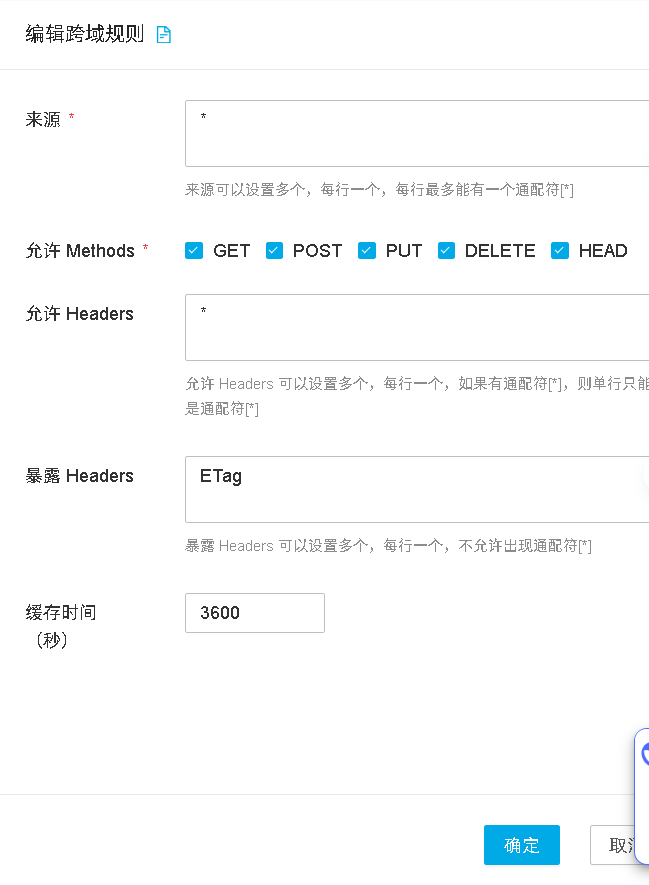
Refer to the following CORS rule configuration, then click "Confirm"
Bitiful Cloud Configuration
Service Reminder
The website is indeed colorful, but it offers 50GB for free, and the real-name verification doesn’t seem strict. There’s a risk of the service shutting down, so it’s not recommended to store valuable data.
If you don’t have a Bitiful account, you can first register one (Note: real-name verification is required, but any ID card should work), then create a storage bucket in Bitiful Console
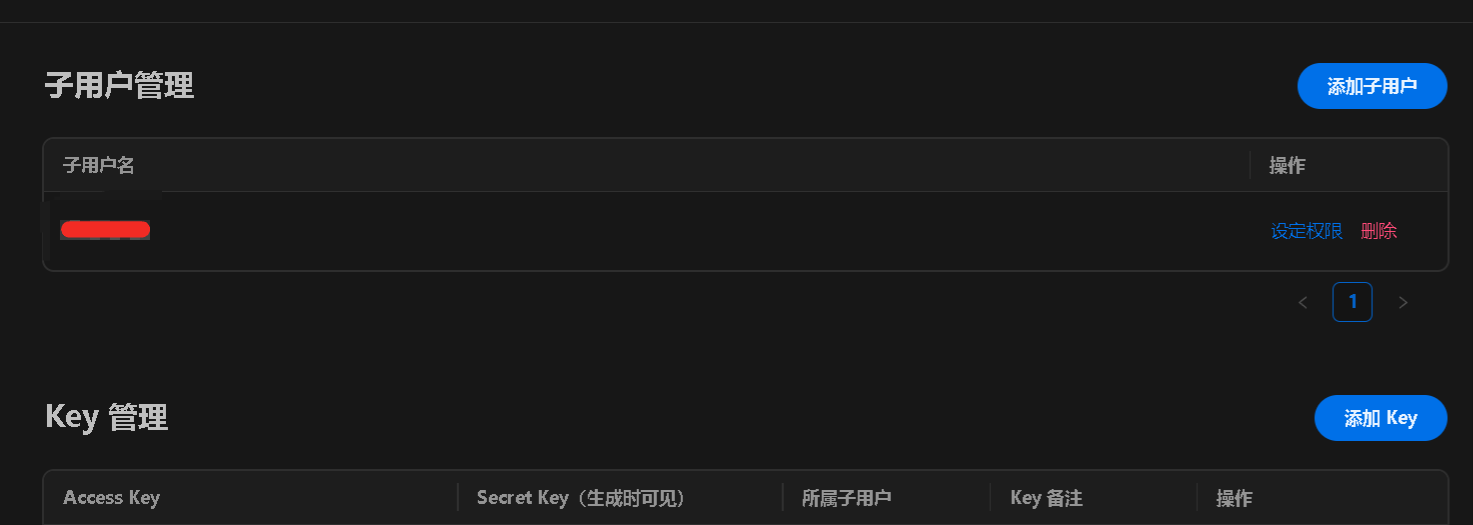
Go to Bitiful Console - Access Key Management, first click "Add User" at the top, then click "Add Key" below. The "Access Key" is the key ID, and the "Secret Key" is the secret key
Endpoint URL:
https://s3.bitiful.net. You can check detailed information at:https://console.bitiful.com/buckets/your-bucket-name/baseinfoConfigure CORS rules: Click into the bucket, go to "Access Management", find "CORS Configuration" and click "New Rule", access URL:
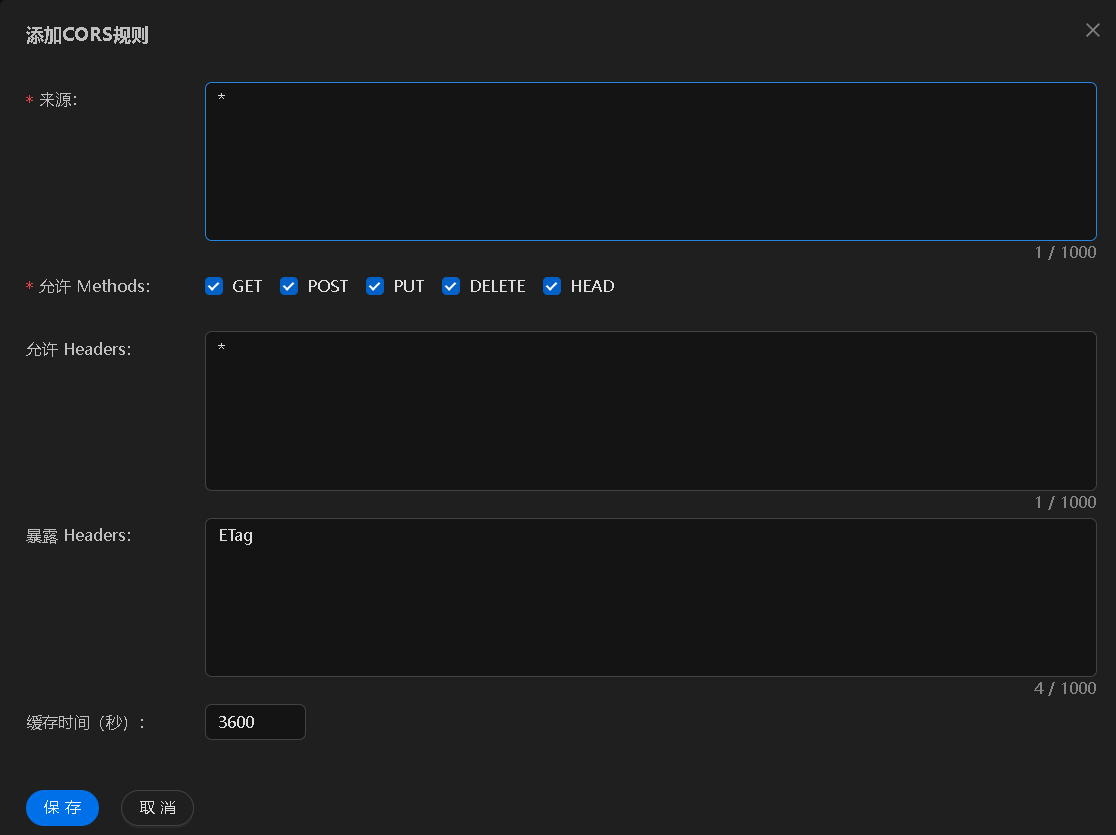
https://console.bitiful.com/buckets/your-bucket-name/ad, refer to the following CORS rule configuration, then click "Save"
MinIO Self-hosted Configuration
1. Deploy MinIO
Deploy MinIO Server
Use the following Docker Compose configuration (reference) to quickly deploy MinIO service:
yamlversion: "3" services: minio: image: minio/minio:RELEASE.2025-02-18T16-25-55Z container_name: minio-server command: server /data --console-address :9001 --address :9000 environment: - MINIO_ROOT_USER=minioadmin # Set admin username - MINIO_ROOT_PASSWORD=minioadmin # Set admin password - MINIO_BROWSER=on - MINIO_SERVER_URL=https://minio.example.com # S3 API access address - MINIO_BROWSER_REDIRECT_URL=https://console.example.com # Console access address ports: - "9000:9000" # S3 API port - "9001:9001" # Console port volumes: - ./data:/data - ./certs:/root/.minio/certs # If SSL certificate configuration is needed restart: alwaysRun
docker-compose up -dto start the service.Configure Reverse Proxy (Reference)
To ensure MinIO service works properly, especially file preview functionality, reverse proxy needs to be configured correctly. Here's the recommended OpenResty/Nginx configuration:
MinIO S3 API Reverse Proxy (minio.example.com):
nginxlocation / { proxy_pass http://127.0.0.1:9000; proxy_set_header Host $host; proxy_set_header X-Real-IP $remote_addr; proxy_set_header X-Forwarded-For $proxy_add_x_forwarded_for; proxy_set_header X-Forwarded-Proto $scheme; # HTTP connection optimization proxy_http_version 1.1; proxy_set_header Connection ""; # Enable HTTP/1.1 keepalive # Key configuration: solve 403 errors and preview issues proxy_cache off; proxy_buffering off; proxy_request_buffering off; # No file size limit client_max_body_size 0; }MinIO Console Reverse Proxy (console.example.com):
nginxlocation / { proxy_pass http://127.0.0.1:9001; proxy_set_header Host $host; proxy_set_header X-Real-IP $remote_addr; proxy_set_header X-Forwarded-For $proxy_add_x_forwarded_for; proxy_set_header X-Forwarded-Proto $scheme; # WebSocket support proxy_http_version 1.1; proxy_set_header Upgrade $http_upgrade; proxy_set_header Connection "upgrade"; # Key configuration proxy_cache off; proxy_buffering off; # No file size limit client_max_body_size 0; }Access Console to Create Bucket and Access Key
For detailed configuration requirements, refer to official documentation: https://min.io/docs/minio/container/index.html
CN: https://min-io.cn/docs/minio/container/index.html
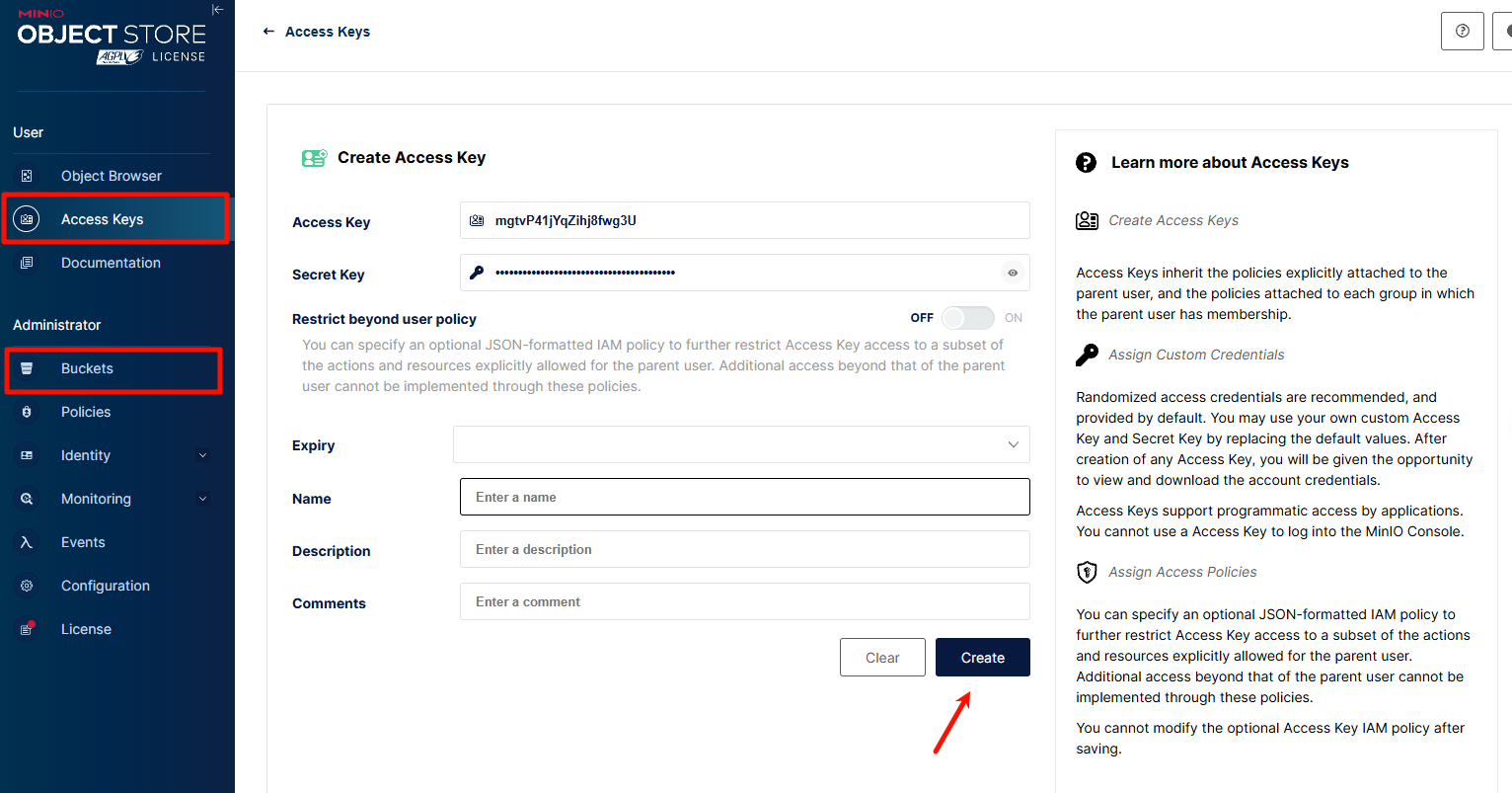
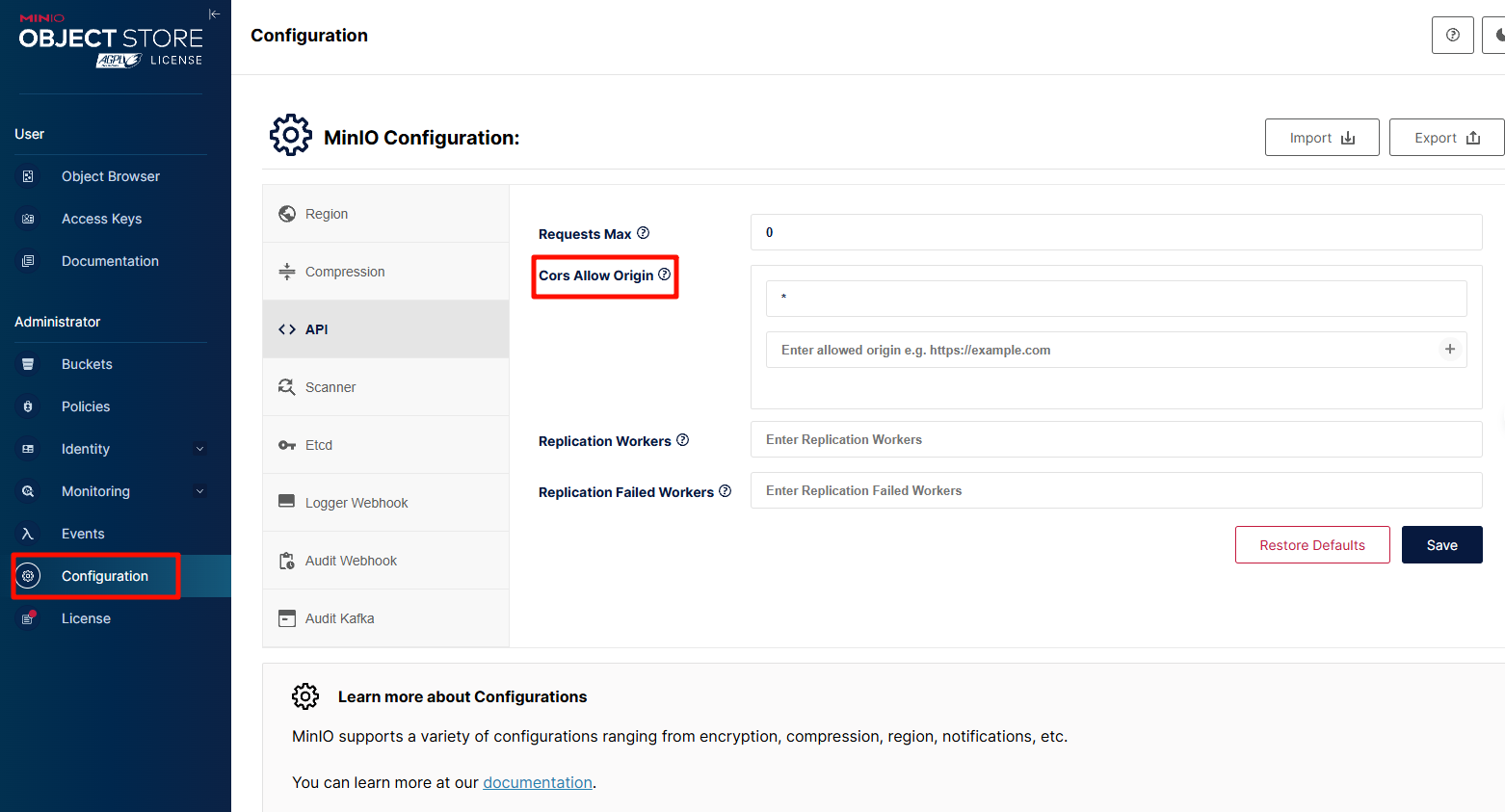
Related Configuration (Optional)
Allowed origins include your frontend domain
Configure MinIO in CloudPaste
- Login to CloudPaste admin interface
- Go to "S3 Storage Configuration" → "Add Storage Configuration"
- Select "Other S3-compatible service" as provider type
- Fill in the following information:
- Name: Custom name
- Endpoint URL: Your MinIO service address (e.g.,
https://minio.example.com) - Bucket name: Previously created bucket name
- Access Key ID: Your Access Key
- Access Key: Your Secret Key
- Region: Can be left empty
- Path style access: Must be enabled!!!!
- Click "Test connection" to confirm configuration is correct
- Save configuration
Notes and Troubleshooting
- Note: If using Cloudflare with CDN enabled, you may need to add
proxy_set_header Accept-Encoding "identity", and there may be caching issues, it's best to use DNS resolution only - 403 error: Ensure reverse proxy configuration includes
proxy_cache offandproxy_buffering off - Preview issues: Ensure MinIO server is correctly configured with
MINIO_SERVER_URLandMINIO_BROWSER_REDIRECT_URL - Upload failures: Check CORS configuration is correct, ensure allowed origins include your frontend domain
- Console inaccessible: Check WebSocket configuration is correct, especially
Connection "upgrade"setting
- Note: If using Cloudflare with CDN enabled, you may need to add
More S3 Configuration Coming...
Configure in CloudPaste
1. Login to Admin Interface
Login to CloudPaste admin interface using administrator account.
2. Add Storage Configuration
- Go to "S3 Storage Configuration"
- Click "Add Storage Configuration"
- Fill in configuration information:
- Configuration Name: Give the configuration an easily recognizable name
- Access Key ID: Access key ID
- Secret Access Key: Access key
- Bucket Name: Bucket name
- Endpoint URL: S3 endpoint address
- Region: Bucket region
- Path Style: Whether to force path style
3. Test Connection
- Click "Test Connection" button
- Confirm connection is successful
- Save configuration
4. Set Default Storage
- In storage configuration list
- Select configuration to set as default
- Click "Set as Default"
Advanced Configuration
CORS Configuration
To support direct upload, CORS needs to be configured:
[
  {
    "AllowedHeaders": ["*"],
    "AllowedMethods": ["GET", "PUT", "POST", "DELETE"],
    "AllowedOrigins": ["https://your-domain.com"],
    "ExposeHeaders": ["ETag"]
  }
]
CDN Acceleration (Custom HOST Domain)
B2 + CloudFlare CDN for Zero Traffic Costs
Direct code link: https://doc.cloudpaste.qzz.io/guide/s3-config#backblaze-b2-configuration
Reference link: https://github.com/ling-drag0n/CloudPaste/issues/59
Related solution: https://github.com/ling-drag0n/CloudPaste/issues/67 .....
Troubleshooting
Common Issues
Connection Failed
- Check if endpoint URL is correct
- Confirm access keys are valid
- Verify network connection
Permission Error
- Check IAM policy configuration
- Confirm bucket permission settings
- Verify CORS configuration, check if cross-origin access is configured
Upload Failed
- Check file size limits
- Confirm sufficient storage space
- Verify file format support