
HuggingFace Storage Configuration
CloudPaste supports using HuggingFace Datasets as a storage backend, enabling file upload, download, and management through the HuggingFace Hub API.
Common use cases:
- Leverage HuggingFace's free storage space for file hosting;
- Reuse existing HuggingFace dataset repositories;
- Need a free storage solution that supports large files (LFS).
HuggingFace storage driver supports DirectLink capability. Files in public repositories can be accessed directly through HuggingFace CDN. Private/gated repositories require CloudPaste proxy access.
Supported Features
HuggingFace storage driver supports the following capabilities:
Base Capabilities (Always Available):
- ✅ READER: Read files and directories
- ✅ DIRECT_LINK: Direct link download (public repositories only)
- ✅ PROXY: Proxy access (required for private repositories)
- ✅ PAGED_LIST: Paginated directory listing (based on HuggingFace Hub API native pagination)
Write Capabilities (Requires Token and Branch):
- ✅ WRITER: Upload, create, rename, delete files
- ✅ MULTIPART: Chunked upload (large files, supports resumable upload)
- ✅ ATOMIC: Atomic operations support (rename, copy, batch delete)
Note:
- Write-related capabilities (WRITER, MULTIPART, ATOMIC) require HuggingFace Token with appropriate permissions
- All operations on private/gated repositories require Token
- Using commit SHA as revision enables read-only mode (only base capabilities available)
1. Prerequisites
1.1 Register HuggingFace Account
- Visit HuggingFace and register an account
- Complete email verification
1.2 Create Dataset Repository
- After logging into HuggingFace, click your avatar → New Dataset
- Fill in repository information:
- Owner: Select your username or organization
- Dataset name: Repository name, e.g.,
my-cloudpaste-storage - License: Choose an appropriate license (optional)
- Visibility: Select Public or Private
- Click Create dataset to create the repository
Public vs Private Repository:
- Public repository: Anyone can access, supports direct link download
- Private repository: Only authorized users can access, must use CloudPaste proxy
1.3 Get Access Token
If you need write operations or access to private repositories, create an Access Token:
- Click your avatar → Settings → Access Tokens
- Click New token
- Configure Token:
- Token name: A recognizable name, e.g.,
cloudpaste-storage - Token type: Select Fine-grained or Write
- Permissions:
- Read-only access: Check
Read access to contents of all repos under your personal namespace - Read-write access: Check
Read and write access to contents of all repos under your personal namespace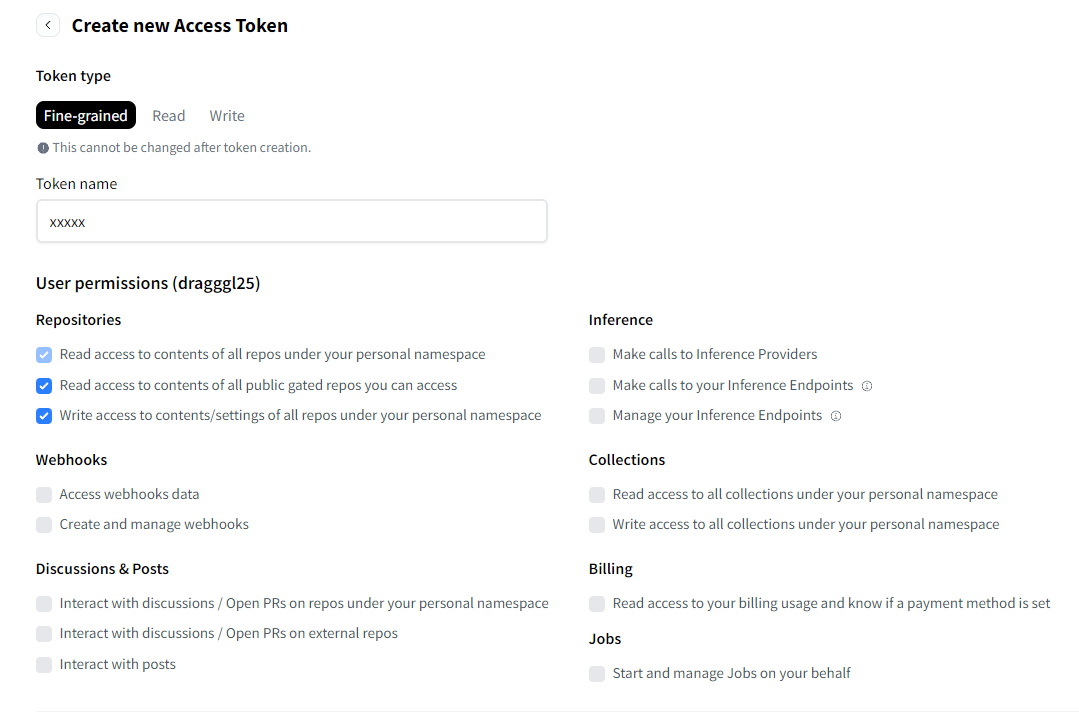
- Read-only access: Check
- Token name: A recognizable name, e.g.,
- Click Create token
- Copy and save the Token immediately, it won't be visible after page refresh
Security Note: Token is like a password, do not share with others. It's recommended to use Fine-grained Token and grant only necessary permissions.
2. Create HuggingFace Storage Configuration
- Log into CloudPaste admin panel → Storage Configuration
- Click "New Storage Configuration"
- Select HuggingFace Datasets from the "Storage Type" dropdown
- Fill in configuration details (see field descriptions below)
- Click "Test Connection" to verify the configuration
- After saving, create a mount point for this storage in "Mount Management"
It's recommended to test with small files first to confirm functionality before large-scale use.
3. Field Descriptions
3.1 Basic Information
Configuration Name Any recognizable name, e.g., "HuggingFace File Storage", "HF Dataset Backup".
Storage Capacity Limit (optional)
- Only affects CloudPaste's own quota calculation, doesn't actually limit HuggingFace storage.
- See "Storage Limits" section below for HuggingFace official limits.
3.2 HuggingFace Configuration
These are the core settings for HuggingFace storage
Dataset Repository (repo) Required
- Format:
username/repo-nameororganization/repo-name - Example:
username/my-dataset,my-org/shared-files - Must be an existing Dataset type repository
- Format:
Access Token (hf_token) (optional)
- Access Token obtained from HuggingFace Settings
- Format:
hf_xxxxxxxxxxxxxxxxxxxxxxxxxxxxxxxxxx - Encrypted and stored in backend
- When needed:
- Accessing private/gated repositories
- Performing write operations (upload, delete, rename, etc.)
Branch/Tag (revision) (optional)
- Specify the branch, tag, or commit SHA to use
- Default:
main - Note: Using commit SHA enables read-only mode
3.3 Advanced Configuration
Hub Endpoint (endpoint_base) (optional)
- Custom HuggingFace Hub API endpoint
- Default:
https://huggingface.co - For self-hosted HuggingFace Hub mirrors or enterprise scenarios
Default Upload Path (default_folder) (optional)
- Subdirectory relative to repository root
- Format: Don't start with
/, e.g.,cloudpaste/orfiles/uploads - Empty means using repository root directly
Enable Detailed File Info (hf_use_paths_info) (optional)
- When enabled, retrieves file modification time, LFS/Xet status, and other details
- Default: Off
- Enabling increases API calls, may affect performance
Directory List Page Size (hf_tree_limit) (optional)
- Number of files/directories returned per page
- Default: Uses HuggingFace default value
- Larger values reduce pagination requests but increase response size
Multipart Upload Concurrency (hf_multipart_concurrency) (optional)
- Number of concurrent chunk uploads
- Default: 3
- Higher concurrency may trigger API rate limiting
Use Xet Storage (hf_use_xet) (optional)
- Enable HuggingFace's Xet storage backend
- Default: Off
- Only effective when repository has Xet feature enabled
Delete LFS Objects on Remove (hf_delete_lfs_on_remove) (optional)
- Delete underlying LFS objects when deleting files
- Default: Off
- ⚠️ Dangerous operation: When enabled, permanently deletes LFS data, affects repository history
4. How It Works
4.1 Storage Architecture
HuggingFace Datasets is essentially a Git repository with Git LFS (Large File Storage) support:
HuggingFace Dataset Repository
├── .gitattributes          # LFS configuration
├── README.md               # Repository description
├── data/                   # Data directory
│   ├── file1.txt          # Small file (direct storage)
│   └── large_file.zip     # Large file (LFS storage)
└── ...
4.2 File Storage Methods
HuggingFace uses Git LFS for large file storage. Based on .gitattributes configuration, files matching specific patterns are automatically stored using LFS.
| File Type | Storage Method | Description |
|---|---|---|
| Small files | Git direct storage | Stored in Git repository |
| Large files | Git LFS | Stored on HuggingFace LFS servers |
Note: LFS triggering depends on the repository's
.gitattributesconfiguration, not a fixed file size threshold.
4.3 Upload Process
Small file upload:
- CloudPaste calls HuggingFace Commit API
- File content written directly to repository
- Creates new commit
Large file upload (LFS):
- Frontend calculates file SHA256 hash
- Requests LFS upload credentials
- Chunked upload to LFS server
- Creates LFS pointer file and commits
4.4 Download Process
Public repository:
- Generates
/resolve/direct link URL - Browser downloads directly from HuggingFace CDN
Private repository:
- CloudPaste proxies the request
- Uses Token authentication to fetch file
- Streams response to client
5. Mount and Permission Integration
After saving HuggingFace storage configuration, create a mount point in "Mount Management":
- Go to Mount Management → New Mount
- Select the HuggingFace Datasets storage configuration
- Fill in mount path (e.g.,
/huggingface), notes, etc. - Enable as needed:
- Web Proxy: Required for private repositories, optional for public
- Enable Signature: Whether to sign-protect proxy entry
Additionally, HuggingFace storage configuration has an Allow API Key Usage (is_public) option:
- When checked, API keys can use this storage within their "mount path" scope
- Combined with API key's basic_path and mount path, you can precisely limit access scope
For detailed mount and permission instructions, refer to:
6. FAQ
6.1 Test Connection Failed: Repository Not Found or No Access
Error message:
HuggingFace test failed: Repository not found or no access
Possible causes:
- Repository name format is incorrect
- Repository doesn't exist
- Private repository without Token configured
Solutions:
- Check repository name format is
username/repo-name - Confirm repository exists on HuggingFace website
- For private repositories, ensure valid Access Token is configured
6.2 Test Connection Failed: Invalid Token or Insufficient Permissions
Error message:
HuggingFace test failed: Invalid token or insufficient permissions
Possible causes:
- Token has expired or been revoked
- Token lacks required permissions
Solutions:
- Check Token status in HuggingFace Settings
- Confirm Token has permission to access the repository
- If necessary, create a new Token
6.3 Upload Failed: No Write Permission
Error message:
Cannot write: Current configuration is read-only mode
Possible causes:
- Token not configured
- Token doesn't have write permission
- Using commit SHA as revision
Solutions:
- Configure a Token with write permission
- If using commit SHA, switch to branch name (e.g.,
main)
6.4 Large File Upload Failed
Possible causes:
- Unstable network causing chunk upload interruption
- Triggered HuggingFace API rate limiting
Solutions:
- Check network connection stability
- Reduce
hf_multipart_concurrencyvalue - Wait a few minutes and retry
6.5 Private Repository Files Cannot Be Accessed Directly
Explanation: This is expected behavior. Private repository files must be accessed through CloudPaste proxy.
Solutions:
- Ensure "Web Proxy" is enabled in mount configuration
- Access files through CloudPaste's proxy links
6.6 Frequent 429 Errors (Rate Limiting)
Possible causes:
- Too many requests in a short time
hf_use_paths_infoenabled causing extra API calls
Solutions:
- Disable
hf_use_paths_infooption - Reduce
hf_multipart_concurrencyvalue - Avoid frequently refreshing directory listings
- Wait a few minutes and retry
7. Storage Limits
Important
The following information is based on HuggingFace official documentation (December 2024). Actual limits may change, please refer to the official documentation for the latest information.
7.1 Account Storage Limits
| Account Type | Public Storage | Private Storage |
|---|---|---|
| Free User/Org | Best-effort* (usually up to 5TB for impactful work) | 100GB |
| PRO User ($9/month) | Up to 10TB* | 1TB + pay-as-you-go |
| Team Org ($20/user/month) | 12TB base + 1TB/seat | 1TB/seat + pay-as-you-go |
| Enterprise ($50+/user/month) | 500TB base + 1TB/seat | 1TB/seat + pay-as-you-go |
* About public storage: HuggingFace aims to provide the AI community with generous free storage space for public repositories. Beyond the first few gigabytes, please use this resource responsibly by uploading content that offers genuine value to other users. If you need substantial storage space, you will need to upgrade to PRO, Team or Enterprise.
7.2 Repository Limits
| Characteristic | Recommended | Hard Limit | Tips |
|---|---|---|---|
| File size | < 50GB | 500GB | Split into smaller chunked files |
| Files per repo | < 100k | - | Merge data into fewer files |
| Entries per folder | < 10k | - | Use subdirectories |
| Files per commit | < 100 | - | Upload in multiple commits |
7.3 Pay-as-you-go Pricing
Above the free tier, private storage is billed at $25/TB/month (in 1TB increments).